
"I have a Mac in my office. Can I just use it to run the company's AI? I don't want to set up a server room."
That idea is actually practical. Many owners don't want a noisy, power-hungry server in the office, and don't want to rent server space just for AI. A Mac is quiet, looks good, and works as soon as you plug it in. It sounds ideal.
I'm Johnny Yang, founder of Brightstream Technology in Taiwan. I've led my team through system implementation for seven years, handled more than 252 projects across 32+ industries, and deployed on-premise models on different hardware.
My answer: yes, and the Mac has a real advantage when it comes to fitting large models. But it suits the owner or a few people using it themselves, not the whole company at once. When documents are long and many people ask at the same time, NVIDIA GPUs are still the better fit.
Why can a Mac fit large models?
In a normal computer, the graphics card has its own memory, separate from system memory. Consumer cards top out at 32 GB, and large models often don't fit.
Apple's chips use "unified memory": the CPU and GPU share the same pool. As long as there's enough memory, the model fits. According to Apple's official specs, the Mac Studio M5 Ultra can be configured with 256 GB or 512 GB, with 1.2 TB/s of memory bandwidth.
Those are big numbers. According to VDF's roundup, the 256 GB M5 Ultra fits the 4-bit version of DeepSeek V4-Flash, and the 96 GB version fits gpt-oss-120b. Running these models on regular GPUs usually takes several data-center-grade cards.
How much does a Mac Studio cost?
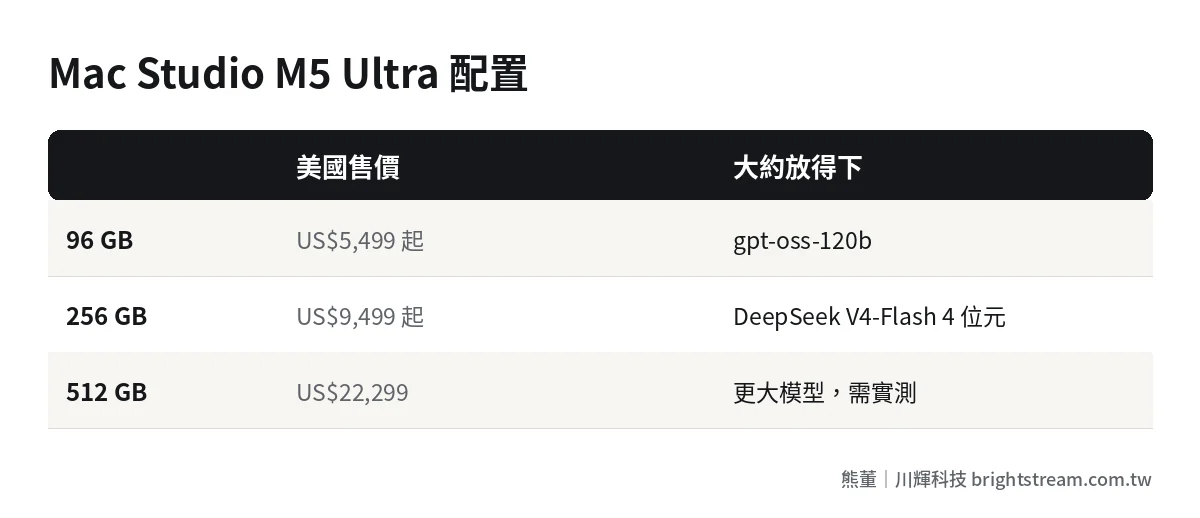
According to VDF's November 2026 roundup, US prices are:
| Configuration | US price | Roughly fits |
|---|---|---|
| M5 Ultra 96 GB | From US$5,499 | gpt-oss-120b |
| M5 Ultra 256 GB | From US$9,499 | DeepSeek V4-Flash 4-bit, Qwen3.8-Flash-Next 4-bit |
| M5 Ultra 512 GB | US$22,299 | Larger models, but check the actual usable space |
We found no citable source for Taiwan pricing this time. Go by official or reseller quotations at the time you buy. Whether the 512 GB version fits a specific model depends on whose math you use: some people raise the system's usable memory and just barely fit it, others count only 80% as usable and say it doesn't fit. For the model you actually plan to use, test it first.
For comparisons with other hardware, see what hardware to buy for on-premise AI.
How fast does a Mac run?
Start with one user. According to VDF citing MacStories' tests, the M5 Ultra running Qwen3.8-27B (4-bit) generates 48 tokens per second. The RTX 5090 does 59. The gap is small, and 48 per second is already faster than people read.
Reading the input is a different story. In the same test, the M5 Ultra reads 1,701 tokens per second and the RTX 5090 reads 3,031. The longer the document, the longer you wait for the first word on a Mac. The same source says a very long document takes the M5 Ultra 104 seconds to read. That's much faster than the previous M3 Ultra's 246 seconds, but still slower than NVIDIA.
The Mac's biggest limit: not for many users at once
This is what decides whether a Mac fits.
According to Pinggy's roundup, MLX, the main framework on Mac, has no multi-user batching like vLLM. The same piece notes that dense models above roughly 120 billion parameters aren't very practical on a Mac. In other words, a Mac is great for one person asking one large model, not for a dozen people asking at the same time.
I explained why multi-user use needs a special engine, with benchmark data, in how fast on-premise AI runs. Short version: fast for one person doesn't mean fast for the whole company.
Who should run local AI on a Mac?
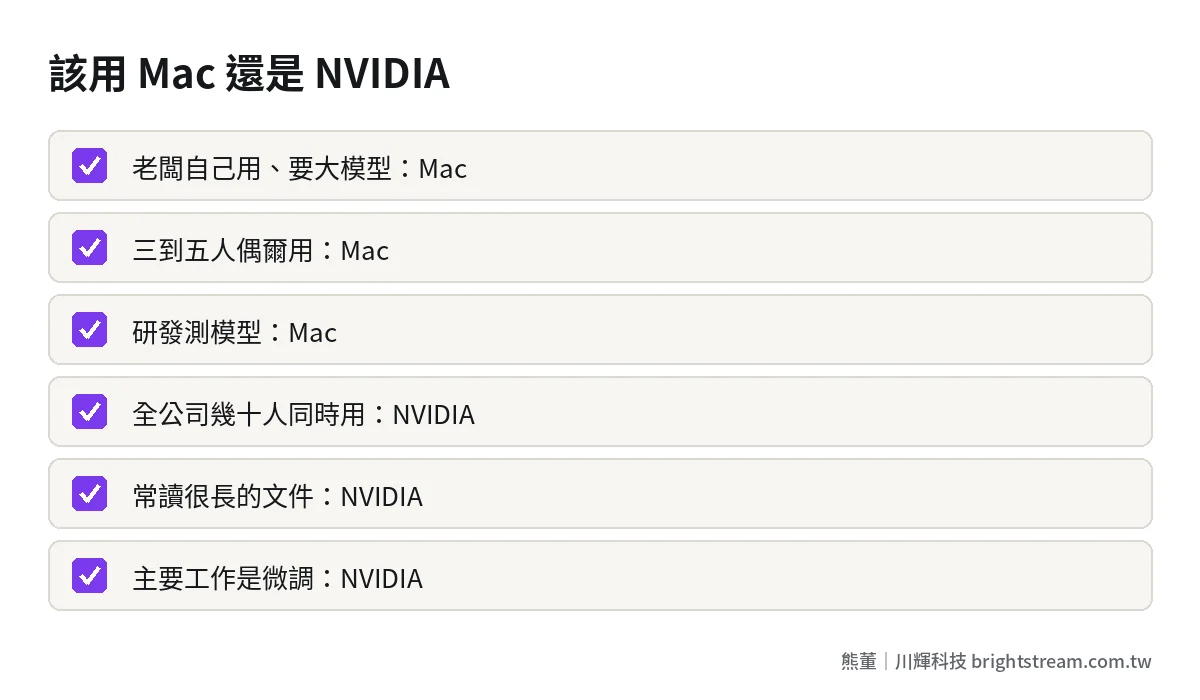
| Situation | Does a Mac fit? |
|---|---|
| Owner's own use, sensitive data, wants a large model | Very good fit |
| Small team of three to five, occasional use | Good fit |
| R&D staff testing different models | Very good fit |
| No server wanted in the office, worried about noise and heat | Good fit |
| Dozens of people across the company using it at once | Not a fit. Use NVIDIA professional cards |
| Very long documents every time | Not a great fit. NVIDIA is faster |
| Fine-tuning models | Possible, but NVIDIA's tools are more complete |
Our usual advice: use the Mac as a "personal AI workstation" for the owner or R&D, and put the company-wide shared service on an NVIDIA professional-card workstation. The two don't conflict. You can use both.
What software should you use on a Mac?
The tools for running local models on a Mac are mature now. According to VDF's roundup, all of these support the M5 Ultra:
- MLX: Apple's own machine learning framework (GitHub), usually the fastest on a Mac. Its built-in server isn't recommended for production use.
- LM Studio: Has a graphical interface, good for people who don't want to type commands. Loads GGUF and MLX formats.
- Ollama: Uses MLX by default on Apple chips, and is the easiest to install. Note that its local API has no authentication by default. On a company network, you need to add protection.
- llama.cpp: Full Mac support and very flexible.
What to watch when running company AI on a Mac
Three final reminders.
First, don't skip security settings. A Mac in the office is easy to treat as a "personal computer" and forget it's handling the company's sensitive data. Set account permissions, limit outbound connections, and remember that local APIs like Ollama have no authentication by default. Don't open them up to the whole network.
Second, have backups. Model files, knowledge bases, settings: back them all up regularly. If the Mac dies, the AI service stops.
Third, it still has to plug into the workflow. The AI on the Mac should also connect to the systems or LINE your staff use every day, not only work when the owner opens some app. See building company systems inside LINE.
FAQ
Can a MacBook run local AI too?
It can run small and mid-sized models, such as ones around 20 billion parameters, which is fine for personal trials. But laptop memory and cooling are limited, so running large models for long periods isn't ideal. For company use, go with a Mac Studio.
Can a 512 GB Mac Studio fit every open-source model?
No. The largest ones, such as trillion-parameter versions, exceed 512 GB even after compression. For the model you actually plan to use, check the file size and test it first.
Is a Mac much slower than NVIDIA GPUs for AI?
For one user, text generation speed is about the same. But reading long documents is noticeably slower, and there's no engine suited to many users at once. So it's good for one person. For company-wide use, go with NVIDIA.
Can you fine-tune models on a Mac?
Yes, MLX supports fine-tuning. But if fine-tuning is your main workload, NVIDIA's tools and resources are more complete, and it's faster.
Conclusion: the Mac is a good personal AI workstation
A Mac Studio lets an owner run very large models without a server room or a noisy server. That's a practical choice. Its strength is one person using it, not the whole company sharing it.
If you're deciding whether your company's AI should live on a Mac or a server, take a look at how we do AI system development, or come talk to us with your headcount and use case.