

The AI feature demo ended. The vendor asked, "Johnny Yang, what do you think?" The owner sitting next to me didn't answer whether it worked well. He asked: "How much is this per month? Does it get more expensive the more we use it? What if the bill suddenly jumps halfway through the month?" The vendor said, "It depends on usage. Usually it's not much." The owner nodded. His face said two words: not convinced.
I'm Johnny Yang, founder of Brightstream Technology in Taiwan. I led a team building systems for seven years, across more than 252 projects in over 32 industries. Now it's just me plus AI, delivering over NT$20,000,000 in systems a year. I pay AI bills every day, and every day I estimate post-launch AI costs for clients. So I know exactly where that owner's "not convinced" comes from.
The short answer: once you add AI features to a system, the extra monthly cost comes in four parts — model usage fees (billed by usage, proportional to how many times you process something and how long the content is each time), hosting and data storage, maintenance and adjustment (rules need tuning, model updates need retesting, errors need someone watching), and staff time for human review. What actually makes the bill spiral is usually not that the model is expensive. It's having no usage cap, sending the entire document in every time, and automatic retries on errors that never stop. The estimate is simple: calculate "cost per run × runs per month", add the fixed costs of maintenance and review, then compare that to what it costs a person to do the job today. If AI wins, build it. If it doesn't, don't.
"Isn't AI just a monthly subscription?" That instinct is half right
Many owners get their sense of AI pricing from the chat tools they use themselves: one person, one fixed subscription per month, the same price no matter how much you use it. So when they hear a system is getting AI, they assume it's also a fixed monthly fee.
That instinct makes sense. For personal use, subscriptions are the simplest way to pay, and for employees using AI to write emails or tidy up data, a subscription is enough.
But AI inside a system is usually not billed that way. When AI is wired into your order flow, customer service flow, or document recognition flow, it is called automatically by code. Every run is billed, and the fee depends on the length of the content. In other words, AI in a system is more like a utility bill than a rent payment. The more you use it, and the more you send in each time, the higher the bill.
That isn't necessarily bad. Usage-based billing means you only pay for work actually processed. No use, no cost. The problem is that if nobody is watching usage and there's no cap, you won't know what next month's bill will be. That is the real reason the owner isn't convinced.
If you're still working out how to connect AI to your existing system, Already have an ERP — do you still need AI? Three ways to add AI to an existing system covers the differences between approaches. Each approach also has a different monthly cost structure.
Breaking the extra monthly cost into four parts
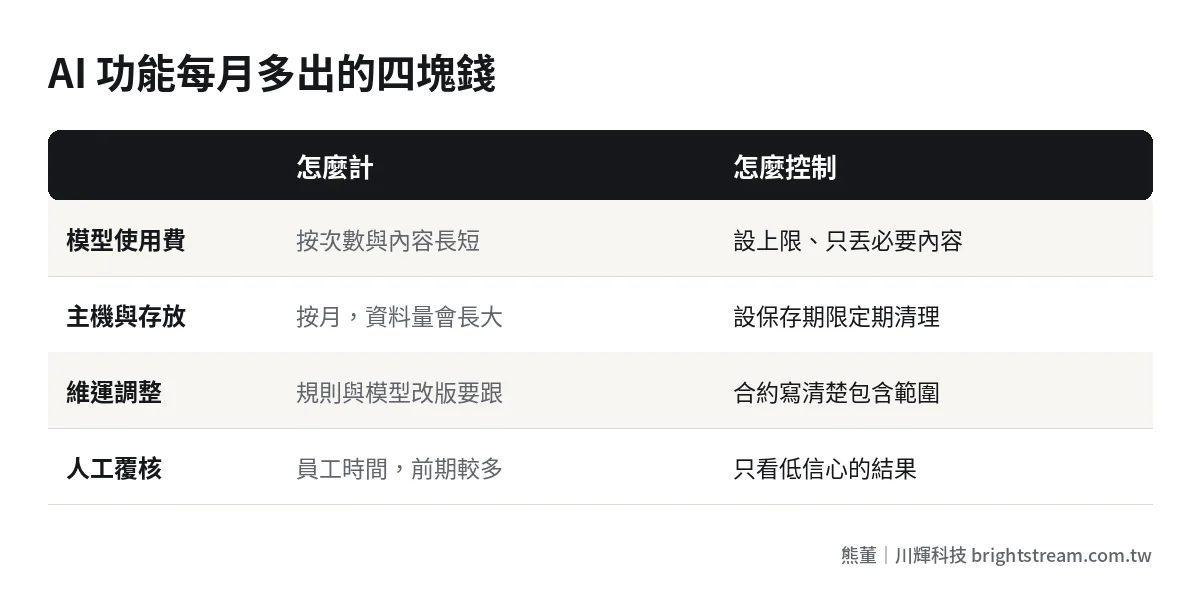
No matter how the vendor's quotation is written, the monthly cost of a live AI feature breaks down into the four parts below. When you get a quotation, check it part by part: what's included and what's missing.
| Cost | How it's billed | Does it vary | How to control it |
|---|---|---|---|
| Model usage fees | By number of runs and content length | Yes, proportional to usage | Set a monthly cap, send only what's needed |
| Hosting and data storage | Monthly, by spec and data volume | Jumps a tier as data grows | Clean up regularly, set retention periods |
| Maintenance and adjustment | Monthly or bundled into a maintenance contract | Rises when models update or rules change | Spell out scope in the contract |
| Human review | Staff time | High for the first few months, then declines | Review only low-confidence or high-risk results |
Model usage fees: the only part that moves with usage
This is the part everyone cares about most. Unit prices are published by each AI model provider. Go by the official pricing, and expect it to change. You don't need to memorize prices. You only need to know three things: it's billed by usage, longer content costs more, and the price gap between model tiers is large.
The last point matters. Many tasks don't need the strongest model. Classifying messages or pulling a few fields from a document works fine on a lighter model, and the cost difference can be big. Whether a vendor picks the model to fit the task is one sign of whether they know what they're doing.
Hosting and data storage: the most stable part, but it grows slowly
AI features usually need to store processing logs, original files, vector data, and so on. This cost is fairly stable month to month, but data piles up over time. Without a retention period, three years from now this line may be bigger than you expect.
Maintenance and adjustment: the part most often left out
Launching an AI feature is not the end. Business rules change — a new type of document gets added, customer service gets a new kind of question. Model providers release new versions and retire old ones, and a new version may answer differently than before, so it has to be retested. Someone has to do this work, and not just once.
This follows the same logic as normal system maintenance. The difference is that AI adds an outside factor: the model itself changes. What's a reasonable system maintenance fee? breaks down what a maintenance fee actually pays for. You can check AI maintenance with the same logic.
Human review: not on the bill, but real money
AI makes mistakes. Early on, someone usually needs to look at the AI's results before they go through. That's staff time. It won't show up on the vendor's bill, but it has to be counted. A good design has the AI flag results it isn't sure about, so people only check those. Review time then shrinks month after month.
How to estimate model usage fees: a formula you can run yourself
You don't need to be technical. Grab three numbers:
- How many runs per month. For example, how many orders, customer service messages, or documents per month.
- Cost per run. Have the vendor test a batch with your real data and work out the average cost per run. Don't use their demo sample data. Real data is usually longer and messier.
- Retry and exception rate. Some runs fail and have to be rerun. Some content is unusually long. Add a safety factor.
The formula: monthly model fee ≈ runs per month × cost per run × safety factor.
Here's a hypothetical example. The numbers only illustrate the method. Actual prices should come from the vendor's test on your own data.
Say an 80-person company uses AI to automatically read supplier documents and enter them into the system, 3,000 documents a month. After testing on real documents, suppose the average model fee per document is NT$1. Multiply by a 1.3 safety factor and the model fee is about NT$3,900 a month. Add hosting and data storage plus maintenance and adjustment, and that's the total monthly cost of this AI feature.
Then compare it to people. Say an assistant currently spends 2 minutes entering and checking each document. 3,000 documents is 100 hours, roughly half a person. After AI goes live, suppose the assistant only needs to review the questionable ones, 20 hours a month. The 80 hours saved is the baseline you compare against the AI's total monthly cost.
This comparison won't always come out in AI's favor. If you only have 100 documents a month, the AI's maintenance cost may be higher than doing it by hand. Then don't do it. For the full labor cost method, see How much labor can AI automation save? A framework to run the numbers yourself.
The three situations where bills spiral
I pay AI bills every day, and I've seen plenty of bills from systems after launch. When a bill suddenly jumps, it's almost always one of the three situations below. All three are design problems, not AI problems.
1. No usage cap and no alerts
The system gets hammered and nobody knows. Maybe a workflow is getting triggered over and over. Maybe someone dumped a big batch of old data in at once. Maybe a public-facing feature is getting called in volume from an unknown source. No cap means the bill has no ceiling.
The fix is simple: a monthly budget cap, daily usage alerts, a notification to the owner when limits are exceeded, and an automatic pause if needed. This is basic equipment, not an add-on.
2. Sending the whole document in every time
Model fees are proportional to content length. Many systems, to save effort, send the entire contract, the entire conversation thread, the entire report to the AI every time, when only a small section is actually needed. Send only what's needed, and the same job can cost several times less.
3. Automatic retries on errors that never stop
When AI processing fails, having the system rerun it automatically is reasonable design. But without a retry limit, one record that can never be processed will keep the system retrying, and billing, forever. This is often only discovered when someone looks at the bill at the end of the month.
At this point you can see it: whether you can control the monthly cost of an AI feature depends not on which model you picked, but on who designed the system and whether anyone is watching. That's why I believe AI features must come with maintenance. The security of sending company data to AI is a separate question to think through at the same time. See Is it safe to send company data to AI?.
When should you not pay this monthly fee at all?
The thing I say to owners most often is "don't build this." AI features are no different. Out of ten things a company wants to automate, roughly two are worth building a system for, five just need an off-the-shelf tool, and three shouldn't be touched. For AI features, there are three cases where I'll tell you outright not to add it yet:
- Work that happens only a few times a month. Too few runs. The model fee is low, but the fixed cost of maintenance and review can't be spread out. Doing it by hand is cheaper.
- Judgment calls where the rules change every time. For example, if every project's quotation logic needs the owner to decide from scratch, AI can't learn stable rules. Someone has to recheck it every time, which just adds a step.
- Features nobody will maintain after launch. A live AI feature needs someone to watch usage, adjust rules, and retest when models update. If nobody in the company does that and there's no maintenance contract, it slowly turns into a feature nobody dares turn off and nobody dares trust.
The flip side: high volume, stable rules, and someone responsible — that's where the AI monthly fee is most worth paying. Document recognition, message classification, and fixed-format report preparation usually fall into this category.
Six questions to ask the vendor before signing
Whoever you hire to build an AI feature, get clear answers to these six questions before signing, and write them into the contract or feature list.
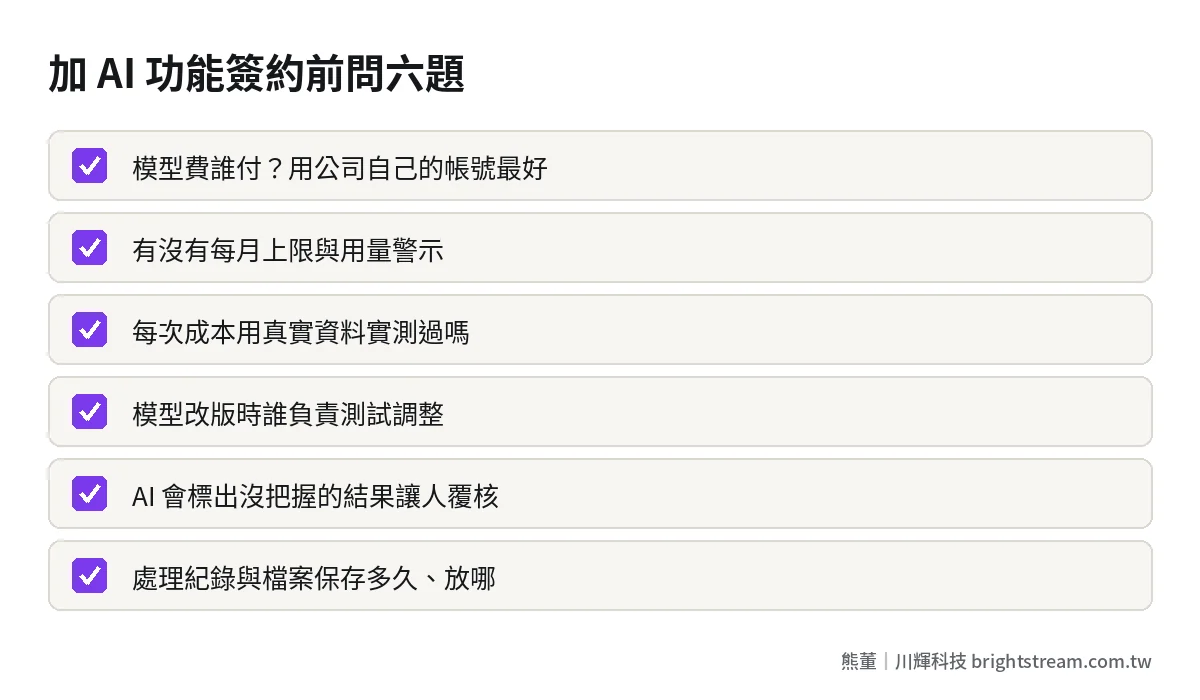
- Who pays the model usage fees, and how? Do you pay the model provider directly from your company's own account, or does the vendor pay and pass the cost on? If they pass it on, is there a markup, and how is it reconciled?
- Is there a monthly cap and usage alerts? When limits are exceeded, who gets notified and what does the system do?
- What data was the cost per run tested on? Can we test a batch with our real data first?
- When the model provider updates or retires an old version, who handles testing and adjustment? Is it included in maintenance, or billed separately?
- How is human review designed? Does the AI flag results it isn't sure about, so people only check those?
- How long are processing logs and original files kept? Where is the data stored, and how is it deleted?
The first question is the one most often skipped, and the most important. If you pay model fees from your company's own account, you can see the bill, you hold the account, and switching vendors later won't cut you off. It's the same principle as registering the system's hosting and domain accounts in your company's name. How much does AI implementation cost? Three approaches by price, timeline, and fit covers the overall cost structure of AI implementation. This post focuses only on the monthly costs after launch.
Frequently asked questions
Roughly how much more per month does adding AI to a system cost?
There's no universal number. It depends on monthly run volume, the length of the content in each run, which model tier you use, and how maintenance and review are handled. The most reliable approach is to have the vendor test a batch with your real data, work out the cost per run, multiply by monthly runs and a safety factor, then add the fixed costs of hosting and maintenance.
Do AI features cost more the more you use them?
Model usage fees do, because they're billed by usage. But fixed costs like hosting and maintenance don't grow in step with usage, so the higher your volume, the lower the average total cost per run usually is. The key is to set a monthly cap and alerts, so any increase in usage is one you expected, not a surprise.
Should model usage fees be paid from the company's own account?
Yes, use the company's own account. The bill is transparent, you hold the account, and switching vendors or shutting it off later won't leave you stuck. If the vendor pays on your behalf, the contract should spell out how costs are passed on, whether there's a markup, and how often it's reconciled.
After an AI feature goes live, does it still need human checking?
Early on, yes. A good design has the AI flag results it isn't sure about or that are high-risk, and people only review those. As rules get tuned and data builds up, the share needing review drops. Skipping review entirely only makes sense for work where mistakes cost very little.
AI's monthly cost is like a utility bill — someone has to read the meter
The extra monthly cost after adding AI to a system isn't a mystery: model fees, hosting, maintenance, and review. Four parts. You can calculate them and you can control them. The real worry isn't the unit price. It's nobody watching usage and nobody responsible for adjustments.
If you're deciding whether to add AI to your existing system and want to work out first how much more it will cost each month and whether it's worth it, take a look at how we do AI system development, then decide your next step.