

“The job’s done, the final payment’s in, and only then does accounting tell me this project didn’t actually make money.” Plenty of construction company owners say this. The usual pattern: while the project is running, everyone is busy, progress looks normal, the client is happy. Then on closeout day, when every invoice, payment request and change order is spread across the table, you finally find out where the money went.
I’m Johnny Yang, founder of Brightstream Technology in Taiwan. In seven years of running the company I’ve handled more than 252 projects across 32+ industries, and we deliver more than NT$20,000,000 in custom-built systems a year. In every industry, the most expensive problem I see usually isn’t doing the work badly. It’s finding out only after the work is done. Construction shows this most clearly, because one project can run from a few months to a year or two. If you only find out at the end, it’s too late to save.
A construction company’s most expensive problem isn’t poor site management. It’s that quotation, budget, purchasing, progress and billing each live in a different person’s Excel file, and nobody knows whether a project made or lost money until it closes. What the system needs to do is use the project as the backbone and connect five handoff points: a signed quotation becomes the budget directly; the budget controls every purchase and subcontract; site progress reports become the basis for progress billing; every change order has a written record and an amount; retention money has a due-date reminder. Once these are connected, the owner can see every month how far along each project is, how much of the budget has been spent, and how much has been billed. On implementation order, connecting billing and change orders first usually shows you money faster than starting with site daily reports.
Why do you only find out whether a project made money after it’s done?
Start with how a construction project actually runs in most companies.
Sales or the owner builds the quotation in Excel. After the contract is signed, that quotation sits in a folder. The site engineer takes over and opens a separate budget sheet, with work items categorized differently from the quotation. Purchasing orders materials from yet another sheet. Subcontractor contracts and payment requests sit with accounting. Site progress lives in the site engineer’s LINE group and daily reports. For progress billing, accounting asks the site engineer at month-end “how far did we get this month,” then works out a billing statement on their own. Change orders? Many are agreed verbally on site and written up later, or never written up at all.
Every piece of data has someone managing it. But no single piece of data can tell you whether this project is making or losing money right now. To get that answer, someone has to reconcile five or six spreadsheets, and that usually happens exactly once, at closeout.
It gets worse because there’s more than one project running at a time. Ten projects, five spreadsheets each. If the owner wants the full picture, the only option is a weekly meeting where everyone reports verbally.
Your instinct says the site, but the money mostly leaks in the office
When owners think about construction management software, the first thing that comes to mind is the site: daily reports, site photos, headcount, equipment. That instinct makes sense. The site is where costs are incurred, and it’s also where the owner has the least visibility.
But break a project’s data flow apart and you’ll see that site costs usually do have someone watching them. The site engineer and the site supervisor know how many workers showed up today and how much material was used. What nobody watches are the handoff points between the site and the office.
The money usually leaks in five ways: extra work agreed with the client on site never gets signed or quoted, so you never get paid for it; completed progress isn’t billed on time, billing slips by a month or two, and cash gets stuck; materials are over-ordered or ordered twice because purchasing can’t see how much budget is left; subcontractor payment requests don’t match the quantities actually completed; retention comes due and nobody remembers to collect it.
Not one of these five happens on site. All of them happen in the handoffs inside the office. So what a construction company needs from a system isn’t digitizing the site. It’s connecting these handoff points. Why margins never come out right was covered with similar logic in three cost blind spots that keep your quotation margins wrong. Construction is just the extreme case.
What does one line look like? Six stations from quotation to closeout
Break a construction project apart and it passes through roughly six stations. Right now each station is usually a separate spreadsheet. Once they’re connected, the data from each station automatically becomes the starting point for the next.

| Station | How it’s usually done now | Once connected | What the owner can see |
|---|---|---|---|
| Quotation | Excel templates, different format per person | Quotations built from standard work items and unit prices | Estimated margin on every quotation |
| Contract to budget | Site engineer opens a separate budget sheet | Contract amount split directly into budgets per work item | A budget summary for every project |
| Purchasing and subcontracting | Purchasing orders on their own, subcontracts sit with accounting | Every purchase and subcontract attached to a work item budget | How much each work item has spent and has left |
| Progress reporting | Site engineer’s LINE group and daily reports | Completion percentage and photos reported per work item | How far along each project is |
| Progress billing | Accounting asks the site engineer at month-end and calculates it themselves | Billing details generated from reported progress | How much to bill this month, and whether it’s been billed |
| Closeout settlement | Manual reconciliation at closeout | Budget, actual spend, billing and change orders summarized automatically | The real margin on every project |
Note the “work items” in the first column. Whether the whole line connects depends on quotation, budget, purchasing, progress and billing all using the same work item categories. If the quotation uses one set and the site engineer’s budget uses another, no system, however powerful, will reconcile them. So the first step of implementation often isn’t writing code. It’s standardizing the company’s work item categories.
The three handoff points worth the most
Connecting all six stations is best, of course. But if budget is limited, I ask owners to look at these three handoff points first, because they connect directly to money.
Quotation to budget: margin visible from day one
At quotation, every work item has a cost and a price. After signing, it converts directly into the budget, so the site engineer doesn’t have to rebuild it. From then on, every purchase and subcontract is attached to its work item, and the system can flag warnings like “this work item has a budget of 100, has spent 70, and is 50% complete” at any time. You don’t wait for closeout. Halfway through, you know which work item is over budget.
Progress to billing: no more asking around at month-end
The site engineer reports completion percentage per work item from the site, and accounting can generate the progress billing details directly from that percentage. You cut out the step of “accounting asks the site engineer at month-end, the site engineer answers from memory, accounting calculates it themselves.” Billing goes out on time, and the client is less likely to find numbers that don’t match. On-time billing means on-time cash flow. For forecasting cash flow, read this alongside how to build a cash flow forecast.
Change orders and retention: the easiest to forget, the easiest to fight over
Every addition or deduction needs a record in the system: who raised it, what it covers, how much, and whether the client confirmed it. Any unconfirmed change order stays on the pending list and doesn’t get forgotten. For retention, the percentage and conditions are recorded when the contract is entered, and the system reminds the responsible person to collect before it comes due. Neither of these is big on its own, but added up over a year, it’s often a whole project’s profit. For judging which money may not come back, see how to do an accounts receivable aging analysis.
How do site staff report? Don’t make the site engineer type up another report
The most common way construction management systems fail is by requiring the site engineer to open a computer after work every day and type up a daily report. The site engineer has already spent the whole day running around the site. That report will be done just to get it done, the data will be wrong, and the billing and margin figures downstream will be wrong too.
My approach is to put site reporting inside LINE. On site, the site engineer picks up their phone, selects the project, selects the work item, enters the completion percentage, takes a few photos. Twenty seconds, done. That data goes straight into the system and connects to the office’s budget and billing. Why employees are more willing to use it this way is covered more fully in putting your company system in LINE.
The fewer fields in the site report, the better. My rule: only collect fields that billing and margin will definitely use downstream. Leave everything else out for now. Every extra field costs the person reporting a bit more patience.
Photos are a field many owners underestimate. Photos taken during site reporting are automatically attached to the matching project, work item and date. Later, if the client questions a billed quantity or remembers a change order differently, you can pull up photos of that spot on that day, instead of it being your word against theirs. Before, these photos were scattered across site engineers’ phones and LINE groups. When the person changes or the phone changes, they’re gone.
Change orders work the same way. When the client asks the site engineer to do an extra section on site, the site engineer creates a change order on their phone right there, writes down what it covers, takes photos, and the system notifies sales or the owner to quote it and get the client’s confirmation. Going from “verbally agreed” to “a record you can trace” takes one minute on site.
The owner only needs one table a month: three percentages
Once everything is on one line, the owner doesn’t need to look at every document. I recommend a project overview with one row per active project, showing just three percentages: percent complete, percent spent, percent billed. Those three numbers side by side are clearer than any long report.
Reading it is simple. If percent spent is clearly higher than percent complete, the project is over budget, and you ask the site engineer which work item has a problem. If percent complete is clearly higher than percent billed, billing is behind: the work has been done but the money hasn’t come in, and you ask accounting where it’s stuck. If the three numbers are about the same, the project is roughly on track. Then add two more columns: change order amounts awaiting client confirmation, and retention coming due soon. If either column isn’t zero, someone needs to deal with it.
Run a hypothetical to see what late billing costs. Say a project has a contract value of NT$10,000,000 and completes about 10% a month. If every progress billing goes out one month late, the company is effectively fronting the client about one month of project payments, roughly NT$1,000,000 in cash, on an ongoing basis. Run five projects at once and that’s several million NT dollars stuck outside the company. This money won’t show up on your income statement. It will show up in the pressure you feel every month juggling your cash position.
Packaged software, ERP, or custom-built: how should a construction company choose?
There’s packaged construction management software on the market, ERP systems you can add a construction module to, and building from scratch. People have done well on all three paths. The difference is what your projects look like.
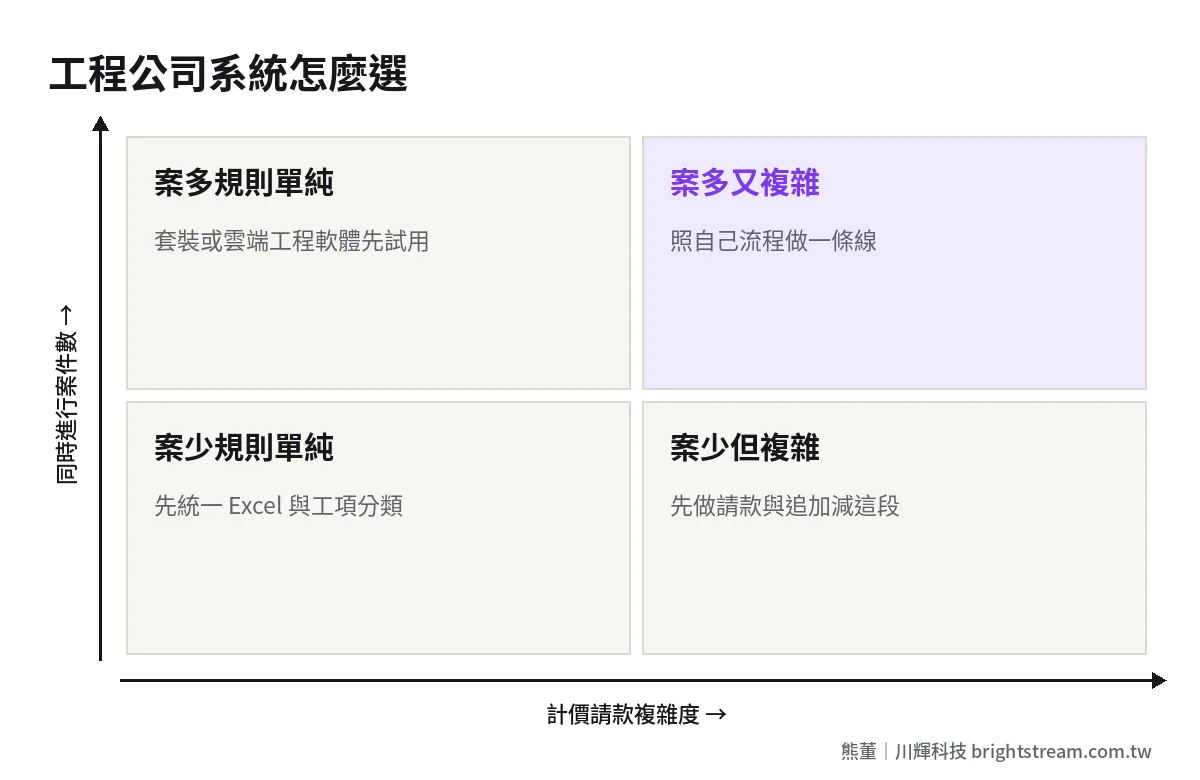
I use two questions to help owners decide: Do you run a lot of projects at the same time? Are your pricing and billing methods complex?
Companies with many projects but simple pricing, where every project follows roughly the same process, will usually be fine with packaged or cloud construction management software. Trial it first and confirm the work item categories fit how you work. Companies with many projects and complex pricing and billing, for example every client uses a different progress billing format, there’s a lot of subcontracting, and change orders are frequent, will easily get stuck on packaged software. In that case, building one line around your own process is cheaper in the long run. Companies with few projects and simple rules should standardize their Excel templates and fix their work item categories first. No rush to adopt a system. Companies with few projects but each one complex can start with just the billing and change order piece.
Whichever path you take, before you look for a vendor, write down your work item categories, billing formats and change order process. That document is the skeleton of your spec. For turning it into a spec vendors can quote accurately, see how to write ERP requirements.
Brightstream’s system implementation starts at NT$300,000, quoted to your spec. We first write the scope as a written feature list, then quote a fixed amount, paid in stages. Each payment is collected only after the agreed result is running. We don’t sign first and raise the price later.
Frequently asked questions
Does a construction management system have to include site daily reports?
Not necessarily. If your pain points are late billing, uncollected change orders and invisible margins, connecting quotation, budget and billing first has a more direct effect. Site daily reports can come in phase two, and they need to live somewhere convenient for site staff, such as LINE on their phone. Otherwise the data you collect won’t be accurate.
Every client has a different progress billing format. Can a system handle that?
Yes, but it has to be spelled out at the spec stage. The common approach is to record progress internally using the company’s standard work item categories, then map to each client’s format when outputting the billing statement. The more formats there are, the more build work it takes, so first count how many formats you actually have.
Can subcontractor payment requests be managed in the same system?
Yes, and we recommend it. With subcontracts, subcontractor payment requests and your progress billing to the client all attached to the same work item, you can see “how much we’ve billed the client versus how much we’ve paid the subcontractor,” and avoid paying a subcontractor before you’ve been paid by the client.
How long does implementation take for a construction company?
It depends on scope. Doing just quotation, budget and billing versus connecting all six stations makes a big difference in timeline. My advice: launch the most painful piece first, run it through one or two full monthly billing cycles to confirm it works, then connect the next piece. That’s safer than launching everything at once.
A project’s profit should be visible while the work is happening
In the end, a construction company’s system isn’t there to make the site busier. It’s there to make each project’s money visible while the work is happening. Connect quotation, budget, progress and billing into one line, and you don’t wait until closeout day to know whether the project made money. You know at 30% complete where you need to adjust.
If you want to figure out which piece your projects should connect first and how to scope it, take a look at how ERP implementation works before deciding how big your first step should be.