“The original vendor says they've handed everything over. A zip file and a spreadsheet of accounts and passwords. That should be it, right?” The owner decided to switch to a different vendor for system maintenance. The original vendor was friendly and promised full cooperation. On handover day, the company received a zip file and an Excel sheet, and both sides shook hands and said goodbye. Two weeks later, the new vendor reported back: the code was not the version running in production, the server account only had regular permissions, and nobody knew where the nightly scheduled report job was set up. The original vendor's contract had already ended. Going back to them now costs extra.
I'm Johnny Yang, founder of Brightstream Technology in Taiwan. In 7 years we've done 252+ projects across 32+ industries, and we deliver more than NT$20,000,000 in systems a year. We've taken over systems other vendors couldn't deliver, and systems a previous vendor spent years building that never went live. Whether a takeover works usually comes down to what you got during those few weeks of handover.
The short answer: if your system is changing hands for maintenance, you must get 9 things at handover: source code, server and cloud accounts, domains and certificates, third-party service accounts, a full database backup, deployment instructions, system architecture and data table documentation, a feature list and known-issues list, and a list of scheduled jobs and routine tasks. But having them is not the same as being able to use them. Verify each one on the spot: the source code must run in a new environment, accounts must have top-level admin rights, and the backup must actually be restored once. Handover must be finished before you pay the final installment and before the old contract terminates, and you need a handover period where the old and new vendors are both present.
Why handovers fail even when “everything was handed over”
Handovers rarely go wrong because the original vendor is deliberately being difficult. Usually the two sides just picture “handover” differently. The original vendor thinks giving you the code and passwords means handover is done. What you actually need is for someone who has never seen this system to take it over and keep it running.
There's a lot missing between those two. Code is the skeleton of the system. But for the system to run, you also need to know how the servers are configured, which jobs run every night, which settings were changed by hand, and which features have known problems. Most of this is not written down. It only exists in the head of the original engineer.
And handover usually happens at the end of a relationship. The contract is about to expire, the working relationship has gone sour, the original vendor has other projects. Nobody is motivated to do a thorough handover. By the time the new vendor discovers what's missing, the original vendor is gone. If the original vendor has disappeared completely, that's a different situation; see what to do when your system vendor goes under or stops responding first. This post is about how to get everything while the original vendor is still willing to cooperate.
The 9 things you must get at handover
The table below is the checklist we use when we take over a system. The middle column explains why you need it. The right column explains how to confirm what you got is real.
| # | What to get | Why it matters | How to confirm it's real |
|---|---|---|---|
| 1 | Source code (with version history) | Without it, the system can't be changed | The new vendor runs it in a test environment and the screens match production |
| 2 | Server and cloud accounts | Where the system lives, and who can get in | Top-level admin rights, account registered under the company |
| 3 | Domains and certificates | If the domain or certificate expires, the whole thing goes down | The domain registrant is the company; you know the expiry date and how to renew |
| 4 | Third-party service accounts and keys | LINE, payments, e-invoicing, SMS all depend on them | List every service, confirm the account is under the company, and change the passwords |
| 5 | Full database backup | All the company's data is here | Actually restore it once; record counts and amounts match production |
| 6 | Deployment instructions | How to put code changes live | The new vendor follows the instructions and deploys successfully on their own once |
| 7 | System architecture and data table documentation | How long it takes to understand the system | The new vendor can explain how the main data flows |
| 8 | Feature list and known issues | Knowing what is by design and what is a bug | Check it once against the colleagues who actually use it |
| 9 | List of scheduled jobs and routine tasks | Things that run automatically every day, or are done by hand every month | Find where each one is configured and who is responsible |
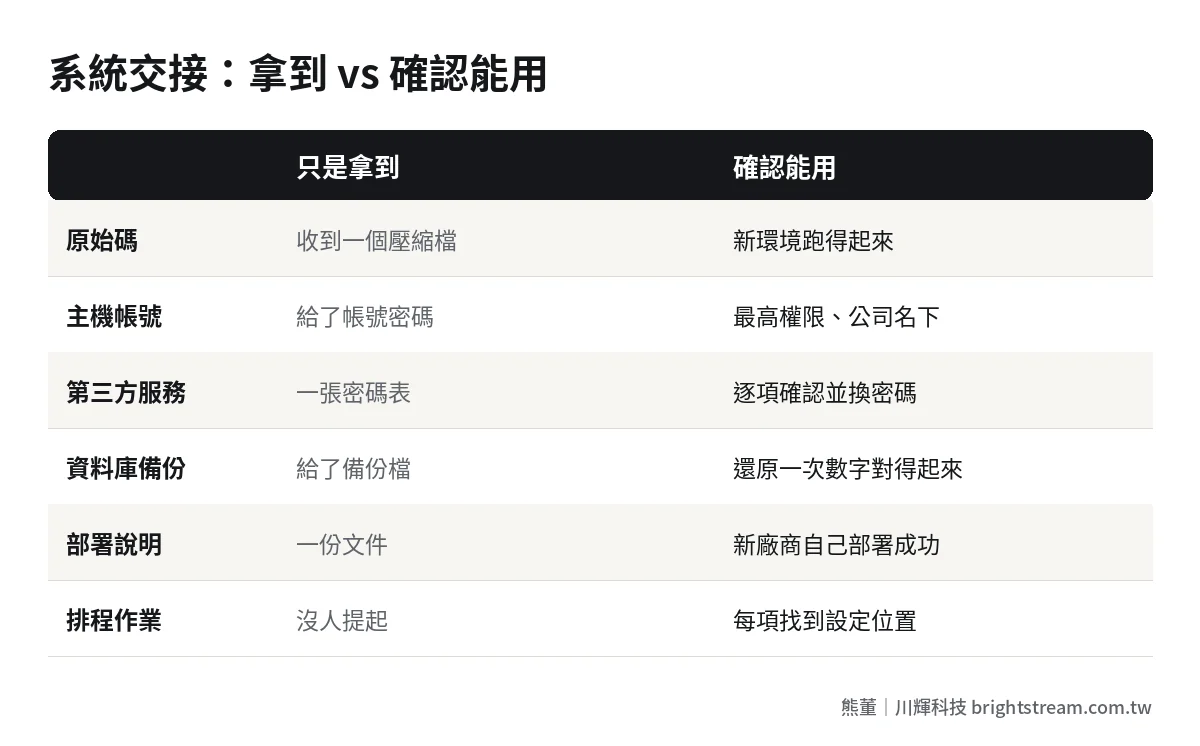
Items 1–4: control. Without these, there's nothing to discuss
The first four items decide whether the system actually belongs to you. Source code, servers, domains, third-party service accounts. If any one of them is in someone else's hands, you can't fully switch vendors.
Pay special attention to item 4. Many systems connect to a LINE Official Account, a payment gateway, e-invoicing (Taiwan's mandatory electronic receipts), and SMS. These accounts were often registered by the vendor on your behalf, under the vendor's name or an individual engineer's name. At handover, list every external service the system uses, confirm one by one whose name each account is under, and change the passwords and keys once handover is complete. For how code licensing should be agreed, see who owns the code in a custom-built system.
Items 5–7: making it readable and workable for someone new
Once you have control, the next step is making it possible for the new vendor to take over. The database backup, deployment instructions, and architecture and data table documentation decide how long it takes the new vendor to really get up to speed.
Incomplete documentation is common. Don't ask the original vendor for perfect technical documentation; that isn't realistic. The practical approach is to schedule several handover meetings where the engineers from both sides talk directly. The new vendor asks questions and takes notes, writes it up as documentation afterward, and has the original vendor confirm it.
Items 8–9: the most often missed, and the most likely to cause trouble
The feature list and the scheduled-jobs list are the two items most often left out. The reason is simple: they aren't in the code, and they aren't in the account spreadsheet. They're in “how we normally use it.”
For example: the revenue report automatically emailed to the owner every night at midnight. The closing program someone has to run by hand at the start of every month. A special discount for one customer that was set by editing the database directly. The original engineer does these things every day, so they don't think of them as something to hand over. If nobody tells the new vendor, they won't know. Then one day the report doesn't arrive, or the month-end numbers are wrong, and someone starts tracing back.
“The original vendor is cooperative, so it should be fine”: having it doesn't mean it works
When the original vendor is friendly, owners usually relax. That instinct is reasonable. Most handovers really do happen on decent terms, and a vendor willing to cooperate is already far better than many situations. I also don't recommend treating the handover like you're dealing with a thief from day one. That just makes the other side less helpful.
But the real problem is that there's a gap between the original vendor's “cooperation” and the “it works” you need. And that gap only shows up when you verify.
The most common gaps: the source code is from six months ago, and every change since then only exists on the production server, never committed back to version history. The server account was handed over, but with regular user rights that can't change settings. The database backup was handed over, but nobody has ever restored it, and only during the restore do you find a few tables missing. The password spreadsheet was handed over, but half the passwords have already been changed.
None of this is malicious. The original vendor just never kept things organized. So at handover, don't ask “did you get it?” Ask “has the new vendor tried it?” Every item in the right-hand column of the table has to be actually done once by the new vendor. Only check it off when it succeeds.
We took over a video streaming (OTT) platform that another vendor couldn't deliver, and finished 18 features within 3 months of taking over. That speed was only possible because we got everything up front and confirmed it ran. Another example is a medical aesthetics brand whose system a previous vendor had spent years building without ever going live. The first thing we did was get everything back. In the end, we decided to rebuild. Whether you can get everything directly decides whether what comes next is a takeover or a restart.
Timing: by what date do you need everything?
When you do the handover matters as much as what you hand over. Get the timing wrong and you have no leverage.
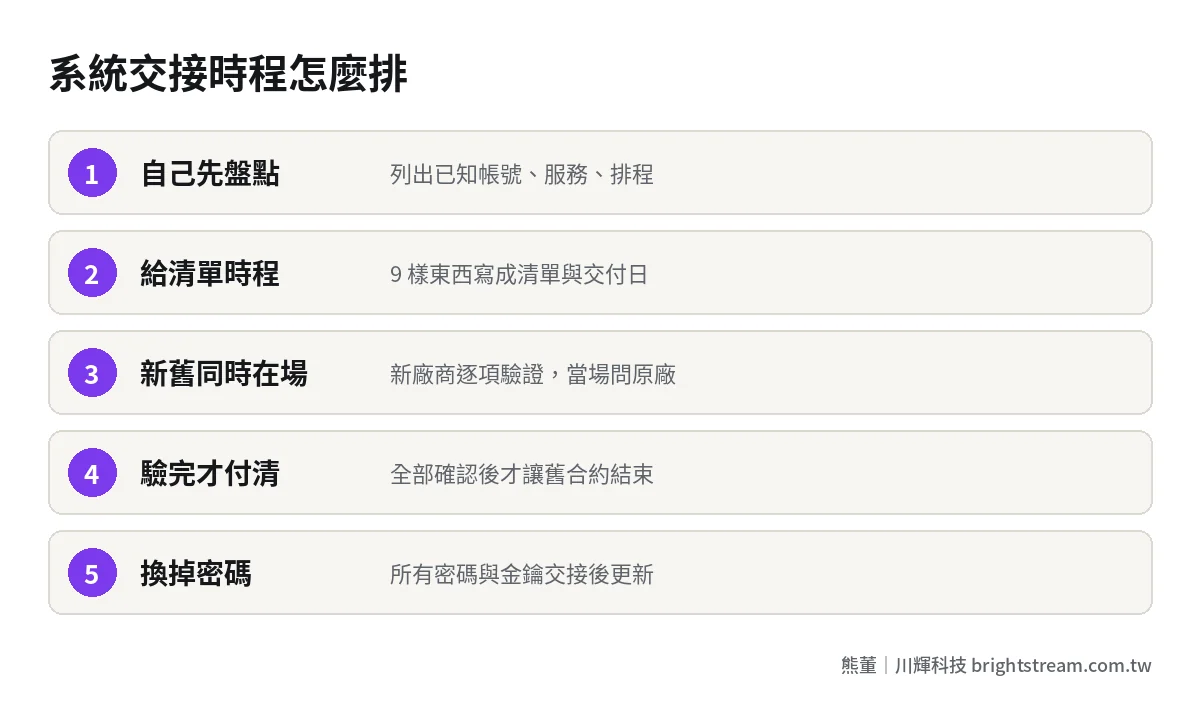
Step one: before you notify the original vendor, take inventory yourself. List the accounts, services, and scheduled jobs you know about, and confirm which are already under the company's name. This step doesn't need the original vendor, but it tells you what to ask for at handover.
Step two: when you notify the original vendor, give them the handover checklist and the timeline at the same time. Put these 9 items in a list and state the date you want each delivered by. If the maintenance contract has a handover clause, follow the contract. If not, confirm in a written letter. For how the handover clause in a maintenance contract should be written, compare against item 12 in what to put in a system maintenance contract.
Step three: schedule a handover period with both the old and new vendors present. The new vendor starts verifying and asks the original vendor on the spot when something comes up. During this period the original vendor is still under contract and obligated to answer.
Step four: only after all verification is done, pay the final installment and let the old contract end. This is the most important step. Once the final payment goes out and the contract ends, the original vendor has no obligation to answer anything.
Step five: after handover, change every password and key. This isn't distrust of the original vendor. It's basic security hygiene, and it should happen whenever any person or vendor leaves.
How to run handover meetings: three, each with a focus
As mentioned, incomplete documentation is common, so handover meetings are the most effective way to fill the gaps. I recommend at least three, each with a different focus. The owner or the internal point of contact should ideally attend all of them.
First meeting: go through the checklist. Walk through the 9 items one by one. The original vendor explains where each one is and when it can be delivered. The output of this meeting is a dated delivery table: who is responsible for which item and by what date, written down clearly.
Second meeting: walk through the system. The original engineer takes the new vendor through the main workflows, starting from user login: order intake, shipping, invoicing, month-end close. At every step, ask: “Is anything running automatically behind this step?” and “Are there any settings that were changed by hand?” Many scheduled jobs and special settings get uncovered in this meeting.
Third meeting: confirm verification results. The new vendor reports the result of each verification: what succeeded and what still has problems. For anything with problems, agree on a date for the missing pieces then and there. Only when this meeting ends do you know whether you can let the old contract end.
Keep minutes for all three meetings, ideally written up by the new vendor and confirmed by both sides. Those minutes will be one of the most useful documents this system has from then on.
Once you have everything, what should the new vendor do first?
Getting all 9 items is only the start. Next, the new vendor needs to assess the actual state of the system and then decide how to take it over.
Our approach: for a system someone else built, we do a free diagnostic first, then give a quotation. The assessment focuses on three things: can the system still run stably, is the code written in a way that can be changed, and roughly what will maintenance cost going forward. The assessment ends in one of three outcomes: take over maintenance directly, fix it up once and then take over, or confirm it can't be saved and only then rebuild it around your workflow.
Many owners worry the new vendor will say “rebuild” the moment they take over. That worry is fair. So the basis for the assessment should be laid out openly, not summed up as “this is badly written.” For the steps to assess a system a previous vendor botched, see what to do when the previous vendor botched your system.
The other question is whether, after switching, you should hire your own engineers or sign a maintenance contract. I ran the numbers on that in hiring your own engineer vs. signing a maintenance plan, so I won't repeat it here.
FAQ
What if the original vendor refuses to hand over the source code?
First, check what the contract says. If it states the source code belongs to you or that you have the right to obtain it, demand it per the contract, and have a lawyer send a letter if needed. If the contract says nothing, you can usually only negotiate, for example paying a handover fee in exchange for the source code and handover support. This is why source code ownership should be spelled out when you sign the contract.
How long does a system handover take?
It depends on the system's size and how complete the documentation is. For a system with simple features and full documentation, the handover period can be short. For a system connected to many external services with almost no documentation, plan for longer, so the new vendor can verify every item. The timeline should be based on “all 9 items verified,” not a particular date on the calendar.
Who is responsible if the system breaks during handover?
Until the old contract terminates, the original vendor is in principle still responsible. That's why the handover period must fall within the old contract. Don't wait until the contract ends to start. While both vendors are present, problems can be handled together, and the new vendor gets to learn the system in the process.
Do you still need the original vendor after handover?
Normally, no. But I recommend the handover agreement include a set period during which the new vendor can go back to the original vendor with problems not caught during handover, and state whether that is charged separately. The period doesn't need to be long, but having this clause saves you a lot of trouble you'd otherwise only discover later.
The point of a handover isn't “handed over.” It's “can be taken over”
In one sentence: when your system changes hands for maintenance, what you need is not a zip file. It's everything another person needs to keep the system running, with every item verified before you pay the final installment.
If you're about to switch vendors, or you've already received a bundle of handover files and aren't sure it's enough, take a look at how system maintenance and takeover gets assessed first, then decide your next step.