“The system works fine. Why update it? If it isn’t broken, don’t touch it.” I have heard this on site many times. It is usually a system that went live three or four years ago. The original vendor only shows up when something goes wrong. Otherwise nobody touches it. The owner thinks this is great: cheap, stable, no trouble. Until one day a customer calls: “Have you been hacked? I just got a payment notice sent in your name.”
I’m Johnny Yang, founder of Brightstream Technology in Taiwan. Seven years in business, more than 252 projects, more than 32 industries, and over NT$20,000,000 in custom-built systems delivered every year. Who looks after a system once it is built, and how, is something I discuss with every client. It is also the thing most owners start caring about last.
The conclusion first: a system nobody updates will not break today, but the risk builds every day. Your system sits on an operating system, a programming language, and a stack of off-the-shelf components. New vulnerabilities keep being found in all of them. If nobody patches them, the door stays open. Add expiring certificates and third-party services that change their versions, and one day it will simply stop working. You don’t need to understand the tech. You need to hold seven minimum standards: one named person responsible, a list of what the system is built on, a fixed update schedule, a deadline for handling critical vulnerabilities, backups stored somewhere else and tested to restore, accounts of departing staff closed the same day, and a record of every piece of work. Ask for a written record covering these seven every quarter, and you will see whether anyone is actually looking after your system.
“Don’t touch it if it isn’t broken” used to be right
First, I’m on your side. “Don’t touch it if it isn’t broken” is not superstition. It has a point. Updates really can break things that worked. Many owners have lived through it: the vendor says it’s time to upgrade, after the upgrade the reports won’t run, and everyone stops work for half a day. After that, being wary of updates is normal.
And ten-plus years ago, most company systems ran on a server in the office. Only people inside could reach it. Outsiders couldn’t touch it. Back then, not touching what wasn’t broken really was low risk.
The problem is that systems are different now. They live on cloud servers, open to the outside so customers can place orders, connected to LINE, to payment gateways, to Taiwan’s government e-invoice system. If your system can reach the outside, the outside can reach it.
More importantly, your system not changing does not mean it is safe. Every so often, new vulnerabilities are found in the components your system uses. Once they are made public, people with bad intentions take those known vulnerabilities and scan the whole internet for systems that haven’t been patched. If you didn’t touch anything, you are that unpatched system. Several large security incidents in recent years started the same way: a component everyone assumed was fine, one nobody had updated in a long time. I broke down one of them in Why a PHP vulnerability set off a global wave of site shutdowns.
So “not broken” and “secure” are two different things. Not broken only means nobody has tried yet.
What actually happens when nobody updates a system?
I split the consequences into four kinds. Each costs the owner something different.
| What nobody looks after | What happens | What the owner actually loses |
|---|---|---|
| Known vulnerabilities left unpatched | Break-in, data stolen or altered | Customer data leaked, reputation damaged, possibly having to notify customers |
| Servers and data left unprotected | Data encrypted for ransom, entire server wiped | System down for days; in bad cases the data can’t be recovered |
| Certificates, domains, third-party services | Expired certificate takes the site offline, external APIs drop old versions | Customers can’t place orders, payments or invoicing stop |
| Years of skipped updates | Too many versions behind; by the time you want to update, you can’t | A small fix becomes a major overhaul, and in the end the only option is a rebuild |
The first three are sudden. The fourth is chronic, and the fourth is the one most often ignored.
If a system goes two or three years without an update, its components may be several major versions behind. At that point, even if you want to patch, it is not a one-click job. Everything is tangled together: replace this component and that feature breaks; fix that feature and another report stops running. Work that could have been handled with a little time each month turns into a renovation project.
In other words, the money you save by not updating isn’t saved. It is paid later, with interest.
What does “updating” actually update? Owners only need to know these four layers
When the vendor says “we need to do an update,” you don’t need the details. But you need to know which layer they mean, so you can ask the right questions.
Layer one is the server and operating system: the computer the system lives on. Layer two is the programming language and framework: the tools the system was written with. Layer three is the off-the-shelf components, such as the modules that handle login, file uploads, and report generation. Layer four is your own system’s code.
Vulnerabilities in the first three layers are discovered and announced worldwide, for everyone at once. They have nothing to do with how well your system was written. All that matters is whether someone keeps patching. Only layer four depends on the people who wrote your system, for example permissions not properly enforced or input data not checked.
So next time the vendor says “the system is stable, no need to update,” ask one question: “What about the first three layers? When was the last update?” If they can give you a date, they are looking after it. If they can’t, you know where you stand.
You installed antivirus and bought a firewall. Why isn’t that enough?
When many owners hear “security,” their first reaction is to buy something: antivirus, a firewall, a security service. These aren’t useless, but they solve a different problem.
Antivirus and firewalls are like the guards and access gates of a building. They stop some of the obvious break-ins. But if your system itself has a known, public, unrepaired broken window, the guard may not see anything. The intruder walks the normal path and comes in through the window you left open.
The real fix is repairing the window, which means updating. You can’t buy that. Someone has to do it on a schedule. That’s why I often tell owners to reverse the order of security spending: first make sure someone is looking after the system and patching on a fixed schedule, then talk about buying more equipment. Get the order wrong and however much you buy, you are installing security cameras in a house with a leaking roof.
The security baseline between company data and AI tools is a separate topic. I covered it in Is it safe to give company data to AI. This post is only about the system itself.
Minimum standards for security maintenance: seven an owner can check
These seven are what I consider the floor for any company system used every day. For each one I wrote “what the owner should see.” You don’t need to understand the tech. Just ask the other side for these things.
| Minimum standard | In plain terms | What the owner should see |
|---|---|---|
| 1. A named person responsible | Who you call first when this system has a problem | A name and contact details, written in the contract or an internal company document |
| 2. Component list | Which operating systems, languages, components, and versions the system uses | A list, updated at least once a quarter |
| 3. Fixed update schedule | How often routine updates happen | Monthly or quarterly update records stating what was updated |
| 4. Emergency deadline | How soon critical vulnerabilities are handled after they are announced | A deadline written into the contract, not “as soon as possible” |
| 5. Backup and restore | Backups stored somewhere else, and tested to restore | The date and result of the most recent restore test |
| 6. Accounts and permissions | Closed on the day someone leaves; admin accounts have an extra verification step | A list of all current accounts that matches the current staff list |
| 7. Work records | Every update, patch, and incident is recorded | A written record every quarter showing who did what and when |
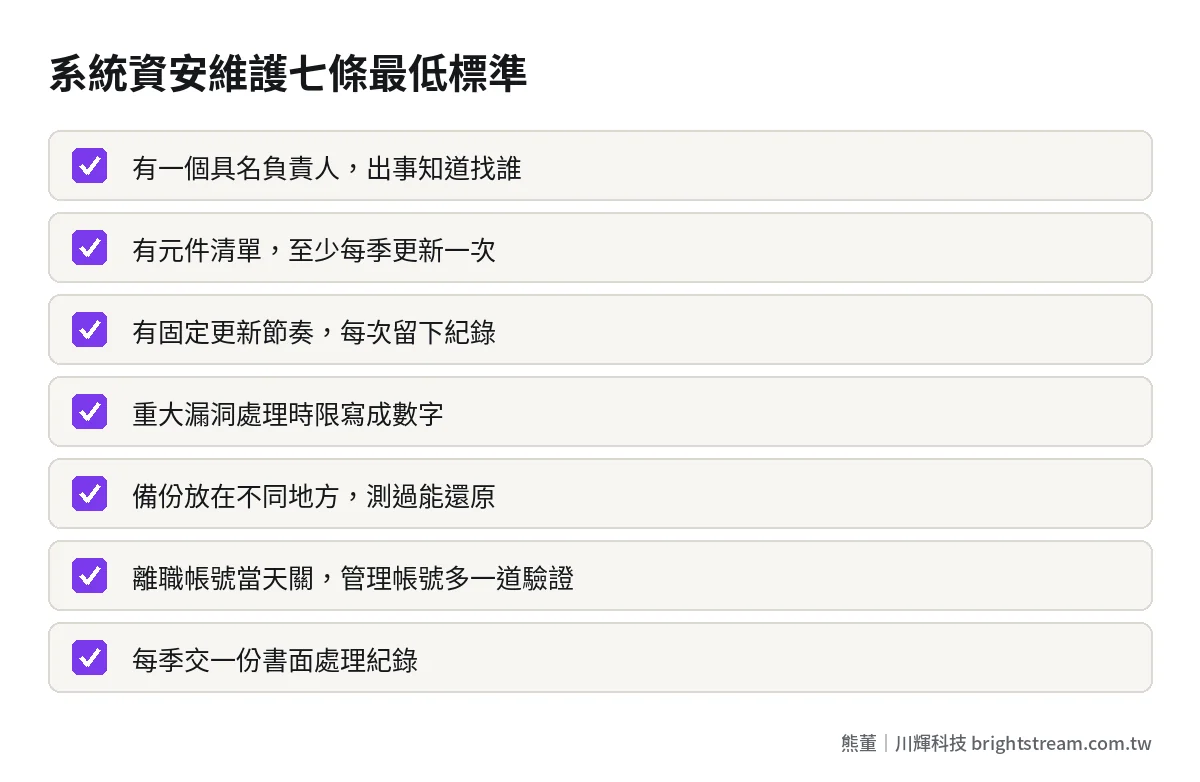
Of these seven, number four and number five are where things go wrong most often.
The key to number four is that the deadline must be a number. For Brightstream’s own maintenance, we commit to patching critical issues within 24 hours of being notified and handling high-risk issues within 72 hours. That is written into our maintenance terms. Your vendor’s deadlines don’t have to match mine, but there has to be a number. Otherwise “as soon as possible” can mean two hours or two weeks.
The key to number five is “tested to restore.” Many companies have backups but have never tried restoring one. Only when something actually happens do they find the backup file is corrupted, only half complete, or stored in the same place as the server and encrypted along with it. An untested backup is just reassurance.
If you want to put these seven into a contract, What a system maintenance contract should include has clause-by-clause wording you can check against directly.
15 minutes a quarter: a check owners can do themselves
Once you have the records, you don’t need to understand every line. Ask four questions. One: are there update records this quarter, and are the dates on a fixed schedule? Two: when was the last restore test, and did it succeed? Three: is anyone on the account list who has already left? Four: was there an incident this quarter, and how long did it take from report to resolution?
If these four get answers, someone is looking after the system. If the other side needs to “go back and check” on any of them, nobody is normally watching that area. I recommend putting these 15 minutes on a fixed quarterly calendar, the same as reviewing financial statements. Don’t wait for an incident to dig out the contract.
Where does your system sit? Decide how closely to look after it first
The seven are the floor, but not every system needs the same level of care. With limited resources, I use two questions to help owners set priorities: how exposed is this system to the outside? And how much do you lose if its data is compromised?
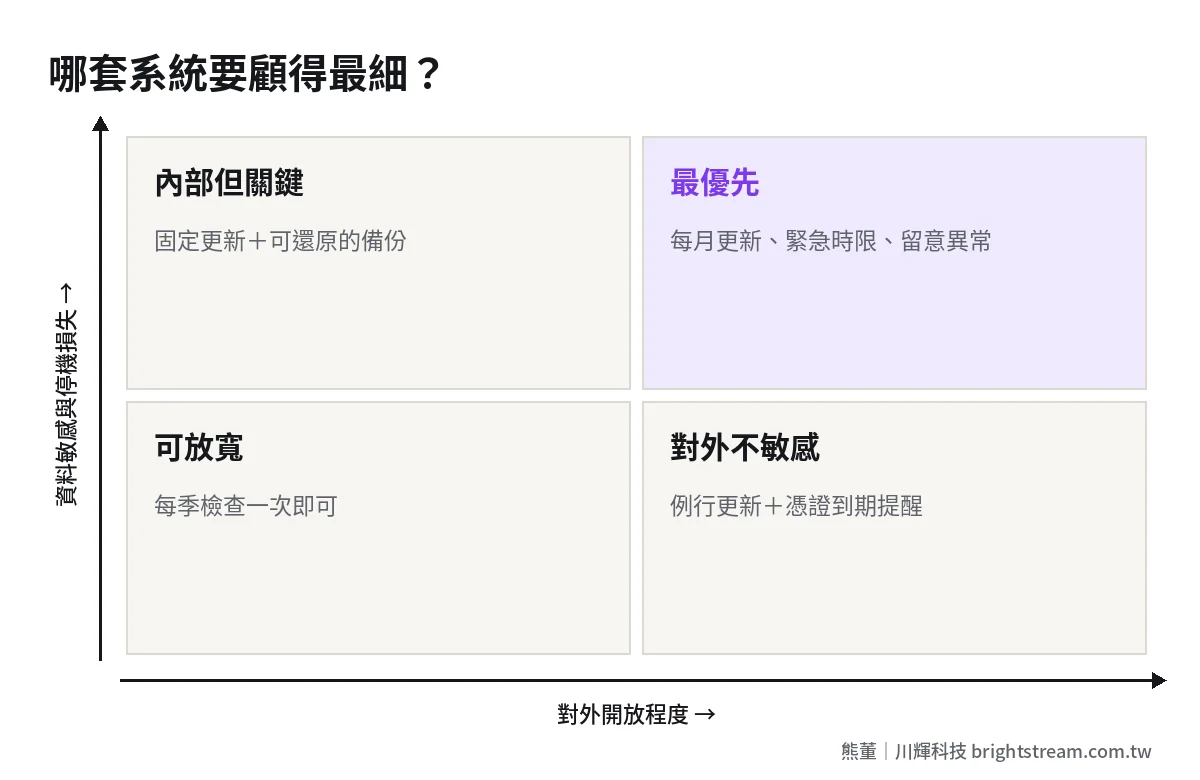
Systems that are exposed and hold sensitive data, such as ones with customer personal data or ones that let customers order and pay online, need monthly updates, a deadline for critical vulnerabilities, and someone watching for unusual logins. Systems used only internally but that would disrupt operations if they stopped, such as shipping and inventory, need a fixed update schedule and backups that restore. Exposed systems without sensitive data, such as a company website, need routine updates plus certificate expiry reminders, and that’s enough. Small internal tools without sensitive data need a check once a quarter.
Once you sort them this way, you will usually find only one or two systems really need the effort. Putting your effort into those one or two works far better than doing a little on each.
It has gone years without updates. What now?
If you have read this far and found your system meets fewer than three of the seven, don’t panic, and don’t rush to have everything updated. A system that has fallen this far behind may simply stop if you upgrade everything at once. Order matters:
- Get the accounts back first: server, domain, wherever the code is stored, database. Confirm these accounts are in the company’s name and that you can access them.
- Make one full backup, and try restoring it once: before touching anything, make sure you can roll back.
- Assess how far behind it is: have someone who knows list the current version at each layer and mark which have known critical vulnerabilities.
- Patch the most dangerous parts first: handle what is exposed and has critical vulnerabilities first; put everything else on the monthly schedule and catch up gradually.
- Write the schedule into the maintenance contract: one round of patches is not the end. It has to become something that happens every month.
Step one is where people get stuck most. If the original vendor no longer responds and you can’t get the accounts and code back, you have to deal with getting them back first. When your system vendor goes under or stops responding has the full steps.
As for how to think about the maintenance fee, I broke down annual, monthly, and per-incident pricing in What a reasonable system maintenance fee looks like. Brightstream’s maintenance starts at NT$20,000 a month, with the quotation based on the size of the system. If someone else built the system, we don’t take it over directly. We start with a free diagnostic to assess whether the system can still be maintained and how much it would cost to bring it back. Only if we confirm it can’t be saved do we rebuild it around your workflow.
Frequently asked questions
Can updating the system actually break it?
It can. That’s why updates need a method, not a refusal to update. The right way: back up before updating, run it in a test environment first, do it outside business hours, and be able to roll back to the previous version if something goes wrong. Small updates on a fixed schedule carry far less risk than one big upgrade every few years.
Do hackers target small and medium businesses too?
Yes, and usually not because you were singled out. Many attacks use automated tools to scan widely for systems with unpatched vulnerabilities. Company size isn’t the point. Whether you patched is. Any exposed system with a known unpatched vulnerability is on the list.
How often should a system be updated?
Routine updates should happen on a fixed schedule, monthly or quarterly, depending on how exposed the system is. When a critical vulnerability is announced, don’t wait for the routine slot; handle it within the deadline in the contract. What matters is a fixed schedule and records, not remembering only after something breaks.
I don’t understand tech. How do I know if the maintenance vendor is doing the work?
Ask for written records. One per quarter, stating what was updated, when, the result of the backup restore test, and the current account list. If they can produce it and it is specific, they are doing the work. If all you get back is “everything’s normal,” ask more.
The money you save by not updating is money you pay later
In the end, security maintenance doesn’t buy a guarantee. Nobody can promise a system will never have a problem. It buys three things: someone patches when a vulnerability is announced, you can roll back when something goes wrong, and you always know the current state of your system. You don’t see these three things day to day. On the day something happens, they are everything.
If you’re not sure when your system was last updated, or don’t even know who to ask, look at how we assess systems in System maintenance and takeover first, then decide which of the seven to fix first.