"The AI sits in our own server room and data never leaves. So we're fully covered, right?"
When an owner asks this, he has usually already been convinced to go on-premise. The reason that convinced him is correct: the data cannot leave the company. But "data doesn't leave" solves only one problem. On-premise AI has several other limits, and they should be spelled out before implementation.
I'm Johnny Yang, founder of Brightstream Technology in Taiwan. I've led my team through system implementation for seven years, across more than 252 projects in over 32 industries. The thing I tell owners most often is "don't build this." On-premise AI is no different. Some things it does badly, and you shouldn't force it.
My answer: the biggest limit of on-premise AI is not "it won't install." It's "it isn't as smart as the top cloud models" and "someone has to look after it." Think those two through before implementation, add a knowledge base, load testing and a maintenance contract, and most of the limits can be handled.
Limit 1: Not as smart as the top cloud models
This is the most important one, so it goes first. Many vendors would rather not mention it.
According to a summary on Hugging Face, on complex reasoning, multimodal tasks and stability, top cloud models "may still be stronger." Open-source models are improving fast and the gap keeps shrinking. But the mid-sized models that fit in an ordinary company's server room still fall short of the strongest cloud models.
What does that mean? On-premise AI is a good fit for looking things up, organizing, summarizing and drafting. It is not a good fit for decisions that need serious judgment and where mistakes are expensive.
Fix: Connect on-premise AI only to work it suits. A person must review every important conclusion. If some work truly needs the smartest model and the data can be de-identified, you can mix in the cloud.
Limit 2: A model that loads isn't a model many people can use smoothly
This is where things break most often after launch.
According to Largitdata, a model that loads is not the same as a reliable multi-user service. In testing on the same GPU, a tool built for a single user made 32 simultaneous users wait nearly a minute for the first word. An engine built for many users took just over 2 seconds. Full numbers are in my post on how fast on-premise AI runs.
Fix: Use an engine like vLLM or SGLang in production. Before launch, load-test with your peak-hour headcount.
Limit 3: Someone has to run it
Cloud AI is maintained by someone else. On-premise AI is yours.
Model updates, security patches, GPU drivers: you handle all of them. Based on NSS's deployment experience, open-source models get a new version roughly every three to six months, and self-hosting takes about half a day to a full day of maintenance per week. Plenty of companies buy the machine, install the model, and six months later nobody is updating it. It falls further behind, and security holes go unpatched.
Fix: Sign a maintenance contract, or at least name one person responsible. For what happens when nobody updates a system, see what happens when nobody updates your system.
Limit 4: Longer documents mean slower speed and tighter memory
Many owners picture it like this: "Drop the whole spec book into the AI and it knows everything."
In reality, the longer the document, the slower the model and the more memory it eats. Tests show the same model can run more than three times slower at 128K length than at 4K. And when documents get too long, the model is more likely to miss what's in the middle.
Fix: Don't feed the whole document to the AI every time. Build a knowledge base first, split documents into sections, and have the AI pull only the few most relevant sections when it answers. This also lets the AI cite its sources so employees can check.
Limit 5: Traditional Chinese and Taiwanese terms can come out wrong
This limit matters especially for Taiwanese companies.
According to NSS, some open-source models output Simplified characters or mainland Chinese phrasing. Employees feel the system "wasn't made for us." Customers see it, and it hurts the brand.
Fix: When choosing a model, test it on real questions in Traditional Chinese with Taiwanese terminology. For official documents and regulations, try TAIDE (Taiwan's government-backed model) first. After launch, keep collecting examples of errors. The full selection process is in how to choose an on-premise AI model.
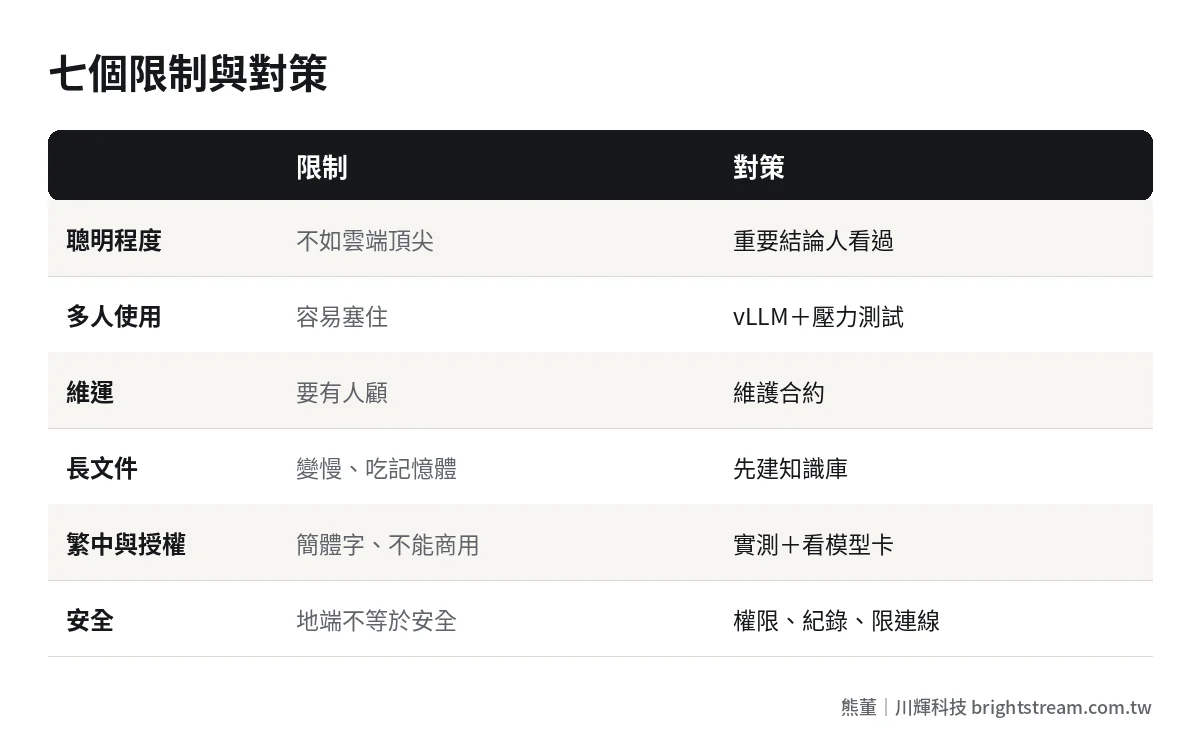
Limit 6: Licenses differ, and some ban commercial use
Open source does not mean free to use however you like. Some models are non-commercial. Some require a separate deal once revenue passes a threshold. Some require attribution in your product. Different versions in the same model family can carry different licenses.
Then there's country of origin. If you bid on government tenders, supply the public sector, or have large customers who audit you, check first whether you're allowed to use models from Chinese vendors.
Fix: Before any version goes live, read the original license on the model card and write it into the delivery documents. If country of origin is restricted, rule those models out from day one.
Limit 7: On-premise doesn't automatically mean secure
This is the most commonly misunderstood point. Many people assume "in our own server room" equals secure.
Largitdata puts it plainly: on-premise deployment does not make a system secure on its own. Third-party compressed models downloaded from the internet need their source vetted. Unnecessary telemetry should be turned off. Outbound connections should be restricted. Who can ask what, and who can see what, needs permissions and logs.
Fix: Verify file hashes when downloading models. Set permissions by department. Log every query. Apply security updates regularly. For the baseline on handing company data to AI, see is it safe to give company data to AI.
One more limit people overlook: cost
One last item that isn't among the seven, but owners will definitely care about: on-premise is not necessarily cheaper.
At low usage, pay-as-you-go cloud is usually the better deal. One vendor estimated you need roughly 8 million to 10 million tokens a day to break even (see MAQ, based on the vendor's own assumptions). So the reason to go on-premise should be "the data can't leave," not "it saves money."

Self-check before implementation
Turn the seven limits into seven questions and ask yourself before implementation:
| Question | If you can't answer |
|---|---|
| Does this task need the smartest model? | Test the ceiling on cloud with dummy data first |
| How many people use it at once at peak? | Load-test before buying hardware |
| Who runs it? | Sign a maintenance contract or name one person |
| How long are the documents, and are they organized? | Build a knowledge base first |
| Has it passed Traditional Chinese tests? | Test with real questions |
| Have you checked license and country of origin? | Read the model card in the original |
| Are permissions and logs set up? | Must be done before launch |
FAQ
Is on-premise AI dumber than ChatGPT?
On complex reasoning, the mid-sized open-source models an ordinary company can host usually trail the top cloud models. But for everyday work like looking up company data, organizing, summarizing and drafting, they're mostly good enough. Test with your own questions, then decide which work goes on-premise.
Does on-premise AI need a full-time maintainer?
It needs someone responsible, not necessarily full-time. Self-hosting takes about half a day to a full day a week for updates and patches. For small and mid-sized businesses, a maintenance contract is usually cheaper than a hire.
If it's in our server room, are we safe from data leaks?
Not necessarily. On-premise only keeps data from passing through outside services. You still need permissions, logs, restricted outbound connections and vetted model sources. Skip those and data can still leak internally.
Are there companies on-premise AI isn't right for?
Yes. If your data isn't sensitive and your usage is low, cloud AI is usually cheaper and smarter. In that case we tell you straight out to use the cloud and skip on-premise.
Conclusion: know the limits to use it well
The value of on-premise AI is that companies whose data can't leave can still use AI. But it isn't smart enough to replace judgment, and it won't look after itself. Spell out the limits first, then decide what work to give it.
If you want to know whether on-premise AI fits your situation, take a look at how we do AI system development, or bring me the one limit you're most worried about and we'll talk.