"Odoo already has accounting and inventory. We just need to change a little."
I hear this a lot, usually early in an evaluation. The owner has seen an Odoo demo: complete modules, a clean interface, used by lots of companies worldwide. Then the partner says "most of what you need is already there, and we'll custom-build the rest," and it sounds like the safest choice. Talk again a year later, and that "little" has often turned into a long customization list.
I'm Johnny Yang, founder of Brightstream Technology in Taiwan. I've led my team through system implementation for seven years, more than 252 projects across 32+ industries. I've also seen plenty of companies keep modifying a packaged or open-source ERP until they finally asked, "Should we have built from scratch in the first place?" What I build is custom systems, so in this post I'll work hard to lay out the strengths of both sides.
The conclusion first: the difference between customizing Odoo and building from scratch is not where you start. It's where you end up. When customization stays in two layers, "configuration" and "adding features on the side," Odoo is usually faster and cheaper than building from scratch, because standard processes like accounting, inventory and purchasing are already mature. Once customization starts changing the logic of core processes, such as how an order is created, how cost is calculated, or how a quotation is generated, you carry two burdens at once: Odoo's own version upgrade cycle, plus your own custom code. At that point, the difference from a from-scratch build comes down to three things: who moves the customizations over at upgrade time, who understands the system when something breaks, and whether you can switch vendors. The key question is not whether Odoo is good. It's which layer your customization touches and how much of daily operations it covers.
Why Odoo is attractive, and why choosing it makes sense
Fair is fair. Odoo is a mature open-source ERP. Its modules cover accounting, inventory, purchasing, sales, manufacturing, projects, websites and more, and a large number of companies and development partners use it worldwide. For many small and mid-sized businesses, it has real advantages:
- Standard processes don't start from zero: chart of accounts, inventory movements, purchase-to-payment. Many companies have already used these flows, and the logic is fairly complete.
- Go live first, expand later: run on standard modules, add more when you need them. You don't have to define every requirement up front.
- A large ecosystem: there are community modules to reference and plenty of partners to choose from.
- Open-source flexibility: the code is visible, so in theory you can adjust it to your needs.
So if your processes look like most companies', choosing Odoo and going live with light configuration is a good decision. I covered Odoo's overall fit and cost structure for Taiwanese SMEs in Is Odoo right for Taiwanese SMEs. This post is about one thing only: what happens as customization goes deeper and deeper.
Split customization into three layers and you'll know where you are
The word "customization" actually covers three completely different things. Their impact on your future is very different.
| Customization layer | Common examples | Impact at upgrade time | Who can maintain it |
|---|---|---|---|
| Layer 1: Configuration | Accounts, tax rates, document formats, field display, approval workflow parameters | Small, mostly follows the version | Trained internal staff or a partner |
| Layer 2: Extension | Adding fields, adding reports, adding a standalone small module, integrating external services | Medium, must be checked and possibly adjusted at every upgrade | A partner who knows Odoo development |
| Layer 3: Core changes | Changing order creation logic, cost calculation, inventory movement rules, rebuilding main screens | Large, must be migrated and retested at every upgrade | The specific team that knows this customization |
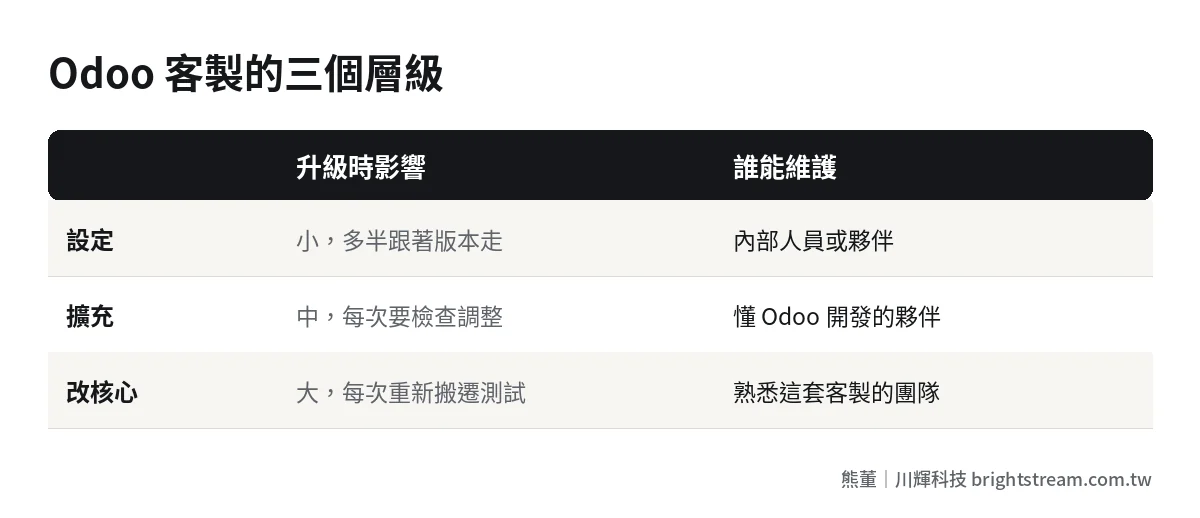
Layers 1 and 2 are things Odoo is designed to expect you to do. Layer 3 is "borrowing Odoo's skeleton but replacing its heart." It can be done. But once it's done, what you have is no longer standard Odoo. It's "a custom system that looks like Odoo."
Many companies don't know they've already reached layer 3. The test is simple. Ask your partner: "If we upgraded to the next major version now, how much of our customization would need to be rewritten?" If the answer is "we'd need to assess that" or "most of it would need reworking," you're in layer 3.
"Ready-made must be cheaper" is only half right
From the owner's side, this instinct makes complete sense. Writing accounting and inventory modules from scratch really does take time and money. If something ready-made works, why build it yourself? In layers 1 and 2, that judgment is almost always correct.
The real problem: customization cost is not one-time. You keep paying it for as long as the system lives. Layer 3 customization on Odoo carries three kinds of long-term cost, and a from-scratch build pays all three too, just in a different form.
1. Upgrades: you run on two clocks at once
Odoo releases new major versions regularly, and support for old versions has an end date. Check official announcements for the actual schedule. Odoo handles upgrades of standard features, but your own custom code has to be moved to the new version by you or your partner. The deeper the customization, the more work each migration takes.
A from-scratch build has no "external major version" clock, but it still has to keep up with updates to programming languages, frameworks, browsers and third-party services. The difference: a from-scratch build has one clock, and you largely set its pace. Deeply customized Odoo has two clocks, and you don't control one of them.
2. People: who understands this system
Odoo with core changes needs more than someone who can code. It needs someone who knows the Odoo framework and can also read your particular customization. There are fewer of these people than you think. If your original partner swaps engineers, or the relationship goes bad and you want to switch, the new team needs time just to understand what's there.
A from-scratch build has the same problem. A new vendor taking over also has to understand the code first. So this isn't an Odoo weakness. It's a property of deep customization itself. The real questions are: how clear is the documentation, who holds the code, and what do you get at handover.
3. Licensing and ownership: who owns the custom code
Odoo has a Community edition and an Enterprise edition with different license terms. Check official announcements for details. A more commonly overlooked issue: who owns the custom modules your partner writes for you, and whether you can hand them to someone else to maintain, has to be written into the contract. This is exactly the same with a from-scratch build. For how to write source code license terms, see Who owns the code of a custom system.
Deep Odoo customization vs. a from-scratch build, side by side
Put the two paths next to each other and compare them from the angles an owner cares about:
| Comparison | Deep Odoo customization | From-scratch custom build |
|---|---|---|
| Speed to start | Fast, standard modules go live first | Depends on scope; much faster with a vendor that has ready-made modules |
| Standard accounting and inventory | Mature, use as-is | Must be built or integrated with existing accounting software |
| Process fit | High within standard processes; the further you deviate, the harder it gets | Designed around your processes, high fit |
| Version upgrades | Standard features follow the version; customizations must be migrated separately | No external major version, but must keep up with technology updates |
| Employee interface | Odoo's web back office | Can be built where employees already work |
| Switching vendors | Need a team that knows Odoo and can read the customization | Need a team that can read this codebase |
| Long-term cost structure | License plan + partner services + customization migration at every upgrade | Build fee + maintenance fee; upgrades handled under maintenance |
Neither side wins everything in this table. Odoo's strength is standard processes. A from-scratch build's strength is fit and the user interface. Whichever side your company leans on, that's your answer.
There's also an often-overlooked middle option: a from-scratch build doesn't have to mean every line is written from zero. Vendors who have worked across many industries usually have ready-made modules they've built up, such as quotations, orders, inventory and permissions, which they combine and adjust to your processes. So when you compare, don't just ask "is it starting from zero." Ask "how many similar things has this vendor built in my industry, and which can be used directly." That directly affects timeline and risk.
One more word on the employee interface. Many system implementations fail not because features are missing, but because employees don't want to open the system. One of our clients, a printing company, spent over NT$1,000,000 on two ERP systems and couldn't get either to stick. The third was built around their own processes, and employee adoption went from under 20% to over 90%. Which two systems they were doesn't matter. What matters: the most complete feature set is worth zero if employees don't use it. That's also why Brightstream builds company systems inside LINE. Employees don't have to learn new software, and they can use it on day one.
Which path should you take? Two questions decide it
Skip the feature list. Answer two questions first:
First, how many differentiating processes do you have? That is, the processes where your company does things differently from competitors, and which are exactly why you make money: special quotation logic, unique production scheduling, unusual profit-sharing rules. The more of these you have, the more you need layer 3 customization.
Second, does anyone in your company have the ability to carry this system long term? That could be internal IT, or a vendor you trust who is willing to sign a long-term maintenance contract.
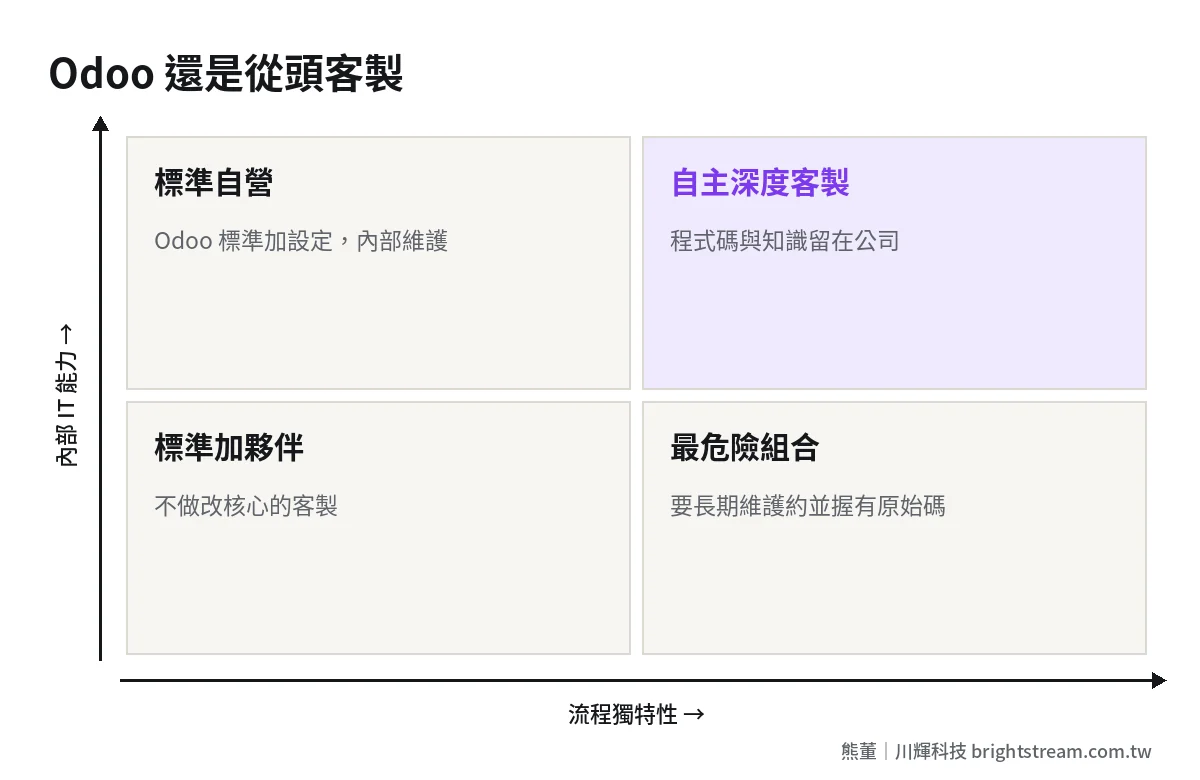
Cross the two questions and you get four situations:
- Low process uniqueness, high internal IT capability: Odoo standard modules plus configuration, maintained in-house. Best value.
- High process uniqueness, high internal IT capability: deep Odoo customization or a from-scratch build both work. The key is keeping the code and the knowledge inside the company.
- Low process uniqueness, low internal IT capability: Odoo standard plus a reliable partner. Don't do layer 3 customization.
- High process uniqueness, low internal IT capability: the most dangerous combination. Deep customization with no one to carry it. Whichever path you choose, you need a long-term maintenance contract, and you need the source code in your hands.
I compare the dividing lines between packaged, cloud and custom systems more fully in Choosing an ERP for a 50–200 person company. On whether to customize and how far, read it together with Should your ERP be custom-built.
Before you commit to Odoo, ask your partner these five questions
If you've evaluated and decided on Odoo, that's a good choice. Before you sign, use the five questions below to get the long-term cost of customization on the table. They don't ask "can it be done," because almost anything can be done. They ask "what happens after it's done":
- In these requirements, which items are configuration, which are extension, and which require core changes? Mark each one.
- For the items that require core changes, is there an alternative that doesn't touch the core? What does it cost?
- At the next major version upgrade, who migrates the customizations? How is it billed?
- Where is the source code for the custom modules stored? When the contract ends, can it be fully handed over to us?
- If the engineer responsible for this project leaves your company, who takes over? Is there documentation?
If the partner can answer item by item and is willing to put the layering from question 1 into the quotation, they have a plan for long-term maintenance. If every answer is "no problem" but they can't explain how, then the deeper the customization goes, the less control you'll have later.
Already customized deep? What to do now
If you've read this far and realized your Odoo is already in layer 3, don't panic. Do three things first:
- Inventory the customization list: have your partner list every customization, and mark for each one which layer it belongs to, why it was done, and whether anyone still uses it. You'll often find that part of the customization is no longer used by anyone.
- Confirm who holds control: where the custom module source code is, whose name the server and database accounts are under, and whether documentation exists.
- Estimate the work for the next upgrade: have your partner estimate how much has to change to move to the next major version. That number tells you roughly what every future upgrade will cost.
After these three steps, you'll have three options: stay on Odoo but pull customization back to layer 2; keep Odoo for accounting and inventory, pull your most unique processes out into a separate build, and integrate them back; or conclude the cost is too high and replan the whole system. Which one is right has to be calculated on five-year total cost, not just the next quotation. For the method, see How to calculate ERP five-year total cost.
FAQ
Can Odoo still be upgraded after customization?
Yes, but the deeper the customization, the more upgrade work. Configuration changes mostly follow the version. Extensions have to be checked one by one. Core changes usually need to be migrated and retested. Before signing, have your partner explain how customizations are handled at every upgrade and who is responsible.
Which is cheaper, customizing Odoo or building from scratch?
There's no fixed answer. It depends on which layer the customization touches. When customization stays at configuration and extension, Odoo is usually cheaper. Once you change the core, long-term cost includes migration work at every upgrade, and the gap narrows or even reverses. Compare on five-year total cost, not just the first-year quotation.
Is it easy to switch Odoo partners?
Standard features and light extensions are fairly easy to hand over. Deep customization depends on whether the documentation and code are complete. Before switching, confirm the source code, database and server accounts are all in your company's hands, and have the new partner do an assessment first before deciding what they'll take over.
Will a from-scratch build lock me into the vendor?
Whether you get locked in depends on the contract, not on whether you build from scratch or use Odoo. Put source code delivery, account ownership and handover documentation into the contract, and a from-scratch build can be maintained by someone else. Leave them out, and you'll be locked in with any system.
Conclusion: decide first which layer customization stops at
Odoo customization vs. a from-scratch build is not a matter of faith. It's a line: if customization stops at configuration and extension, Odoo is a good deal. Once customization goes into the core, you have to evaluate it by the standards of a from-scratch build, including upgrades, maintenance, and whether you can switch vendors.
If you're evaluating Odoo, or your Odoo is already getting more and more customized, start with How ERP implementation works. Take stock of your customization list and who holds control, then decide your next step.