

On the 10th of every month, finance puts the maintenance invoice on the owner's desk. He flips through it. The attachment has one line: “System operated normally this month.” He signs. But it doesn't sit right: this money goes out every month, and what is it actually buying? If the system really does break one day, he won't even know what to ask.
I'm Johnny Yang, founder of Brightstream Technology. In seven years, I've led the team through more than 252 system projects across more than 32 industries, and post-launch maintenance is work we do every day. I tell owners this often: whether a maintenance fee is worth it isn't about whether the system broke. It's about the report you get every month.
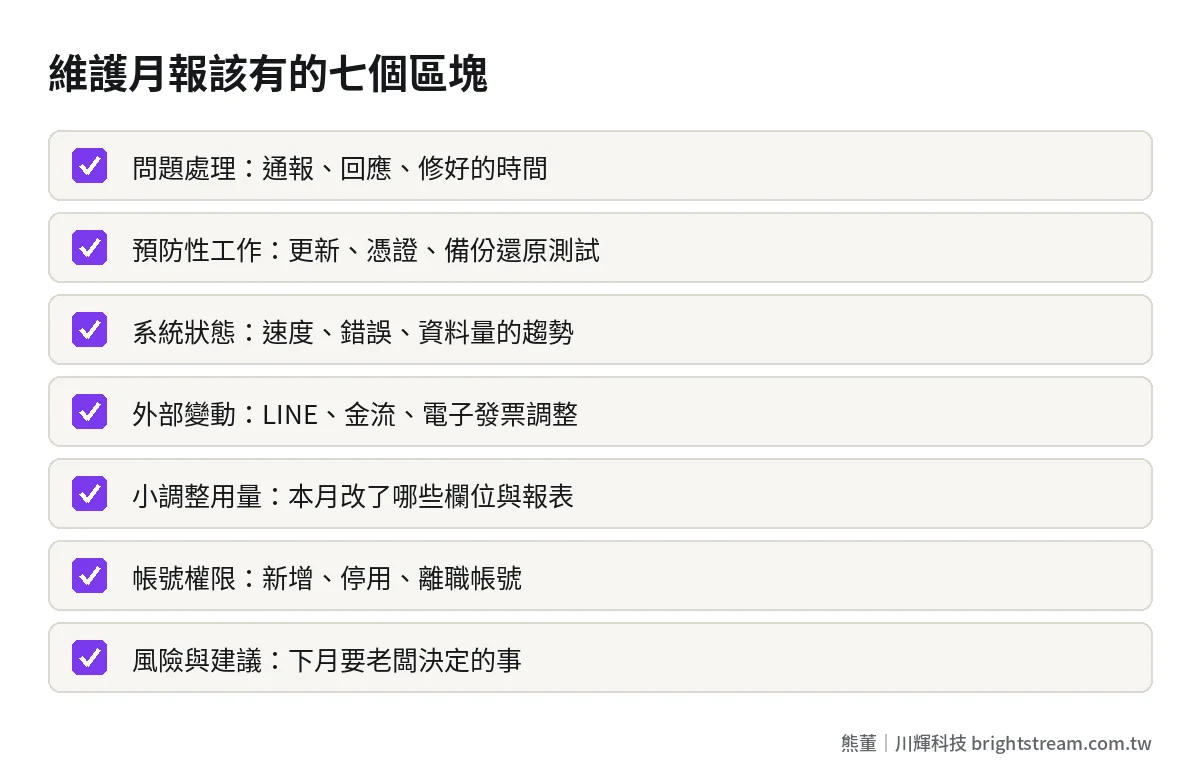
A good monthly system maintenance report lets an owner understand three things in five minutes: what happened this month, whether it was handled within the agreed time, and what risks next month need your decision. Specifically, it needs seven sections: incident log (how long from report to fix), preventive work (updates, certificates, backups and restore tests), system health, changes to external services, small-adjustment usage, account and permission changes, and risks and recommendations. A report that only says “normal this month” is no report at all. If it says that several months in a row, it's time to ask exactly what this maintenance fee is paying for.
“If nothing broke, the report doesn't matter” is half right
First, the owner's side. You pay for maintenance so the system runs steadily. No news is best. Spending time every month on a report full of jargon sounds like a waste. And honestly, a lot of maintenance reports are long and hard to read, and you finish without knowing what mattered.
But here's the other half: when maintenance is done well, it's invisible by nature. Certificates renewed before they expire. Security patches installed before the vulnerability gets exploited. Backups running every day and tested to restore. Nobody thanks you for doing these. You only notice when they weren't done. Because the work is invisible, the report is your only evidence that someone is actually doing it.
The report has another use people overlook: handover. If one day you switch maintenance vendors, or your current vendor stops doing the work, the first thing the new team needs is what happened, what was changed, and where the weak spots are. With a year of monthly reports, they get up to speed fast. With nothing, they have to figure it out from scratch.
So the question isn't whether to read the report. It's whether the report covers the right things, in a form you can finish in five minutes.
Seven sections a monthly maintenance report should have
You can hold the table below directly up against the maintenance report you have right now.
| Section | What it should contain | What the owner should check |
|---|---|---|
| 1. Incident log | Report time, severity, response time, and fix time for each issue | Whether anything exceeded the contracted time |
| 2. Preventive work | Security patches, certificate renewals, backup status, restore tests | Whether the restore test was actually done |
| 3. System health | Uptime, speed changes, error counts, data growth | Whether things are slowly getting worse |
| 4. External changes | Changes to LINE, payment gateways, e-invoicing, hosting and other external services | Whether any change affected operations |
| 5. Small-adjustment usage | Field, screen and report layout adjustments handled this month | Whether it stayed within the agreed scope |
| 6. Accounts and permissions | Accounts added, disabled, or with permission changes | Whether departed employees' accounts were closed |
| 7. Risks and recommendations | What to watch next month, what needs the owner's decision | Whether anything needs your sign-off |
1. Incident log: record times precisely enough to show overruns
Every issue needs four timestamps: when it was reported, what severity it was assigned, when work started, and when it was fixed. “Resolved” alone isn't enough, because you can't tell whether it was fixed within an hour or dragged on for a week.
Those times need to map back to the contract. At Brightstream, critical issues are patched within 24 hours of being reported and high-risk issues within 72 hours, and every entry in the monthly report has to show whether it met that window. I broke down how to agree on and tier response and fix times in How fast should a broken system be fixed? SLAs in plain language, and how to write them into a contract.
2. Preventive work: the easiest to skip, and the most important
This section covers why nothing broke: which security patches went in this month, which certificates were close to expiry and got renewed, whether daily backups succeeded, whether a restore test was done.
Pay special attention to restore tests. A successful backup doesn't mean you can recover. It only counts once someone has actually restored from the backup and confirmed the data is complete. This doesn't have to happen every month, but the report should state when the last one was done and what the result was. For the risks of a system nobody updates for a long time, see What happens when nobody updates your system? The minimum security maintenance an owner should know.
3. System health: watch the trend, not a single month
Did the system go down this month, did pages get slower, did errors increase, how much did data grow. One month's numbers mean little. What matters is the comparison with previous months. Data growing steadily every month while speed drops month after month is a signal to act early, not something to discover on month-end closing day when the system can't keep up.
4. External changes: you can't see them, but they affect you
If your system connects to LINE, payment gateways, Taiwan's government e-invoice system, or e-commerce platforms, every time those services change their rules, your side has to adjust. The monthly report should say: which external services changed this month, whether it affected us, and what was adjusted. This section is often where maintenance delivers the most value, because it deals with things you never knew happened.
5. Small-adjustment usage: give the scope a record
Renaming a field, adding an option to a menu, rearranging a report. Many maintenance contracts set a scope for small adjustments like these. When the monthly report lists what was done this month, both sides have a shared record of what counts as maintenance. At Brightstream, during the maintenance period, UI/UX, field and report layout adjustments within the written feature list are not charged separately, and we still list them in the monthly report so you know what was done.
6. Accounts and permissions: the cheapest security there is
Who was added this month, who was disabled, whose permissions were raised. Watch departed employees most closely: when someone leaves, was their account closed that same day? This section takes a few lines and blocks a lot of unnecessary risk. The other thing to look for is shared accounts: if the report shows several people using the same admin account, there's no way to trace who did what when something goes wrong. That belongs in risks and recommendations too.
7. Risks and recommendations: the part of the report most worth reading
The first six sections are records. This one is judgment. A good maintenance vendor uses it to tell you which component is about to lose support, which feature's usage has spiked and may need adjusting, which external service is changing next year, and which issues need you to decide whether to spend money. If this section is empty every month, either the system really is perfect, or the vendor isn't thinking.
Five minutes for the owner: check these four things
You don't need to read every word of all seven sections. When the report arrives each month, these four checks are enough:
- Did any entry exceed the agreed handling time? If so, ask why. Once in a while is understandable. If it keeps happening, it's time to talk.
- When was the last backup restore test? If it's overdue against the contracted schedule, ask them to book one.
- Is the same issue coming back? If an error gets fixed this month and returns next month, they fixed the surface, not the root cause.
- Is there anything in risks and recommendations that needs your decision? If so, give an answer before the next meeting. Don't let it sit in the report for months.
Answer these four and you have a basic grip on the state of the system. When something in the report raises questions, pick one entry and ask the vendor to walk you through it, such as how a particular ticket was handled, or the record of the most recent restore test. Vendors who can explain clearly are usually the ones doing solid work.
Signs in the report that your maintenance vendor is going through the motions
The report itself tells you a lot about whether the vendor is doing real work. Here are the contrasts I see most often.
| Where to look | Empty report | Useful report |
|---|---|---|
| Incident log | Just says “resolved” | Four timestamps and severity |
| Preventive work | Not mentioned at all | Patches, certificates, backups, restore tests |
| System health | “Operating normally” | Trend compared with previous months |
| External changes | Not mentioned, or only after something breaks | Impact and handling explained in advance |
| Risks and recommendations | Always blank | Lists what the owner needs to decide |
| Format | Nearly identical every month | Changes with what actually happened |
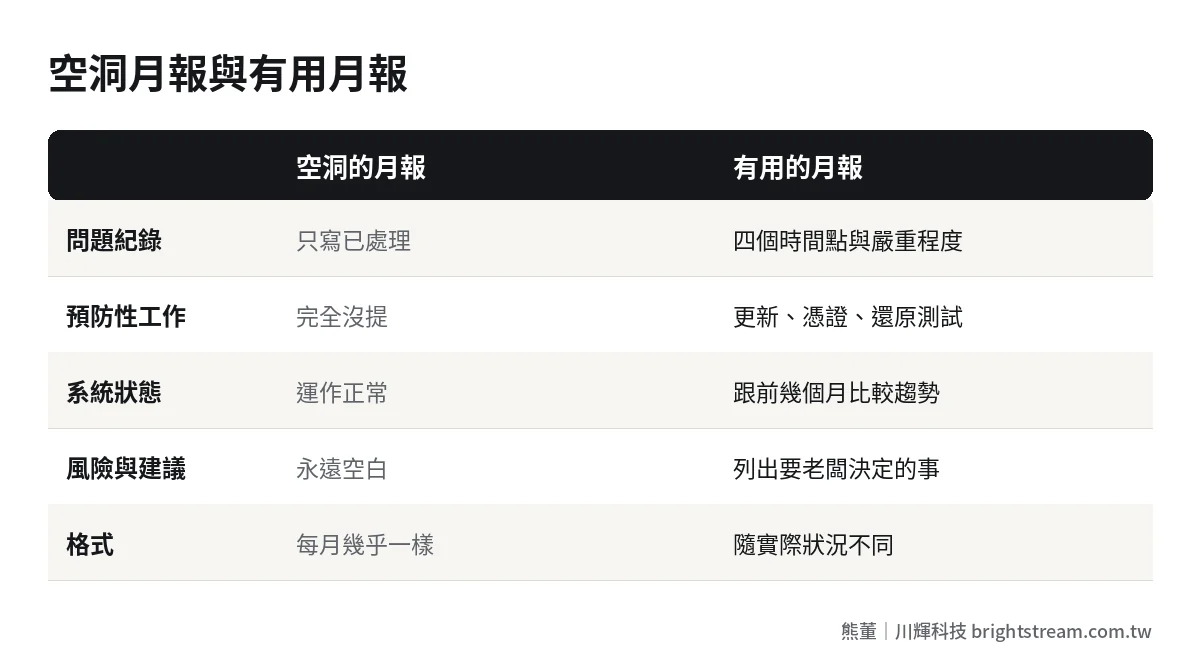
The last row is especially useful: if every month's report is nearly word-for-word identical with only the date changed, it's most likely a template, not a record. A real system has something a little different happen every month.
If most of your reports land in the empty-report column, don't rush to switch vendors. First give them this table and ask them to use this format starting next month. If they're willing and can actually fill it in, they've been doing the work and just haven't reported it. If they can't, you know where the problem is. For a broader look at the current state of your company's systems, pair this with Company system checklist: ten questions that show where you're leaking money.
Put the report in the contract, don't rely on goodwill
The best way to keep report quality up over time is to spell it out in the maintenance contract, not rely on the vendor's good intentions. At minimum, agree on these:
- Frequency: Once a month, delivered by a fixed date.
- Required sections: At least the incident log, preventive work, account changes, and risks and recommendations.
- Time records: Every issue must have report, response, and fix timestamps.
- Retention and handover: Reports are kept, and delivered along with the other handover documents when the contract ends.
Also, when you first sign a maintenance contract or switch vendors, ask for a “baseline report.” It describes the system as it was at handover: the main components in use, which are already outdated, when certificates and domains expire, where backups are stored, and which known issues are still unresolved. This report is the baseline for every monthly comparison after it. Without it, if the system gets slow three months later, you can't tell whether it was always like that or got worse after the handover.
The baseline report protects both sides. The maintenance vendor can show which problems existed before they took over, and you can confirm they actually understand the system, rather than signing the contract and only then starting to figure it out.
For the other clauses a maintenance contract should include, I put together the full list in What should a system maintenance contract include? 12 items to check line by line before you sign. For how maintenance fees should reasonably be priced, see How should system maintenance fees be calculated? Annual, monthly and per-incident compared.
Frequently asked questions
How often should a system maintenance report be delivered?
For systems used every day and tied directly to operations, once a month. When a major incident happens, don't wait for the monthly report: there should be a separate incident write-up after it's handled, stating what happened, how big the impact was, how it was fixed, and how to prevent it from happening again. For internal systems that rarely change, once a quarter is fine.
We're a small company. Do we still need a monthly maintenance report?
Yes, it can just be leaner. Small companies usually have no dedicated IT staff, so the owner or finance is the only person who will read the report, which makes a five-minute report even more necessary. Each of the seven sections can be a line or two, but don't drop the incident log, backup status, or account changes.
What if the maintenance vendor won't provide reports?
First check whether the contract requires it. If not, ask to add it at renewal and give them the format you want. If the vendor won't even provide a basic monthly report, the question to ask yourself is: when something breaks, will you be able to get the information you need from them? That is usually also a signal for whether to switch maintenance vendors.
How do I confirm that what's in the monthly report is true?
You don't need to check everything. Spot-check. For example, ask to see the record of the most recent restore test, or pick one ticket and ask them to walk you through how it was handled. If someone has left the company, confirm yourself that their account was actually disabled. Once a few spot checks match up, the report has earned its credibility.
Maintenance fees buy a record you can see
A good monthly maintenance report, in one sentence: it turns invisible maintenance work into a visible record, so in five minutes you know what happened this month, whether it was done as agreed, and what needs deciding next month. Vendors whose reports have real content are usually the ones actually looking after your system.
If you're paying maintenance fees every month but have never received a proper report, or your original vendor can no longer be reached, start by looking at how system maintenance and takeover is assessed, then decide your next step.