

At the start of every month, the accountant pastes the sales detail exported from the ERP into Excel, reformats it into journal vouchers, then keys them into the accounting software one by one. Halfway through, one document doesn't match. She goes back to ask the sales rep, who says the price on that one was changed last month. The owner walks over and asks: “Don't we already have a system? Why does this still take three days?” The accountant says nothing, because she'd like to know too.
I'm Johnny Yang, founder of Brightstream Technology. In seven years, my team and I have delivered more than 252 projects across more than 32 industries. Almost every company with an ERP asks me this question at some point: can the ERP and the accounting software be connected, so the accountant stops moving data by hand?
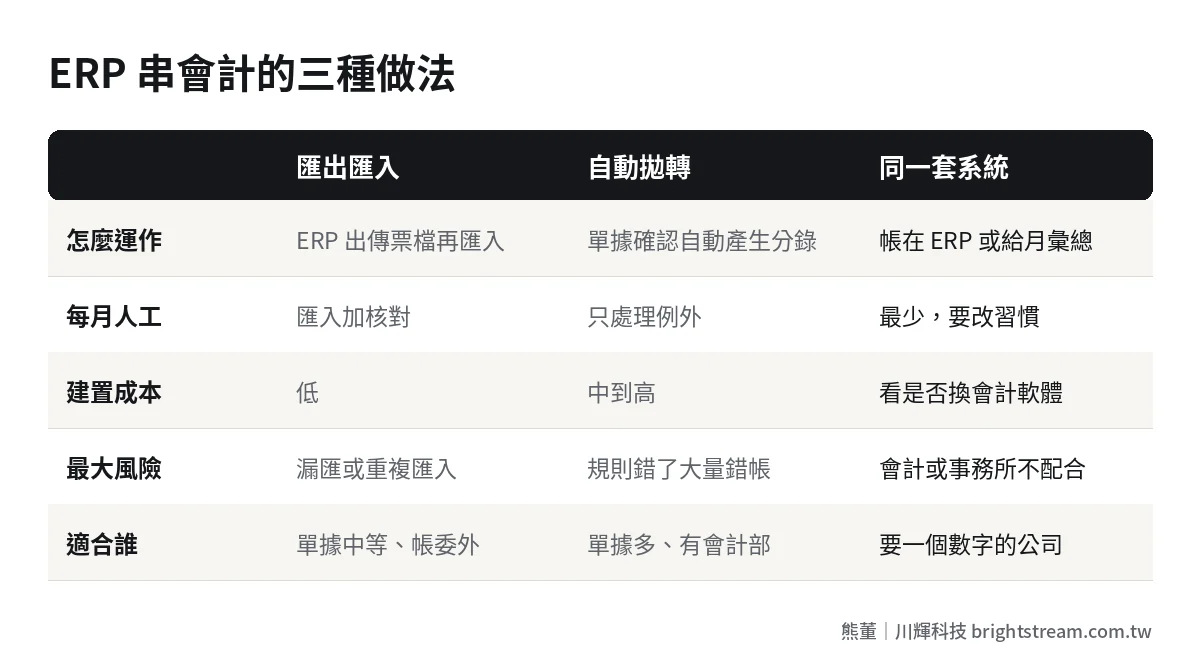
There are three ways to connect ERP and accounting software. One: export and import. The ERP produces a voucher file and the accounting software imports it. It's cheap and fast. The price is that someone has to handle it and reconcile it every month. Two: automatic posting. As soon as an ERP document is confirmed, an entry is generated and sent to accounting. It saves the most labor. The price is that someone has to maintain the account mapping rules long term, and errors also reach the books faster. Three: don't connect. Keep the books in the same system, or send only monthly summaries to the bookkeeper. The data is the most consistent. The price is changing how your accountant or accounting firm works. To choose, look at three things: monthly document volume, whether accounting is in-house or outsourced, and how often accounts and rules change. The real cost isn't the engineering fee. It's who owns the mapping rules, and what happens when a document is changed after closing.
Running ERP and accounting software as two systems actually makes sense
First, to be fair. Many owners think two systems means nobody planned properly in the first place. Actually, keeping them separate has its reasons.
Accounting software is designed for bookkeeping, tax filing, and financial statements. Common options in Taiwan include the accounting modules inside packaged systems, cloud accounting services, and whatever bookkeeping software your accounting firm is used to. They handle accounts, journal vouchers, and tax filing formats well. ERP is designed for operations: orders, inventory, purchasing, shipping. The two were built to solve different problems.
On top of that, many companies outsource their books to an accounting firm or bookkeeper. The firm serves dozens of clients at once. It is not going to switch software for you. So running two systems side by side is normal in Taiwan, not a mistake.
The problem isn't having two systems. It's that the gap between them is bridged by a person moving data. That person spends several days a month on it, makes errors along the way, and has to go back and trace them. Whether to close that gap with a system, and how, is the actual decision.
Three ways to connect them: where does each one cost you?
| Comparison | Export and import | Automatic posting | One system, or summaries only |
|---|---|---|---|
| How it works | ERP outputs a voucher file; accounting imports it | Entries are generated automatically when a document is confirmed | Books are kept in the ERP, or the accounting firm gets a month-end summary |
| Monthly manual work | Importing plus checking, depending on document volume | Mostly handling exceptions | The least, but accounting has to change habits |
| Build cost | Low | Medium to high, depending on how many rules | Depends on whether you replace your current accounting software |
| Biggest risk | Someone skips an import or imports twice | Wrong mapping rules push errors into the books in bulk | The accounting firm or accountant won't cooperate |
| Best for | Moderate document volume, outsourced accounting | High document volume, in-house accounting department | Companies that want one set of numbers and will adjust who does what |
Option 1: Export and import, cheap but someone has to watch it
The ERP produces a voucher file in the format the accounting software expects, and the accountant imports it weekly or monthly. It's the simplest to engineer. Usually you just need to get the format right.
The cost is in the people. Someone has to remember to run the import and check the totals afterward. The most common errors: the same batch imported twice, or a few days of documents never imported at all. If your document volume is modest and your accounting is outsourced, this is often the best value.
Option 2: Automatic posting, saves labor but someone has to own the rules
Once a sales order, purchase receipt, or payment receipt is confirmed in the ERP, the matching journal entry is generated automatically and sent to the accounting software or accounting module. The accountant stops moving data and only handles exceptions.
It sounds ideal, but it rests on a prerequisite that is often underestimated: every document type, every product category, every expense has to be mapped to an account in advance. If that mapping is wrong, it's not one entry that's wrong. It's every entry of that type for the whole month, and it goes wrong automatically and quietly.
Option 3: Don't connect, merge two jobs into one
One version is keeping the books directly in the ERP's accounting module, so operations and accounting live in one place. The other is having the ERP produce only a month-end summary (sales, purchases, receipts and payments, inventory changes) and handing it to the accounting firm to record. The first gives the most consistent data. The second is the friendliest to the firm.
Both cost you in habits. The accountant has to learn a new interface, or the firm has to accept your summary format. This isn't a technical problem. It's something to negotiate up front.
“Automate everything” gets stuck in three places
When many owners hear “integration,” their instinct is full automation: open an order and the books are done. The direction is right. Moving data by hand really is wasteful, and it really does produce errors.
But the integration problems I've seen are rarely “it won't connect.” Mostly, once it's connected, the books get harder to reconcile. The causes cluster in three places. If they aren't settled first, full automation just pushes the mess into the books faster.
The account mapping table: who is responsible for changing it?
The company adds a product category, a new expense type, a new sales channel. Adding an option in the ERP is quick, but which account does it map to on the accounting side? If nobody owns this mapping table, new documents either fail to post or get dumped into an “Other” account for the accountant to split by hand at month-end.
The owner of this table should be the accounting manager, not an engineer. The engineer knows how to post entries, not where they should go. The contract and division of responsibilities should spell it out: who decides the mapping rules, who updates them in the system, and how changes are communicated.
Line by line or summarized?
Generating one entry per sales order means accounting can trace every entry back to its source document. The downside is bloated books that give the accounting firm a headache. Summarizing into one entry per day or per month keeps the books clean, but tracing a specific order means going back to the ERP.
There's no standard answer, but decide in advance. What I usually recommend: anything tied to bank reconciliation, such as receipts and payments, goes line by line. Sales and purchases can be summarized daily, as long as the detail stays searchable in the ERP.
What happens when a document is changed after closing?
This is where things break most often. Last month's books are closed, business tax (Taiwan's VAT) may already be filed, and then a sales rep goes back and changes the price on last month's delivery order. The ERP allows the edit, but accounting has already moved on. If the system is designed to “repost on any change,” an entry suddenly appears in a month that's already closed.
The right approach: lock documents for closed months in the ERP. Any change has to go through a current-month adjustment or sales allowance, so the error is reversed in the current month instead of rewriting history. This rule has to be agreed before integration, and actually built into the system.
One more small thing: off by a few dollars
After go-live, what drives accountants crazy usually isn't big errors. It's being off by a few dollars every single month. The cause is usually different tax calculations: the ERP calculates tax per line and adds it up, while the accounting side calculates tax on the total. Rounding happens at different points, and you get a residual difference.
The amounts are tiny, but someone has to spend time hunting for them every month. Decide in advance whose calculation is authoritative and which account absorbs the difference, and you save that time. One sentence during requirements solves it. Discover it after go-live and you often have to change several programs.
I covered the full process for shortening month-end close in Month-end close takes a week? How to cut accounting down to two days. Integration is only one part of it.
Which approach fits your company? Three questions to decide
Don't start from the technology. Answer these three questions first:
How many documents a month generate journal entries? Say it's a 50-person trading company with a few hundred sales and purchase documents a month. Export and import takes half a day each time, and the time saved by automatic posting may not be worth the cost to build and maintain it. Say it's a 150-person manufacturer with several thousand documents a month. Moving them by hand will definitely miss some, and automatic posting is worth it.
Do you keep the books yourself or outsource them? If an accounting firm does them, start with export/import or monthly summaries, because you can't change the firm's software and processes. If you have your own accounting department, automatic posting or a single system is easier to sustain long term.
How often do accounts and rules change? If your product lines and expense items are stable, you set the mapping table once and it lasts a long time, so automatic posting is cheap to maintain. If you frequently add items, channels, or projects, the mapping table changes every month, and you need to be sure someone can keep up with it.
Once these three are answered, most companies can decide quickly. What takes real time is the next part: getting the rules agreed.
Five things to do before you decide to connect
Whichever approach you choose, don't start writing code until these five are done.
- List which documents generate journal entries. Sales, sales returns, purchases, purchase returns, receipts, payments, expenses, inventory adjustments. List them one by one, and mark which accounts each one debits and credits.
- Set the account mapping table and its owner. The accounting manager signs off on it, and decides on any new items going forward.
- Decide posting timing and granularity. Post as soon as a document is confirmed, or once a day? Line by line or summarized?
- Write the closing lock and adjustment rules. Who can change documents in a closed month, and what process a change has to go through.
- Run in parallel for one month and compare line by line. Run the new integration for a month while keeping the old manual process. Switch over only when both sides match.

Step five is the one most often skipped, because everyone assumes the system's numbers must be right. But if even one cell in the mapping table is wrong, it will surface within that month. Running in parallel for a month costs far less than finding out after the tax filing.
If you want to see the main technical ways to connect, including e-commerce platforms, LINE, and accounting software, see How to integrate ERP: API connections to e-commerce, LINE, and accounting software. That article covers how to connect. This one covers whether to connect, and who owns it once you do.
Integration costs: don't just count the build
When owners evaluate integration, they often ask only “how much will this cost to build?” But an integration is a pipeline that stays in place. Its cost comes in three parts.
Part one is the build: format matching, rule setup, testing. Part two is maintenance: when the accounting software updates, tax formats change, or the ERP adds fields, the pipeline has to be adjusted. Part three is handling exceptions: who looks at documents that fail to post, and how fast they get dealt with.
Add all three together and that's what you actually pay. If you're already calculating the long-term cost of your ERP, integration maintenance belongs on the same sheet. See How to calculate the five-year total cost of an ERP. And if you want your accountant to spend the time saved on more valuable work, like reconciliation and analysis, How finance and accounting can use AI lists a few places to start.
To see how an order moves through the system from order intake to shipping, invoicing, and collection, read From order to cash: every stop an order makes inside your company. It makes clearer where accounting sits in the whole flow.
FAQ
Does ERP have to be connected to accounting software?
Not necessarily. If your document volume is low, your accounting is outsourced, and a monthly import takes only half a day, export and import is plenty. Forcing automatic posting just adds another pipeline to maintain. The real signal that you should connect: your accountant spends several days a month moving data, and often has to go back and trace mistakes from it.
Our accounting firm uses its own software. Can our ERP still connect?
Yes, but usually not by connecting directly into the firm's system. Instead, the ERP produces a file the firm can import, or a fixed-format monthly summary. Ask the firm which formats they accept first, then design the ERP output around that. It goes much more smoothly than the other way around.
After integration, do we still need accounting staff?
Yes. Their work just changes. Time spent moving data and keying vouchers goes down, but account mapping rules, exception documents, month-end closing, and reconciliation still need someone who understands the books. Integration saves the time spent on repetitive data entry, not the accountant's judgment.
Can ERP documents be changed for a month that's already closed?
Better not to edit them directly. Documents for closed months should be locked in the system. If there's an error, reverse it in the current month with an adjustment or sales allowance. Editing historical documents directly creates differences between the ERP and the books in months that are already closed, and those are hard to trace later.
Agree on the rules first, then talk automation
How to connect ERP and accounting software, in one sentence: the connection method is a technical problem; who owns the account mapping and how adjustments work after closing are management problems, and the management side is what decides success or failure. Get the rules clear first, then choose export/import, automatic posting, or a single system. Any of them can run reliably.
If you're planning an ERP and want to sort out the division between operations and accounting from the start, take a look at ERP implementation first, then decide how far the integration should go.