

"We bought the system, ran three training sessions, and the floor is still shouting orders in the LINE group." I hear this a lot. The person saying it is usually the owner or operations manager of a company with fifty or sixty people. The system cost real money and has every feature you could ask for. But the warehouse staff, the sales team, the field technicians just don't open it. They keep taking photos, shouting orders and reporting back in the LINE group, and then an assistant copies it all into the system, one entry at a time. The system becomes something only the assistant uses.
I'm Johnny Yang, founder of Brightstream Technology in Taiwan. Seven years in business, more than 252 projects, 32+ industries, over NT$20,000,000 in custom-built systems delivered per year. Over the past few years my direction has gotten clearer: build the company system inside LINE. Staff don't learn new software. They can use it on day one.
Staff can use it on day one not because LINE is better, but because they don't have to go somewhere new. They open the app they already use every day, tap familiar menus and forms, and notifications pop up in the same place as messages from their family. But what they enter doesn't stay in chat history. It goes straight into the company's own database, with permissions, records and reporting. What belongs in LINE is high-frequency, short work on the floor: reports, purchase requests, approvals, orders, bookings, lookups, notifications. What doesn't belong is heavy data entry, complex reports and finance work. Those stay on the web back office. To decide whether to do this, look at three things: who the users are, how long the action is, and whether the account and the data are in the company's name.
Staff who don't use new systems usually aren't lazy
When staff don't use a system, an owner's first reaction is often "these people won't learn." I understand the frustration. The money is spent and nobody is cooperating.
But what I see on the floor is usually something else. For staff, the cost of a new system isn't learning it once. It's one extra thing every day: one more app to open, one more username and password to remember, one more hunt for where that button is. People on the floor have goods in their hands, gloves on, a customer waiting. They take the fastest route, and the fastest route is the LINE app that's already open.
We worked with a printing company that had spent over NT$1,000,000 on two ERP systems, and neither took off. For the third, we built it around their own workflow. Staff adoption went from under 20% to over 90%. That project made me more certain of one thing: whether a system gets used doesn't depend on how many features it has. It depends on whether it fits how staff already work. I've laid out the reasons staff resist and how to rescue the situation in what to do when staff won't use a new system.
"Built inside LINE" is not the same as "running the company on LINE groups"
At this point a lot of owners say, "We already use LINE." This is the most common misunderstanding, so let's get it straight first.
Running the company on LINE groups means everyone sends messages, photos and orders in chat rooms. Data is scattered across dozens of groups. To find who said what, you scroll up. When someone leaves, the conversations on their phone leave with them. I covered the risks in running your company on LINE groups: can you find anyone the day something goes wrong?.
A system built inside LINE uses the company's official account (LINE's business account) as the entry point. Staff tap a menu and open a page or form from the company system. It looks like it's inside LINE, but the data goes into the company's own database, with fields, permissions and records like any other system.
| Comparison | Running the company on LINE groups | Traditional system | System built inside LINE |
|---|---|---|---|
| What staff have to learn | Nothing | New software, new account, new interface | Almost nothing, just a few extra menus |
| Where data lives | Chat history, scattered across groups | Company database | Company database |
| Can you report on it | No, someone compiles it by hand | Yes | Yes |
| When someone leaves | Data may leave with their phone | Close the account | Unlink them; data stays with the company |
| Notifications | Buried in chat | Have to open another system to check | Pushed to where staff already look |
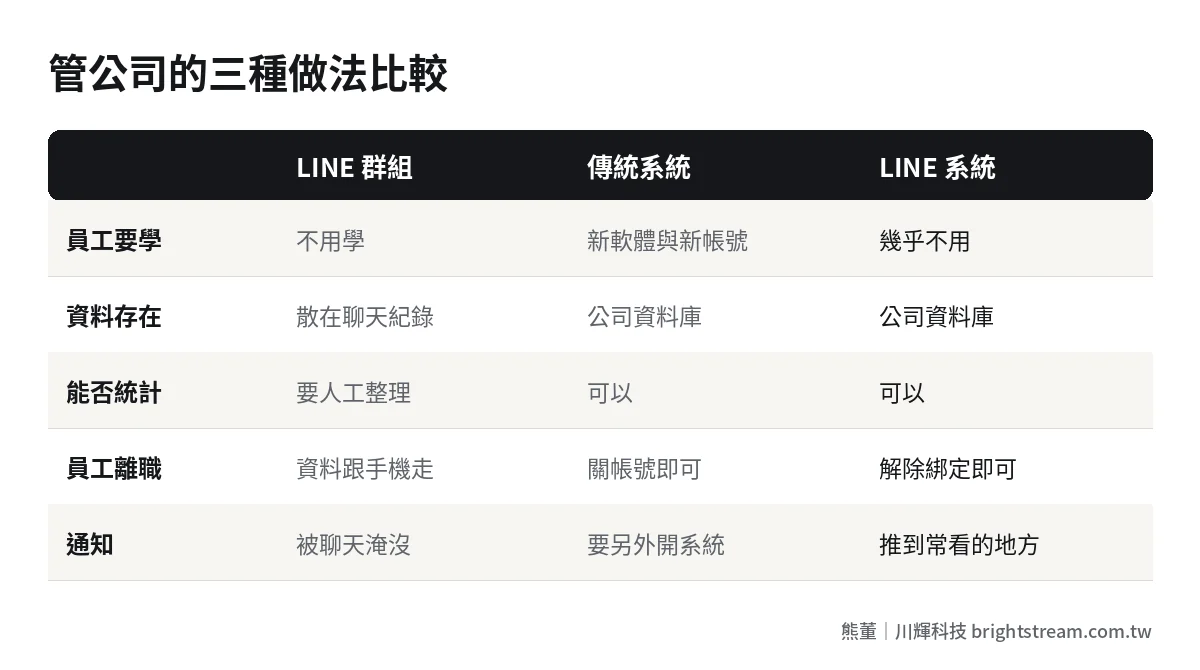
In short, it keeps what's easy about LINE and removes the mess of LINE groups. My starting point has always been the same: data lives in one place. Not one copy in the system, one in Excel, one in LINE.
Why staff can use it on day one: three reasons
First, there's no barrier to getting started. Nothing to install, no URL to remember, no extra password. Staff add the company's official account, verify their identity once, then tap the same menu every day. A lot of systems fail right at the first login.
Second, the actions are short. A report form asks three or four fields. If it can be a selection, there's no typing. If it can be a photo, there's no describing. If someone on the floor can finish in twenty seconds, they'll do it. If it takes three minutes, they'll leave it until the end of the shift, and then forget.
Third, the work comes to them. Orders waiting for approval, shipments due, customer bookings get pushed straight to their phone, and they handle it with one tap. With a traditional system, people have to remember to check. Inside LINE, the system finds the person. What disappears is the "forgot to check" part.
Put those three together and that's why we say staff can use it on day one. Staff didn't get more diligent. We removed the friction.
Sounds too good? You're right to doubt it. LINE can't do everything
If you're thinking "it can't be that simple," you're right. I tell owners this myself: not all work belongs in LINE.
A phone screen is only so big. Work that needs dozens of fields at once, like creating a new product master record, bulk price changes or month-end reconciliation, is just more painful on a phone. Work that needs many numbers side by side, like gross margin reports, receivables aging or the annual budget, also needs a big screen. That work should stay on the web back office, done by office staff on a computer.
So the right architecture is usually two layers: the floor and field staff use LINE, the office and management use the web back office, and both look at the same data. You don't cram the whole ERP into LINE. You put in the few actions that the most people do most often and that take the least time.
Two risks need to be stated up front. One is platform dependency: LINE changes its rules and interface, and someone has to maintain the system to keep up. That belongs in the maintenance fee. The other is account ownership: the official account must be registered in the company's name, with admin rights held by the company, not by an employee or a vendor. And one thing often overlooked: customer and employee personal data is protected by law the same way. Who can see what data needs permissions set just like any other system. Having the entry point in LINE is no excuse to loosen that. Get these wrong, and convenience turns into risk.
Which work should move into LINE first?
I use the table below to help owners pick the first step. The rule is simple: the more users, the shorter the action, the more often it happens, the sooner it should go in.
| Work | Suited to LINE? | Why |
|---|---|---|
| Field, repair and job-site reports | Very suited | Out in the field there's only a phone; a photo plus a few fields and it's done |
| Purchase requests, leave, expense claims and approvals | Very suited | Short actions; managers can approve from their phone |
| Customer or distributor orders | Very suited | They already use LINE; no extra app to install |
| Bookings and reminders | Very suited | Reminders go straight to the customer's phone; fewer no-shows |
| Customer service message routing | Suited | Every message has an owner; nothing gets missed |
| Inventory and order status lookups | Suited | Lookups need little input; visible anytime |
| Master data creation, bulk price changes | Not suited | Many fields; faster on a computer |
| Finance, month-end close, report analysis | Not suited | Needs a big screen for comparison; keep it on the back office |
We've built every one of the "very suited" items. A cross-border B2B brand takes orders automatically through a LINE Bot, managing orders for 1,218 products, 2,204 stores and 4 regions. A booking-based store moved to online booking through LINE: labor costs down 50%, online bookings up 80%, no-shows down 90%. A refrigeration machinery manufacturer was getting 50 to 80 LINE messages a day with nobody responsible for them. After the build, missed messages dropped to near 0 and customer service efficiency rose 150%. What these projects have in common: the users were already on LINE. We just connected what they were doing to the system. For distributor ordering, the post on distributor ordering systems goes into more detail.
The math owners need to do: training cost and adoption rate
When owners evaluate a system, they often look only at the build cost. But for a company of 20 to 200 people, one cost is regularly ignored: getting everyone to learn it, and the price of them not learning it.
Take a hypothetical. Say an 80-person company has 50 people on the floor or in the field, and each needs 4 hours of training and practice to learn a new system. That's 200 work hours, not counting the first month after launch when everyone asks questions while working and supervisors teach while yelling. The bigger cost is adoption: say only half end up actually using it, and the other half keep shouting orders in the LINE group. Then someone has to copy what's in the group into the system every day. You pay for that person every month.
Building inside LINE doesn't make training cost zero. It makes it small enough to cover in one briefing. What you really save is the "someone copies orders every day" cost, plus the shipping errors and complaints from orders copied wrong or missed.
Many owners have never actually calculated how much time copying orders takes. We worked with a bakery that spent 4 hours a day copying orders. After the system, it took 30 minutes. 4 hours doesn't sound like much, but it happens every day, every month, every year. And the person doing it is usually the most careful person in the company, the one who should be doing something else. Convert that time into a year of salary, compare it with the build cost, and the answer is often clearer than owners expect.
Six things owners must decide before implementation
If you want to build your company system inside LINE, decide these six things before work starts. These aren't technical questions. They're management questions, and a vendor can't decide them for you.
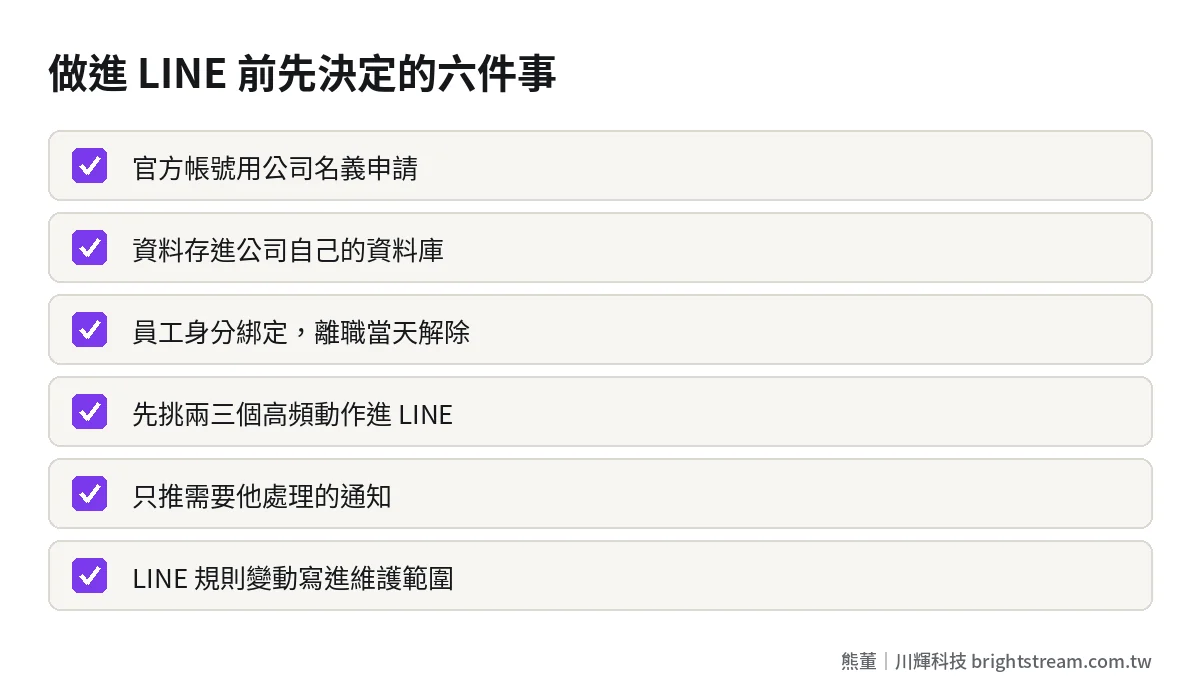
- The official account is in the company's name: Register it under the company, with admin rights held by at least two people inside the company.
- Data lives in the company's database: Not just chat history. It must be exportable, reportable and transferable.
- Identity linking and offboarding: When staff link their account, it maps to their employee record. On their last day, unlink them and revoke permissions.
- Which actions go into LINE and which stay on the back office: Pick two or three high-frequency actions first. Don't move everything in for version one.
- Keep notifications restrained: Only push what needs their action. Push too much and it becomes another ignored group.
- Who handles LINE rule changes: Write it into the maintenance scope. Don't wait until something breaks to find someone.
Number four is the one greed most often derails. The owner sees the first feature work well and wants to move everything into LINE. My advice: do the most painful one first, run it smoothly for a month, then add the next. That's also what I often say: of ten things you want to automate, maybe two are worth building a system for, five just need off-the-shelf tools, and three shouldn't be touched at all.
After launch, how do you know staff are really using it?
Don't look at how many people linked their accounts. Linking just means they tapped it once. I ask owners to watch three numbers in the first month.
First, whether the number of reports or forms coming in through LINE each day keeps rising steadily, or is hot in week one and drops by week three. Second, whether order-shouting and photo reports in the old LINE groups have dropped. If the group is as busy as ever, people are doing it in both places, or never switched at all. Third, whether the person who used to copy orders is spending less time on it each day.
If all three numbers move the right way within a month, that action has really moved into the system, and you can start the next one. If one is stuck, go back and ask the floor what isn't working. Usually it's too many fields, the wrong options, or notifications going to the wrong person. None of it is hard to fix.
FAQ
If our company system is built inside LINE, can LINE see or take our data?
The data lives in the company's own database. LINE is only the entry point and the notification channel. What matters is that admin rights to both the official account and the database are in the company's name, and that backup and export are agreed in writing. That way, even if you change vendors one day, your data goes with you.
What if staff don't want to use their personal LINE for work?
That concern is reasonable. The approach: only push notifications related to their work, don't push non-urgent messages after hours, and make clear that the company can only see what they enter into the system, not their private chats. You can also pair it with company-issued phones.
Can a system built inside LINE connect to our existing ERP or accounting software?
Usually, yes. A common setup is LINE handling floor input and notifications, with data written into the existing system, and office staff using the back office as before. Whether it can connect and what it costs depends on whether your current system offers a way to integrate. The post on connecting ERP to e-commerce, LINE and accounting software breaks down several approaches.
What size company is a LINE-based company system right for?
It has less to do with headcount and more to do with how many people work on the floor or in the field. If most staff sit in an office with a computer open all day, the benefit is less obvious. Companies with lots of floor staff, field staff, retail stores or distributors see the clearest results.
Whether a system gets used depends on how close it is to your staff
In the end, building your company system inside LINE isn't a technical choice. It's an adoption choice. A system with every feature is worth zero if nobody uses it. A system with just enough features that everyone can use on day one is the one where data starts to build up, and where the owner finally sees real numbers.
If you have a system you bought that nobody uses, or you're still deciding which actions to move into LINE first, bring the one thing that gives you the biggest headache to a free 30-minute diagnostic. We'll look at whether it's a fit first. If it isn't, I'll tell you straight.