
“We have backups. The vendor says they back up every day.”
I've heard that sentence many times while checking companies' systems. Then I ask three questions. Where are the backups stored? When did anyone last actually restore from one? If the system won't open tomorrow morning, what time can you start shipping again? Usually by the second question, the room goes quiet.
I'm Johnny Yang, founder of Brightstream Technology in Taiwan. I've led my team through system implementation for seven years, across more than 252 projects in 32+ industries, and I've taken over plenty of systems other people built. When I take one over, the first thing I do is confirm whether the data can be recovered. Every other problem can be fixed over time. Data that's gone is gone.
My conclusion: the minimum standard for backup is not “do you back up every day.” It's whether you can answer two questions, and have actually rehearsed the answers. First, when the system goes down, how much data can you afford to lose at most — a day, an hour, or a few minutes? That decides how often you back up. Second, how long until you must be operating again at the latest — three days, one day, or two hours? That decides your restore method and budget. Once those answers are set, there are four baselines: at least three copies, in two different kinds of locations, with one isolated from the production system (it can't be deleted or encrypted with the same account); backups that include files outside the database; an actual restore at least every six months, with a record of how long it took; and a contract that states whose account holds the backups and who can get them. A backup that has never been restored is just a hope.
Why “we have backups” doesn't mean “we can recover”
First, let me take the owner's side. The vendor says there's a daily backup, and you believe them. That's reasonable. Compared to a company with no backups at all, daily backups are much better, and it's genuinely something maintenance work should include.
But the problems I see on site are almost never “no backups.” They're one of these four:
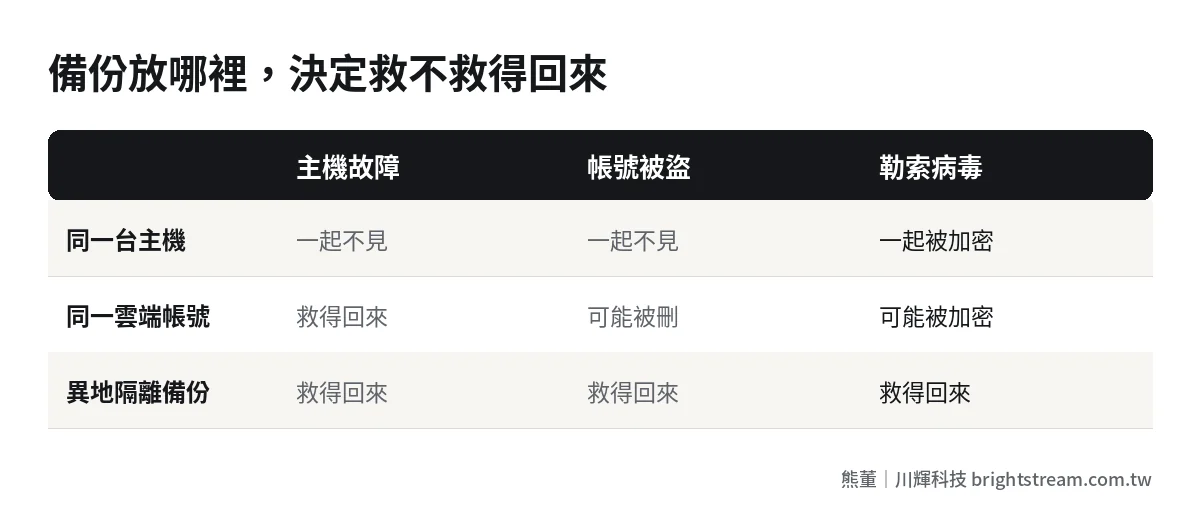
Backups sit with the production system. The backup files are stored on the same server or in the same cloud account. If the server fails, the account gets hijacked, or the whole platform has an incident, the production data and the backups disappear together.
Only the database gets backed up. Orders, customers and inventory are in the database. But files customers uploaded, scanned contracts, product photos and signature images live somewhere else and aren't backed up with it. The recovered system has all the records, and none of the attachments open.
Nobody has ever restored. The backup runs every day, but no one has ever tried restoring from it. When you actually need it, you find the backup file is corrupted, the versions don't match, or restoring takes far longer than you imagined.
Nobody knows who holds the backups. The backups sit in the vendor's account. Day to day, no problem. Then the vendor stops cooperating, goes under, or disappears, and you find out you can't get them. I wrote about how to handle that in When your system vendor goes under or stops responding.
So the question was never “do you have one.” It's “when something actually goes wrong, can you get back the data you need within the time you need.”
Answer two questions first: how much you can lose, how fast you must recover
IT people talk about backups in terms of RPO and RTO. As the owner, you don't need to remember those terms. You only need to answer two questions.
Question one: how much data can you afford to lose at most? Say the system goes down at 3 p.m. today and your last backup was made at midnight last night. Every order, shipment and payment from this morning until 3 p.m. has to be re-entered by hand. Can you accept losing a day of data? Or only an hour? That answer decides how often you back up.
Question two: how long until you must be operating again at the latest? While the system won't open, sales can't send quotations, the warehouse can't ship, and the store can't ring up customers. Can you last three days? Or not even half a day? That answer decides how far you prepare for a restore, and how much it costs.
The answers are different for every system. Here's the reference I often use. The numbers are suggested starting points. Adjust them to how you actually operate:
| System type (assumed) | Max data you can lose | Max time to recover | Backup recommendation |
|---|---|---|---|
| Orders, shipping, store POS | Under one hour | Half a day to one day | Frequent backups or real-time sync, plus a daily full backup |
| Accounting, payroll | One day | One to two days | Daily full backup, plus an extra one before and after month-end close |
| CRM, customer leads | One day | Two to three days | Daily full backup |
| Leave requests, internal announcements | One week | Within one week | Weekly backup is enough |
The most important use of this table is getting the owner and the vendor to speak the same language. You don't need to understand the technology. Just tell the vendor: “For the order system, I can lose at most one hour of data, and it has to be back within half a day. Tell me whether the current backup can do that, and if not, what it will cost.” That conversation is far more useful than “do we have backups.”
Higher requirements cost more: how to decide if it's worth it
Losing only a few minutes and recovering within an hour is technically possible, but it costs much more. You need a standby environment with real-time sync, and someone on call at all times. Not every system is worth that.
You decide the same way you'd buy insurance: first work out what a day of downtime costs you. Say a company's order system is down for a day. The warehouse writes delivery notes by hand and enters them the next day, sales can't take new orders, and the wrong items may go out. Add up that day's revenue impact, the overtime for re-entry, and the cost of returns and exchanges from errors. That's the ceiling on what you'd pay per year for “one less day of downtime.”
On the other hand, if an internal leave system is down for three days, everyone files on paper and nothing is lost. Backing up that system every hour is spending money where you don't need to.
So here's what I usually suggest. List every system in the company, answer the two questions for each, then spend money only on the one or two with the highest cost of downtime. For the rest, hold the minimum standard. That's enough.
When they make the list, many owners discover for the first time that the company's data is scattered across several places: an inventory system, accounting software, a cloud drive, a few Excel files kept by individual salespeople, and a pile of quotations and photos in LINE groups. Each place is a set of data that needs backing up, and each is a point where data can be lost. The more places data lives, the more ground backup has to cover. That's one of the reasons I keep arguing that data should live in one place.
The minimum standard: three copies, two locations, one isolated
No matter how demanding your system is, these are the minimum. The “3-2-1” rule the IT industry talks about, in plain words:
- At least three copies of the data: the one in the production system, plus two backups.
- In two different kinds of locations: for example, one in your cloud hosting provider's backup service, and one in another cloud service or on the company's own storage device.
- One of them isolated: stored where the production system's account can't reach it, or set so it can't be deleted or modified for a period of time.
The third one has become the most important in recent years. In ransomware and account-hijacking cases, the first thing an attacker often does after getting access is delete or encrypt every backup they can see. If your backups are managed with the same account as the production system, in that situation they effectively don't exist. For the security risks of a system nobody has updated in a long time, see What happens when nobody updates your system.
Two more things that often get missed:
Backup scope must include files. Uploaded files, images, documents and config files outside the database all belong in the backup scope. Ask the vendor for a list of “every place this system stores data,” and confirm each item is backed up.
The platform itself can fail too. Putting a system on a cloud platform doesn't mean the platform will always be there. I broke down how to get your data out when a deployment platform suddenly shuts down or has an incident in What to do if Zeabur goes down. The key point: at least one backup must not be on the same platform.
Restore drills: a backup you've never restored is just a hope
This is the most important section of the post. The value of a backup only shows up the moment you restore it.
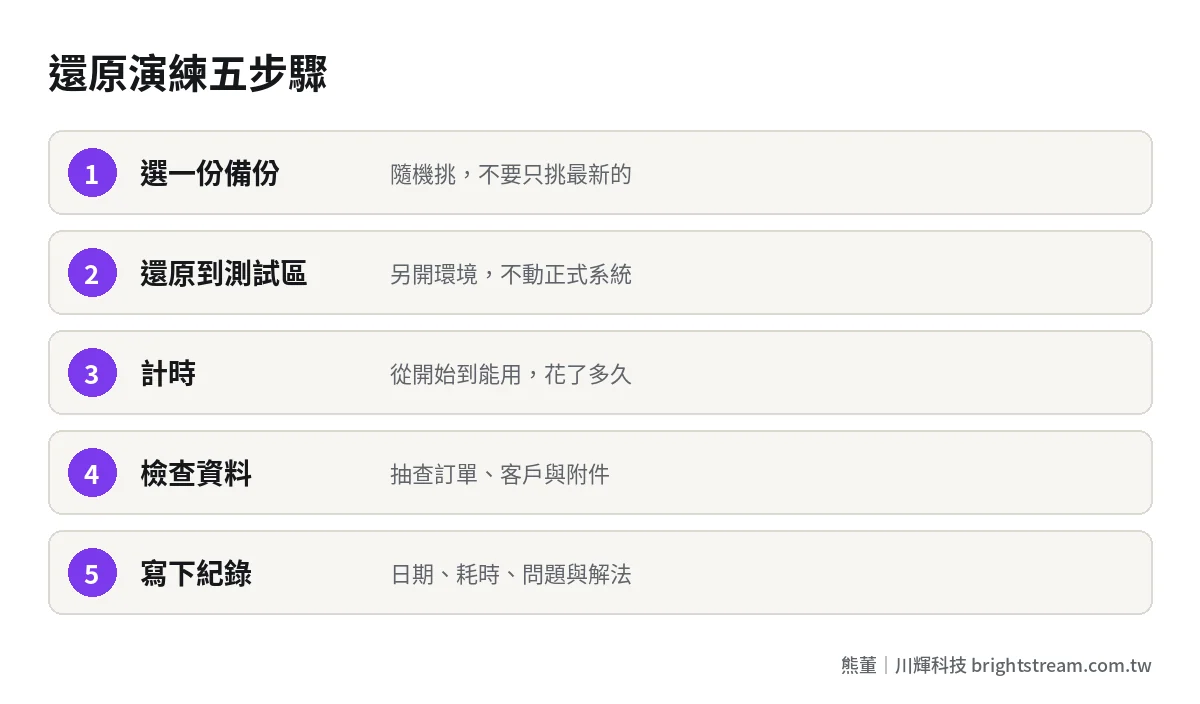
I recommend a restore drill at least every six months. The steps aren't complicated:
- Pick a backup: don't pick the latest one. Pick one at random to simulate a real situation.
- Restore to a separate environment: don't touch the production system. Set up a test environment and restore there.
- Time it: from starting the restore to the system being usable, how long did it take in total? That number is your real recovery time.
- Check the data: spot-check a few orders, a few customers, a few attachments. Confirm they're all there and all open.
- Write it down: the date, which backup, how long it took, what problems came up, and how you solved them.
After the first drill, many companies find two things: restoring takes longer than they thought, and some data was never actually backed up. Both discoveries are far better than finding out on the day something really breaks.
The day the system actually goes down: what to do in the first hour
If you've run drills, you won't panic when it happens. But beyond the technical restore, the company also needs a very short response procedure so everyone knows what to do in the first hour. I suggest writing it on one page and posting it where every manager can see it:
- Who reports, to whom: whoever notices the system acting up notifies the designated contact right away, and that contact calls the maintenance vendor. Don't have everyone phoning separately.
- Stop writing first: if you suspect data errors or an intrusion, stop everyone from entering new orders in the system, so bad data doesn't keep piling up or overwrite data that could still be recovered.
- Switch to fallback operations: shipping, payments and order-taking move to paper or forms prepared in advance. Record every transaction and enter it after the system is back.
- Confirm which point in time to restore to: confirm with the vendor when the last usable backup was made. Everything after that point has to be re-entered by hand.
- Decide: fix or restore: small problems can be fixed directly. Big problems get restored. The owner or a designated manager makes the call. Don't let the vendor decide alone.
These five steps look simple. But the most common chaos on site is people waiting for the system while still entering orders in the broken system, until the data is a complete mess. With this one page, you can contain the damage in the first hour.
How to write backup and restore into your maintenance contract
If an outside vendor maintains your system, backup and restore must be written into the contract. A verbal promise isn't enough. These are the items I suggest spelling out at minimum:
- Backup frequency and scope: how often, and whether it covers the database and which files.
- Backup storage location: where it's stored, whether there's an isolated copy, and whose name the account is registered under.
- Whether you can get the backup any time: when the company asks, how quickly a complete backup is delivered, and in what format.
- Restore drill frequency: how often drills happen, and whether drill records are handed to the company.
- Recovery time when something breaks: when the system is completely down, how fast work starts and how fast it's restored. Negotiate this one together with your service level. For how to write it, see How long should a system fix take? SLAs explained in plain language.
For everything else a maintenance contract should cover, What a system maintenance contract should include has the full 12-item checklist. On backups, the item most often overlooked is the third one: whether you can get the backups yourself. If the vendor holds all of them, it makes no difference day to day. When you really need them, it makes all the difference.
FAQ
Do cloud systems still need their own backup?
You need to confirm, not assume. Many cloud services do back up, but the scope, how long backups are kept, and whether you can retrieve them yourself differ from provider to provider. Go by the terms of service. The safest approach is to regularly export a copy of your important data yourself and keep it somewhere else.
How often should company data be backed up?
It depends on how much data you can afford to lose. If you can lose a day, one backup a day is enough. If you can only lose an hour, you need more frequent backups or real-time sync. Different systems can run at different frequencies. They don't all need the highest standard.
How long should backups be kept?
At minimum, long enough to cover “the time it takes to notice a problem.” Some data errors or intrusions aren't discovered until weeks later. If you only keep backups for seven days, the version from before the incident may already be gone. A common approach is to keep daily backups for a period, plus one monthly copy kept longer. Decide the actual length together with your accounting or legal requirements.
How do I know if my current vendor's backups are any good?
Ask the vendor to run a restore drill and give you a record: which backup, where it was restored to, how long it took, and whether the data was complete. A vendor that's willing and can actually do it usually has sound backups. If they say it's too much trouble or they've never done it, now you know what needs fixing.
Conclusion: the standard is being able to say how long recovery takes
The minimum standard for data backup and recovery isn't “are you backing up.” It's whether you can say how much data you'd lose at most and how long recovery would take at the latest, and whether you've actually restored once. Three copies, two locations, one isolated, files included, regular drills, written into the contract. Do these, and on the day the system goes down, you won't be stuck just waiting.
If you're not sure where your current system's backups are or whether they can be recovered, start by looking at how we assess system maintenance and takeover, beginning with checking your backups.