
"Who changed the price on this order?" "No idea. We all use the same login."
A lot of owners only start thinking seriously about permissions after something goes wrong. Maybe the unit price on an order got changed and a big chunk of margin disappeared. Maybe a salesperson exported the entire customer list before quitting. Or someone deleted a delivery note, the books won't reconcile at month-end, and nobody can find out who touched it.
I'm Johnny Yang, founder of Brightstream Technology in Taiwan. I've led system implementation projects for seven years: more than 252 projects across over 32 industries. Before every system goes live, I sit down with the owner and lay out the permissions, because this is one of the few things in a system that "runs fine without it, but you'll regret it the day something goes wrong."
My conclusion: the point of system permissions is not to lock things up. It's to make sure every high-risk action has someone accountable and a record you can check. Split actions into four types — view, edit, delete, export — then decide how to handle each by "how much money it affects" and "how often it happens." Frequent and low-value: just open it. Frequent but high-value (like changing prices): open it, but set a threshold — anything below the floor price needs manager approval. Rare and high-impact (like deleting documents or exporting the full customer list): require two-person review or restrict it to specific people. Finally, three non-negotiables: no shared accounts, access shut off on the employee's last day, and every change records who changed what and when. Cost and margin fields are only visible to people who make decisions with them. Not everyone who can see an order needs to see its cost.
Where does an owner pay for bad permissions?
Permissions sound abstract. The cost is concrete. Here are the four situations I see most often on site. Every one of them turns into money.
Prices get changed, and nobody knows. To close a deal, a salesperson knocks the unit price down a bit. The system has no floor price and doesn't record who changed it. One or two orders, you won't notice. Over a year, that's the slice of margin quietly eaten away.
The whole company can see cost and margin. The more people who can see cost, the easier it is for that number to reach customers or competitors. Once sales knows the cost, their floor in a price negotiation drops too.
The entire customer list walks out the door. If anyone can export all customer data, the company's most valuable asset has no lock on it. This is the same issue as the three lines of defense in will a departing consultant take the client list.
Documents get deleted, and the books don't reconcile. Someone deletes a delivery note that was issued wrong and creates a new one. Seems reasonable. But at month-end reconciliation, one document's history is missing and nobody can explain it.
All four have one thing in common: the problem isn't bad employees. It's that the system didn't hold the line for the company. Most people mean no harm. The system allowed it, so they did it.
"The tighter the lock, the safer" is only half right
From the owner's side, this instinct is normal. You're afraid of problems, so lock everything. Only the owner and accounting can view and edit, everyone else requests access when they need it. Sounds safest.
But I've seen too many companies after they lock everything down. Sales has to wait for a manager to grant access before sending a quotation, the manager is in a meeting, the customer won't wait. The warehouse needs to fix a wrong quantity, can't find anyone with access, and writes it on paper for now. Eventually people get fed up and start sharing the manager's account, or just go back to Excel and LINE. The tighter the permissions, the stronger the motive to go around the system.
And once people share accounts, every permission you set is useless, because "who changed it" in the system is always the same person.
So the real question in permission design isn't how tight. It's how finely you split it. Not "can this person use the order module," but "can this person view orders, change prices, delete orders, export." Four separate decisions. Many things can be open as long as they're logged. Only a handful of actions really need locking. Same logic as who's holding up approvals: the owner doesn't sign everything, only what needs signing.
Split actions into four: view, edit, delete, export
Before setting permissions, sort every action in the system into four types. This is the foundation of the whole design.
- View: whether someone can see a record or a field. Focus on sensitive fields: cost, margin, floor price, salary, customer contact details.
- Edit: whether someone can change data. Focus on fields that affect money: unit price, discount, quantity, payment terms.
- Delete: whether someone can delete or void a document. Deletion is the hardest action to trace, so as a rule, replace "delete" with "void" and keep the original record.
- Export: whether someone can pull data out of the system in bulk. Looking at records one at a time is part of the job. Exporting the whole thing is something else.
The same person, on the same data, can have completely different permissions for each of these four actions. For example, sales can view their own customers' orders, change the unit price but not below the floor price, cannot delete orders, and cannot export the full customer list. Think about them separately and you'll find most permissions can be looser than you expected, as long as a few actions are locked down.
Beyond actions, there's another dimension people often miss: data scope. Same "view orders" — a salesperson only needs their own customers, a branch manager only needs their own branch. Neither needs the whole company. Draw the scope clearly, and even if someone takes data, they only take the part they were already handling, not the whole company.
One more reality: the system can control exports. It can't control phone screenshots. If an employee can see a screen, it can end up in a LINE group. So the real defense isn't banning screenshots. It's not showing that screen to people who don't need it in the first place. For sensitive information like cost, floor prices, and the full customer list, the best protection is that it never appears on their screen.
A role-permission template you can use as-is
Below is a common permission setup for a hypothetical 50-person trading or manufacturing company. Adjust it to the roles in your own company. Cells with a limit mean conditional access; the conditions are explained below the table.
| Action | Sales | Sales manager | Warehouse | Purchasing | Accounting | Owner |
|---|---|---|---|---|---|---|
| View orders | Own customers only | All | Shipping info only | Not needed | All | All |
| View cost and margin | No | Margin % only | No | Purchase price only | All | All |
| Change selling price | At or above floor price only | Yes, reason logged | No | No | No | Yes |
| Change floor price | No | No | No | No | No | Yes |
| Void documents | Request | Approve | Request | Request | Approve | Approve |
| Export customer list | No | Own team only | No | No | No | Yes |
| Change inventory quantity | No | No | Stock-count adjustments only, manager approval required | No | No | Yes |
A few notes. First, when sales prices below the floor, it's not forbidden — it goes to a manager for approval. Rush orders don't get stuck, and exceptions have someone accountable. Second, the sales manager sees margin percentage, not cost amounts. Enough to make the call, without laying out the whole cost structure. Third, voiding a document always goes through request and approval, and the original is kept, so the books reconcile.
This table isn't the right answer. Your company might not have purchasing, or accounting might also run the warehouse. The point is that someone has thought about every cell, instead of taking whatever the system defaults to. If different customers get different prices, see wholesale pricing tiers for how to set floor prices.
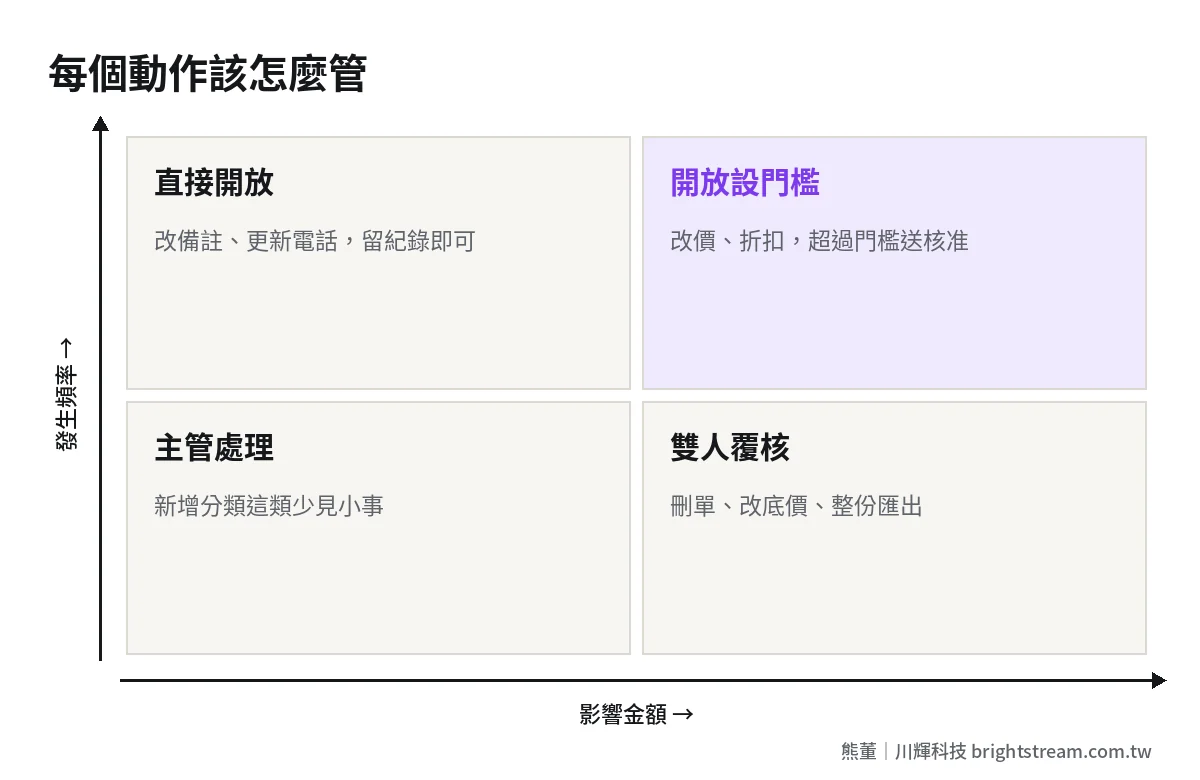
Use "amount" and "frequency" to decide how to manage each action
Once the table is done, you'll still hit plenty of actions you're unsure about. Ask two questions: if this action goes wrong, how much money does it affect? How often does it happen?
- Frequent, low impact: for example, editing a shipping note or updating a customer's phone number. Just open it and log it. Locking this kind of thing only pushes people around the system.
- Frequent, high impact: for example, changing selling prices or giving discounts. Open it, but set a threshold, and anything past it goes to approval automatically. This is the cell where you most need the system's help, because no one can watch it manually.
- Rare, low impact: for example, adding a product category. A manager or a designated person can handle it.
- Rare, high impact: for example, deleting documents, changing floor prices, exporting the full customer list, changing inventory quantities. Restrict to specific people, or require two people to confirm.
With these four cells sorted, the owner doesn't have to manage everything. Just manage the bottom-right cell, and where the threshold sits in the top-right cell.
Three non-negotiables: no shared accounts, access off at departure, changes logged
Everything above can be adjusted to your company. These three are the floor, no matter how small you are.
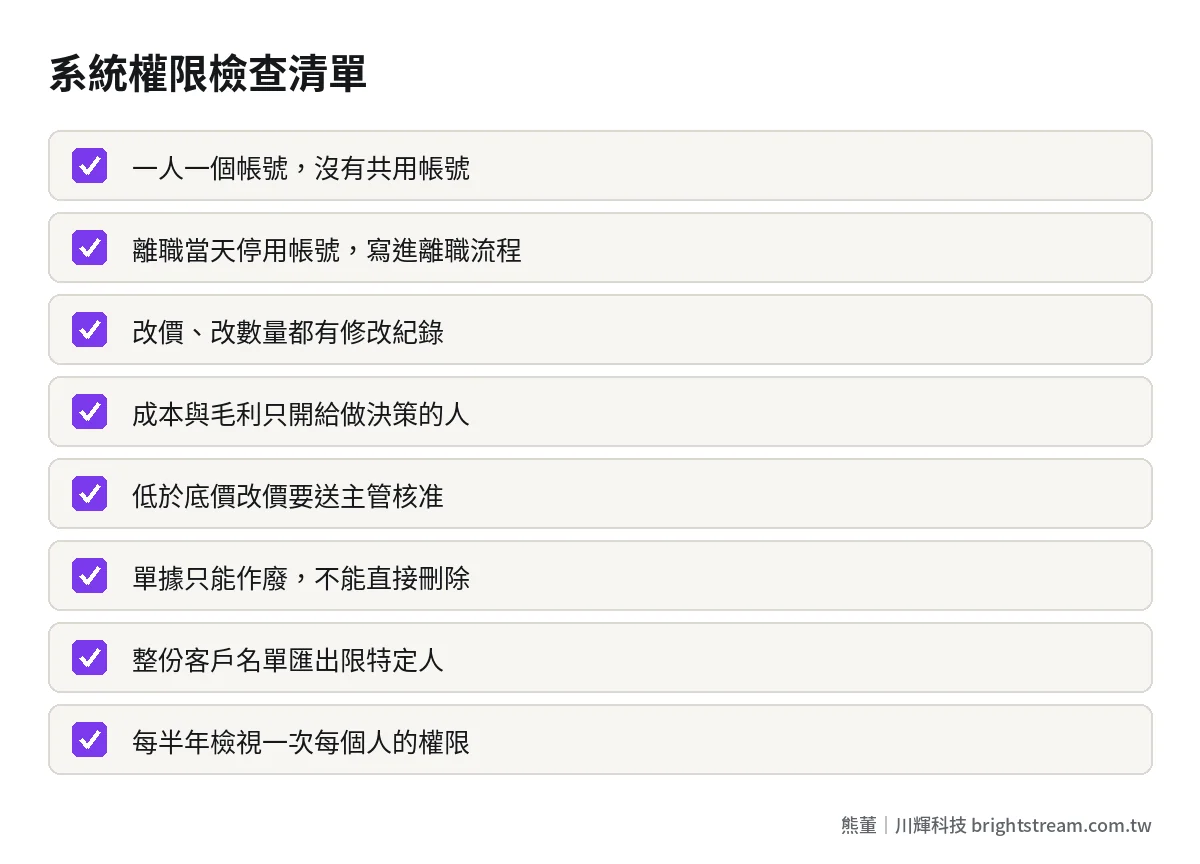
One: no shared accounts. One person, one account. This is the precondition for all permission design. With shared accounts, no matter how detailed your permissions are, they mean nothing, because when something goes wrong you can't find out who did it. If someone says "more accounts cost more," treat that money as an insurance premium.
Two: shut off access on the last day. On an employee's last day, the account is disabled that day — not cleaned up next month. Write this into the offboarding process, triggered by HR or the manager. Don't rely on IT remembering. For the full handover process, see employee handovers always miss something.
Three: changes must be logged. Who, when, which field, from what value to what value. Nobody looks at this log day to day. But when something goes wrong, it's the only thing that can explain what happened. When choosing a system, always ask: which fields have change logs? How long are logs kept? Who can see them?
Get these three right and, even if your permission table isn't perfect, you can at least trace what happened. Get them wrong and no matter how neat your permission table looks, it's just paperwork.
Permissions aren't set once — review them regularly
Companies change. People get promoted, move departments, take on two roles, and permissions usually only get added, never removed. After three years, a senior employee may have more permissions than the owner, and nobody remembers why they were granted.
I recommend a permission review at least every six months: pull up what permissions every account currently has, ask each department head to confirm "does this person still need these," and revoke what isn't needed. It takes less than half a day, and it clears out a lot of risk you can't see.
There's also a common bad habit when onboarding new hires: just "copy a senior colleague's permissions." Fastest option, but it also copies over everything that colleague accumulated over the years and no longer needs. The better way is to define roles first — sales, sales manager, warehouse, accounting — each with a fixed set of permissions. New hires get a role applied, special needs get added individually, and you write down why. With roles defined, reviews go much faster too, because you check whether each role makes sense instead of going person by person.
If your system can't even "list what permissions each person has," that's a signal: its permission design may not be good enough, and next time you replace or modify the system, put this in the requirements. The rules for feeding company data into AI tools are an extension of the same permission logic — see is it safe to put company data into AI.
FAQ
We're a small company of a dozen or so people. Do we still need permissions?
Yes, but they can be simple. At minimum, do three things: one account per person, cost and floor prices visible only to those who need them, and accounts disabled on the last day. Permissions are easiest to set when you're small. Wait until you're fifty people, and you'll first have to spend time figuring out what everyone can currently do.
Sales needs to see cost to quote. What then?
Let sales see the "floor price" or "margin percentage," not the cost amount itself. A manager or the owner sets the floor price. When sales prepares a quotation, the system tells them directly whether it's acceptable, and anything below the floor goes to approval. Sales gets something to base decisions on, and the cost structure isn't laid out in full.
What's the difference between deleting and voiding a document?
Deleting makes the document disappear from the system. Voiding marks it as invalid but keeps the original content. After voiding, you can still see what the document originally said, who voided it, and why — so month-end reconciliation can be explained. As a rule, documents that affect money can only be voided, not deleted.
Who should decide permission design — IT or the owner?
The owner and department heads decide. IT or the system vendor carries it out. Who can see cost and who can change prices are business decisions, not technical ones. IT can offer options and advice, but the final call belongs to the people responsible for those numbers.
Closing: permissions make exceptions accountable, not lock everyone out
Whether system permissions are set well isn't about how tight they are. It's about whether, when a high-risk action goes wrong, you can find out who did it and why. Split view, edit, delete and export. Decide by amount and frequency whether to open, set a threshold, or require review. Hold the three lines — no shared accounts, access off at departure, changes logged — and you don't have to watch everything yourself.
If you're not sure where your current system permissions are leaking, bring the one thing that worries you most to a free 30-minute diagnostic, and we'll lay out the permission table together.