“I want to put an AI in the company. Roughly how much does that cost? Do I just buy a graphics card, or do I need one of those servers that costs several million NT dollars?”
When owners ask this, they usually picture one of two extremes: either “swap a better graphics card into the gaming PC at home,” or “the rows of glowing racks from the tech news.” The real answer is in between, and the range is very wide.
I'm Johnny Yang, founder of Brightstream Technology in Taiwan. I've led my team through seven years of system implementation, more than 252 projects across 32+ industries, and we have built on-prem models inside clients' own server rooms.
My answer: you don't choose hardware by budget. You choose it by “how many people use it at the same time” and “how big a model you need to run.” For a company of a few dozen people, a workstation with a 96 GB professional card at about NT$1,000,000 is usually enough. For five people or fewer trying it out, a workstation or Mac Studio costing a few hundred thousand NT dollars gets you started. Only when hundreds of people use it at once do you need data center servers costing several million to over NT$10 million.
Why GPU memory matters more than compute
Most people buy a graphics card based on how fast it is. But when running AI models, the first thing that blocks you is usually memory, not speed.
The logic is simple: the whole model has to fit in the card's memory before it can run. If it doesn't fit, speed is irrelevant. The rough formula is “parameter count × bits per parameter ÷ 8.” According to Hugging Face's documentation, an 8B model takes about 16 GB at 16-bit and about 4 to 5 GB compressed to 4-bit. A 70-billion-parameter model still needs over 40 GB even at 4-bit.
And that's just the model itself. When many people ask questions at once and documents are long, you need extra memory to hold each person's conversation. So step one in choosing hardware is checking whether there's enough memory. Speed is step two.
For how to choose a model size, start with how to choose an on-prem AI model.
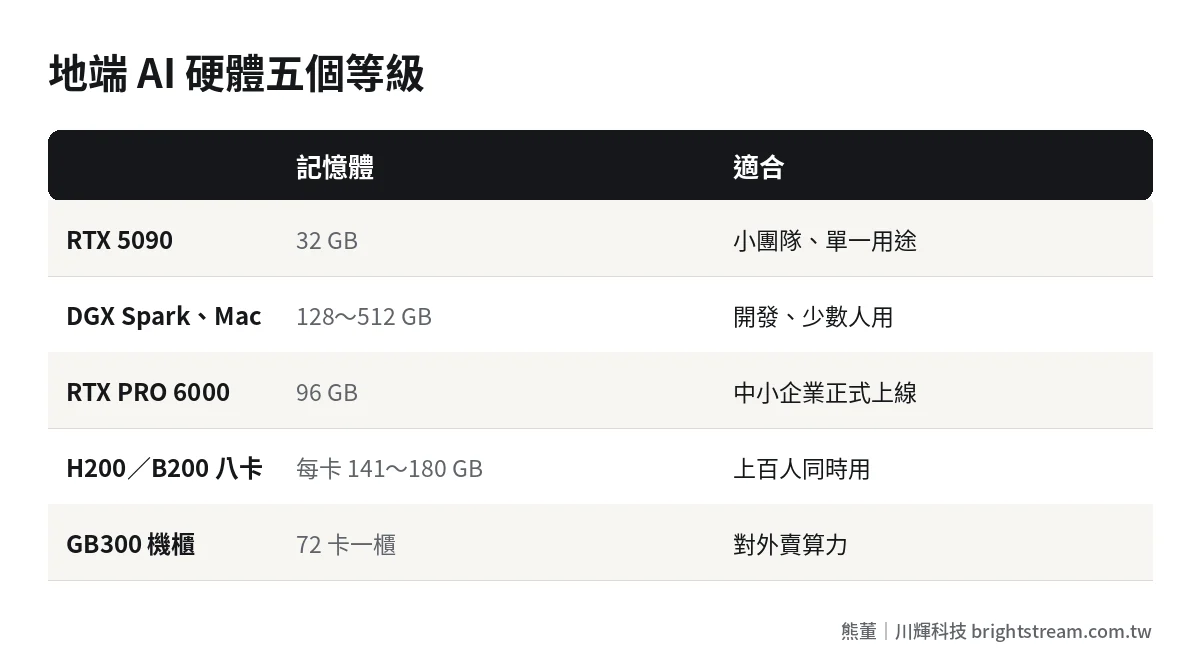
Five tiers of on-prem AI hardware
We group common hardware into five tiers. Note: prices are rough estimates compiled from public information in 2026, hardware only, excluding installation, integration, maintenance and other service fees. The supplier's quotation on the day is what counts.
| Tier | Example model | Memory | Roughly fits | Hardware estimate | Good for |
|---|---|---|---|---|---|
| L1 Consumer-card workstation | RTX 5090 | 32 GB | 27B to 32B parameters (4-bit) | 32 GB-class complete system in Taiwan about NT$160,000 | Small teams, single use case |
| L2 AI mini PC | NVIDIA DGX Spark | 128 GB unified memory | Officially, inference up to 200B parameters | Taiwan price about NT$165,000 to NT$240,000 | Development, fine-tuning, a few users |
| L2 Mac | Mac Studio M5 Ultra | 96, 256, 512 GB | 256 GB fits DeepSeek V4-Flash at 4-bit | US$5,499 to 22,299 | Individuals or small teams, quiet and power-efficient |
| L3 Professional-card workstation | RTX PRO 6000 Blackwell | 96 GB | gpt-oss-120b, 70B parameters (4-bit) | 96 GB-class complete system in Taiwan about NT$1,140,000 | SMEs in production across multiple departments |
| L4 Data center server | HGX H200 or B200, eight GPUs | 141 to 180 GB per card | Almost every open-source model | H200 about US$320,000 to US$420,000; B200 about US$450,000 to US$550,000 | Hundreds of concurrent users, multiple use cases |
| L5 Rack-scale | GB300 NVL72 | 72 cards in one rack | Frontier large models | About US$3,000,000 to US$6,500,000 | Facilities selling compute to others |
Sources: Taiwan complete-system prices from MAQ; DGX Spark Taiwan price from Zonetech; Mac Studio prices and supported models from VDF; eight-GPU H200 from Mercatus; B200 and GB300 compiled by IntuitionLabs.
Why you need to watch prices closely when buying hardware in 2026
First, an admission: hardware prices always move. That's not news. But 2026 is unusually extreme.
Take the RTX PRO 6000. According to BigGo's report, a single card cost about US$8,565 in April 2025. By August 2026 the official price was US$16,000, close to double. The same report says the RTX 5090's suggested retail price is US$1,999, while its US market price exceeded US$4,000 in August 2026.
The cause is a memory shortage. The HBM memory used in data centers already makes up 30 to 40 percent of an accelerator card's cost, and the large cloud providers have reserved most new cards first. That means two things:
- Quotations expire fast. Today's quotation may not hold next month. The contract needs to state clearly how hardware prices get adjusted.
- Don't buy everything at once. Prove it's useful on hardware one tier down, or rent GPUs for a proof of concept, and buy once the requirements are clear.
Our approach: clients buy the hardware themselves, or we purchase it for them at cost. We don't make a margin on hardware. With prices swinging this much, clients are more comfortable that way.
Which tier fits which company?
L1: the owner or a team of five or fewer trying it out
An RTX 5090 has 32 GB. It runs 20B to 30B parameter models smoothly and is fast for a single user. It's good for starting with one use case, such as internal document Q&A, to prove AI actually helps. The downside is limited memory. It gets tight when several people use it at once or documents are long.
L2: DGX Spark and Mac Studio fit big models but aren't fast
What these two machines share is “large unified memory,” so they can hold bigger models than a graphics card. DGX Spark has 128 GB, and NVIDIA officially says it can run inference up to 200B parameters and fine-tune up to 70B. Mac Studio M5 Ultra goes up to 512 GB.
But “fits” does not mean “runs fast.” These machines have lower memory bandwidth than professional graphics cards. One user is fine. Many concurrent users is not. They are best for development, testing, fine-tuning, or the owner running a larger model alone. I'll write a separate post on the Mac in this series.
L3: the workhorse for SMEs in production
The RTX PRO 6000 has 96 GB. It can run gpt-oss-120b or a compressed 70B parameter model, and paired with an inference engine built for multiple users, a few dozen employees can use it at the same time without trouble. For companies of 20 to 200 people, this is the most common choice for going live.
L4 and L5: hundreds of concurrent users, or selling compute
Eight-GPU servers and rack-scale equipment are data center specs. They need a dedicated server room, power, and cooling. Internal enterprise use rarely needs this tier, unless hundreds of people are using multiple models at once or you plan to offer AI services externally.
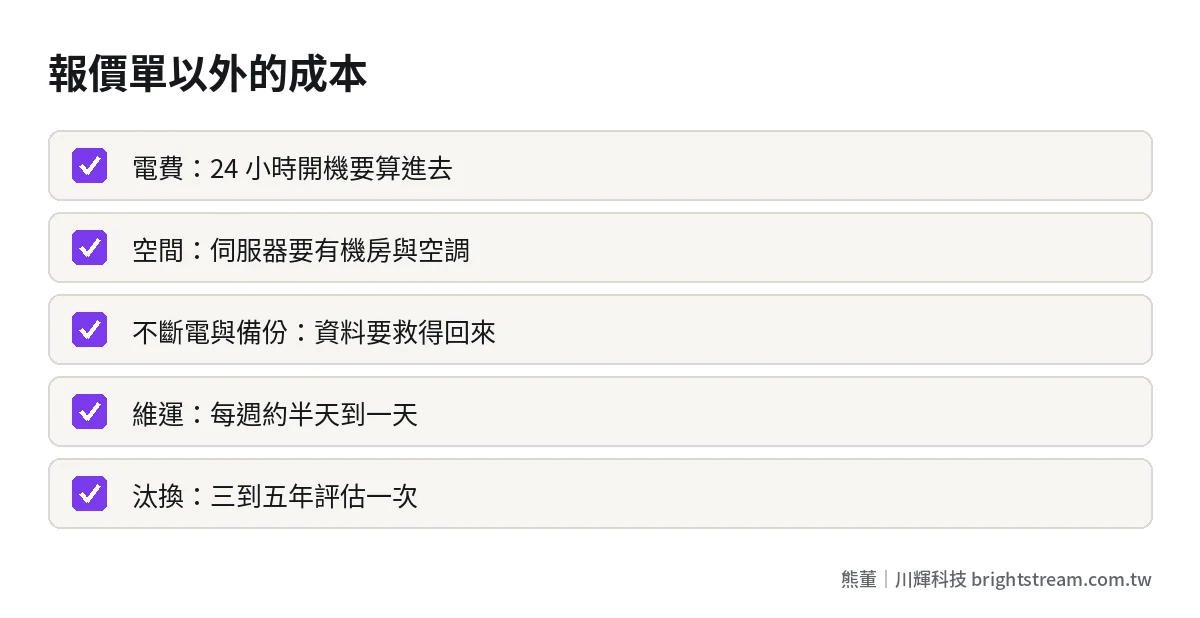
Do the math first: these costs aren't on the hardware quotation
Many owners only look at the hardware quotation and ignore other costs that will definitely happen.
| Cost | Description |
|---|---|
| Electricity | A single professional card draws several hundred watts. Factor in the power bill for running 24 hours a day |
| Server room or space | A workstation can sit in the office; a server needs a room with air conditioning and stable power |
| UPS and backup | When the power cuts out or a disk fails, data and services have to be recoverable |
| Operations staff | Model updates, security patches, drivers. If you run it yourself, expect half a day to a full day per week |
| Replacement | GPU generations turn over fast. Reassess every three to five years |
The operations staffing estimate comes from NSS's deployment notes. This is also why we recommend SMEs sign a maintenance contract rather than hire someone just to look after the machine. For minimum standards on backup and recovery, see how long it takes to recover company data when systems go down.
Rent first, or buy outright?
With hardware prices this unstable, this is the question owners most need to think through.
My recommendation: rent during the proof of concept, buy once it's proven useful. Taiwan already has quite a few GPU rental services. According to GPUtw's roundup, an RTX 4090 runs about NT$13 to NT$23 per hour and an RTX 5090 about NT$24 to NT$32 per hour, and there are monthly plans for a single RTX 4090 starting at NT$13,800. Renting for a month or two for a proof of concept costs far less than buying a workstation outright.
One thing to watch when renting: the proof of concept runs on a rented machine, so the data isn't inside your company. At this stage, test with dummy or de-identified data. Do not upload real medical records, formulas, or customer data.
When should you buy? When you've pinned down three things: which model, how many people will use it at the same time, and how long the documents are. Once those three are settled, the hardware spec is settled, and that's when you can buy without getting it wrong. Many owners buy the biggest machine up front, and their usage never needs it. Others buy too small and have to add more a month after going live. Renting first is how you avoid both kinds of waste.
Another option is “rent the server room, buy the machine,” meaning you colocate the server you bought in a professional facility. This fits companies that need an eight-GPU server but don't have a suitable server room in-house.
Is on-prem hardware always cheaper than the cloud?
Not necessarily. This needs to be said honestly.
If usage is low, paying the cloud per use is usually cheaper. One vendor estimated that daily usage has to reach about 8 million to 10 million tokens to break even (see MAQ; these are the vendor's own assumptions). Day-to-day usage at SMEs is usually far below that.
So the reason for on-prem usually isn't “it's cheaper.” It's “the data can't leave.” If your data can go to the cloud, use the cloud first. If it can't leave, on-prem is the only option. For the trade-offs between cloud and on-prem, see how much AI implementation costs.
FAQ
Can a regular office computer run on-prem AI?
It can run small models, provided it has a discrete graphics card and enough video memory. Something like gpt-oss-20b runs on about 16 GB, which is fine for a first test. Office PCs with only integrated graphics aren't recommended. They'll be too slow to use.
Is one RTX 5090 workstation enough for the whole company?
For five people or fewer and a single use case, usually yes. With a few dozen concurrent users, 32 GB of memory gets tight. Move to a 96 GB professional-card workstation and pair it with an inference engine that supports many simultaneous users.
Hardware prices keep rising. Should I buy now or wait?
Don't buy everything at once. Rent GPUs or use hardware one tier down for a proof of concept. Buy after you're sure it's useful and know how many people will use it. The contract should state the quotation's validity period and how prices get adjusted.
Where does on-prem AI hardware go?
Workstations and Macs can sit in the office. Watch cooling and power stability. Eight-GPU servers and above need a server room, either your own or colocation in a data center with enough power and cooling.
Conclusion: count users and model size first, then look at budget
Choosing on-prem AI hardware doesn't start with “how much budget do I have.” It starts with “how many people will use it at once, and how big a model do I need to run.” Most SMEs land in L1 to L3, from just over NT$100,000 to just over NT$1,000,000.
If you want to know which tier your company belongs in, look at how we do AI system development, then bring your headcount and use cases and let's talk.