"We have 120 people now. We can't keep running on that little system, can we? A big brand would be safer." Once a company passes 50 people, the owner often starts thinking this around some month-end. Accounting complains the books don't reconcile. Sales says a quotation takes three days. The warehouse is off a little at every weekly stock count. The team meets about switching ERP. Someone pushes a big-brand packaged system. Someone says everything is cloud now. Someone says our processes are unusual and we should go custom-built. Six months later, all three paths still make sense, and nobody has convinced anybody.
I'm Johnny Yang, founder of Brightstream Technology in Taiwan. In 7 years I've done 252+ projects across 32+ industries, and we deliver over NT$20,000,000 in systems a year. Of the companies I've worked with, the 50-to-200-person range is the hardest to choose for. The small-company approach no longer works, and the large-enterprise approach is too heavy.
My conclusion: a 50–200 person company choosing an ERP doesn't have to pick one of packaged, cloud or custom-built. Draw the line by process instead. Accounting, payroll, general purchasing-sales-inventory — processes every company runs roughly the same way, where there's a standard answer — go packaged or cloud. They're mature and cheaper. Quotation rules, production scheduling, distributor pricing, customer ordering — processes that make you different from your competitors and directly decide whether you make money — are the ones worth custom-building your way. For each process, ask two questions: How different is this from how competitors do it? If it goes wrong, do you lose money directly? Custom-build only when both answers are yes. Everything else follows the standard.
Why does the ERP question change after 50 people?
In a company under 20 people, the owner sees every order. Who took the order, whether the shipment went out, which customer hasn't paid — you ask once and you know. At that stage the system just helps keep the books. I covered how to decide whether to implement an ERP at that size in Does a company under 20 people need ERP.
Past 50 people, things change. There are more departments. One order passes through sales, purchasing, production control, warehouse and accounting, and every handoff can drop something. The owner can no longer see every order, only reports. But each department compiles its own numbers, and they often don't match.
At this point the system isn't solving bookkeeping. It's solving handoffs between departments. Who can see costs, who can change prices, who has to sign which order — at 20 people this runs on unspoken understanding. At 100 people it has to run on the system. That's also why choosing wrong costs far more than it does for a small company: more people are involved, and when it doesn't get used, going back is hard.
There's one more situation specific to this size. Most companies have one or two people handling computers and the network, but no in-house development team. That means when something breaks or a process needs to change, you almost always depend on the vendor. So when choosing an ERP, look beyond features. Look at who you'll call for every future change, how long you'll wait, and what it will cost.
What are packaged, cloud and custom-built each actually selling?
First, let's define the three paths. Packaged means a standardized ERP you license. Cloud means an ERP you subscribe to monthly or yearly, running on the vendor's servers. Custom-built means a system developed around your company's processes. In practice many products sit somewhere in between, but from an owner's point of view, knowing these three personalities is enough.
| Comparison | Packaged ERP | Cloud subscription ERP | Custom-built system |
|---|---|---|---|
| What you're buying | Standard processes many companies have run | Standard processes, plus no servers to maintain | A system built around your processes |
| Speed to go live | Medium, depends on how much configuration | Usually fastest | Depends on scope; specs must be written clearly first |
| Fit | You adapt to the system | You adapt to the system | The system adapts to you |
| Cost of changing a process | Secondary development; watch out at version upgrades | Usually you wait for official updates | Separate development against the spec |
| Long-term cost structure | License plus annual maintenance | Subscription, usually by headcount or module | Build fee plus maintenance fee |
| Lock-in risk | Licensing and secondary development | Data export terms | Who holds the source code and documentation |
| Best-fit processes | Accounting, payroll, standard inventory | Standard processes, multiple sites needing remote access | Processes that differ from competitors and affect profit |
Choosing between on-premise and cloud involves where your data lives and who maintains the servers. I compared those separately in Cloud ERP vs on-premise ERP. The point of this table is the last row: the three paths don't fit different companies. They fit different processes inside the same company.
"At this size you should go with a big packaged system" is only half right
Many owners feel that once the company reaches a hundred people, it should use the big-brand packaged system everyone else uses. More disciplined, safer, easier to hire for later.
That's half right. Packaged processes were worked out across many companies. Accounting entries, receivables and payables, payroll — these already have standard answers. You don't need to invent your own. Running these processes the packaged way can actually pull your company's practices back on track.
The real problem is the other half. For a 50–200 person company, the biggest pain usually isn't accounting. It's those processes that make you different: quotations that calculate a dozen-plus processing combinations, distributors on five price tiers, scheduling that depends on machines and technicians. Force these into a standard system and staff find the system can't do it. So they patch around it with Excel and LINE. The system goes live, but the real work stays outside it.
We worked with a printing company that had already spent over NT$1,000,000 on two ERPs before coming to us. Neither got used. The third was built around their own processes. Staff adoption went from under 20% to over 90%. Quotations that took 30 minutes by hand became automatic estimates, and missed orders dropped to near zero. The difference wasn't how big the system was. It was whether quotation, their most central process, followed how they actually work. The full story is in What made the printing company's third ERP finally work.
Draw the line by process, not by company
So my advice: don't ask "which kind of ERP fits our company." List your processes one by one and judge each one separately.
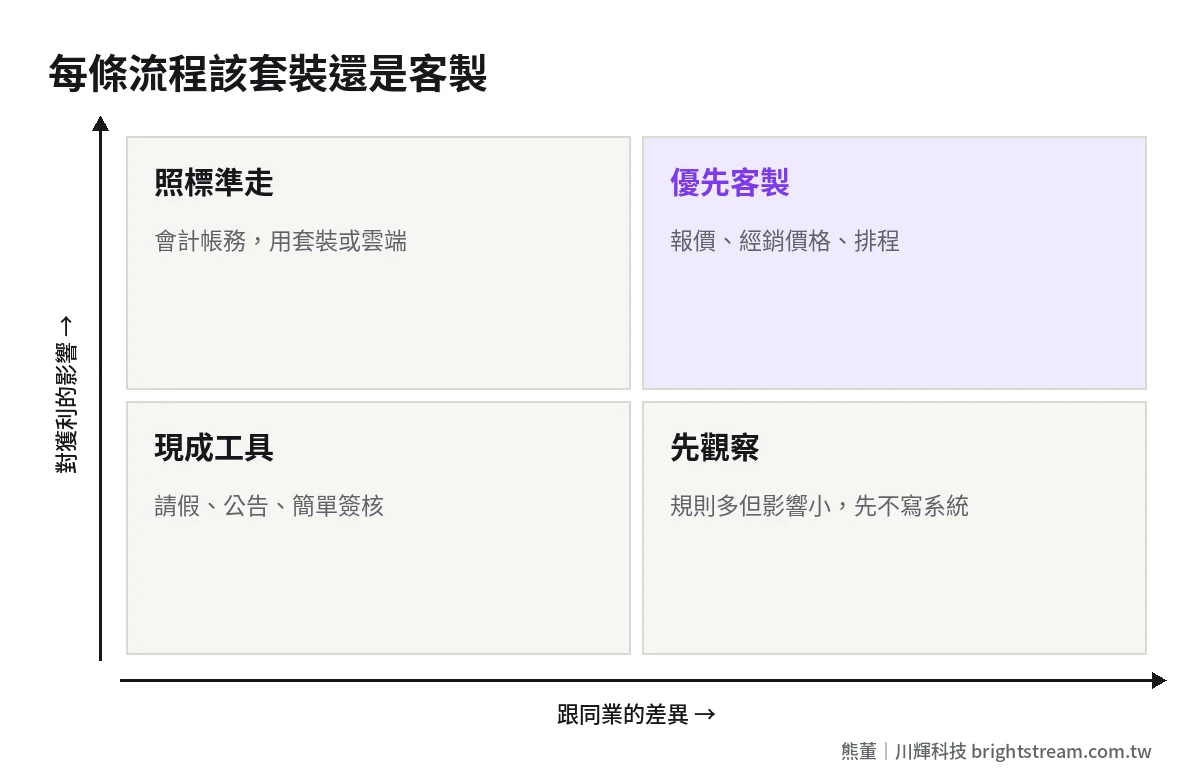
For each process, ask two things. First, how different is it from how competitors do it? Second, if it goes wrong, do you lose money or customers directly? Two yeses: worth custom-building. Two nos: packaged or cloud is fine. Only one yes: start with the standard approach, or add a small tool outside the standard system, and watch it for a while.
You can use the table below directly. Fill in your own company's processes.
| Process (example) | Very different from competitors? | Lose money directly if wrong? | Recommendation |
|---|---|---|---|
| Accounting, receivables and payables | No | Yes | Packaged or cloud, follow the standard |
| Payroll, leave | No | No | Off-the-shelf tools are fine |
| Quotation and estimating | Often yes | Yes | Evaluate custom-built first |
| Production scheduling, job dispatch | Depends on industry | Yes | Map the rules first; custom-build if there are many |
| Distributor pricing and ordering | Often yes | Yes | Evaluate custom-built first |
| General purchasing, inventory | Mostly no | Moderate | Packaged or cloud |
| Internal announcements, approvals | No | No | Off-the-shelf tools are fine |
This table will also cut a lot of requirements. The thing I say to owners most often is "don't build this." Out of ten things you want to automate, roughly two are worth building a system for, five are fine with off-the-shelf tools, and three shouldn't be touched at all. Those three are the ones used twice a month, with different rules each time, and nobody to maintain them afterward.
How far custom-building pays off, and which custom work most easily turns into a trap, I break down in more detail in Should your ERP be custom-built.
Where mixing systems most often goes wrong: the same data stored twice
Drawing the line by process usually ends in a mix: accounting on packaged or cloud, quotation and ordering custom-built. This is the most cost-effective approach, but there's a very common trap: the same data stored in two places.
Customer data has one copy in the custom system and another in the accounting system. A product price gets changed in the quotation system, but accounting still has the old one. At first people sync it by hand. Three months later nobody remembers which copy is right. That's right back to the company's original problem: one copy in the system, one in Excel, one in LINE.
A common case: sales adjusts the price for a long-time customer in the quotation system. The accounting system doesn't change. At month-end, the invoice goes out at the old price. The customer calls to ask. Sales and accounting each hold their own data, and each says theirs is right. Nobody did anything wrong. The company let the same data have two homes.
So before mixing, decide where the "master record" for each type of data lives. Customers, products, prices, inventory — each has one system as the source of truth. The other only reads it, never edits it, and an integration syncs them automatically. The reason I build systems at all is to keep data in one place. Mixing is fine, but each type of data gets only one home.
The other thing to watch is the users. In a 50–200 person company, a large share of people aren't in the office: sales are out on the road, technicians are on the shop floor, drivers are driving. They won't open a computer and log in for one order. That's why we build company systems inside LINE. Staff don't learn new software, they can use it on day one, and data from the field actually gets in.
How can you tell whether a vendor is drawing the line right for you?
Whether packaged, cloud or custom-built, every vendor will say they're the best fit for you. A more reliable test is what they ask and say in the first two meetings.
Good sign: they ask about your processes before talking about their product. They'll ask where your orders come from, how quotations are calculated, which step goes wrong most often, which step staff complain about most. After that, they'll tell you which parts are fine with the standard approach, and may say outright that some requirements don't need to be built. A vendor willing to cut requirements usually cares more about whether the system gets used after go-live.
Warning sign: they say yes to everything. The packaged vendor says "our system can be configured for all of it." The custom vendor says "we'll build whatever you want." It sounds reassuring, but it means they aren't drawing any line for you. A 50–200 person company usually has a long requirements list. Building everything means scope out of control, timelines slipping, and budget top-ups.
Another simple test: ask the vendor to run your company's most complicated order. The packaged vendor has to actually do it in the system, not say "that can be handled with secondary development." The custom vendor has to explain that order's rules back to you more clearly than your own staff can. Only then do you know they actually understood.
Before you choose, do these four things
Whichever path you end up on, finishing these four things first is worth more than sitting through ten demos.
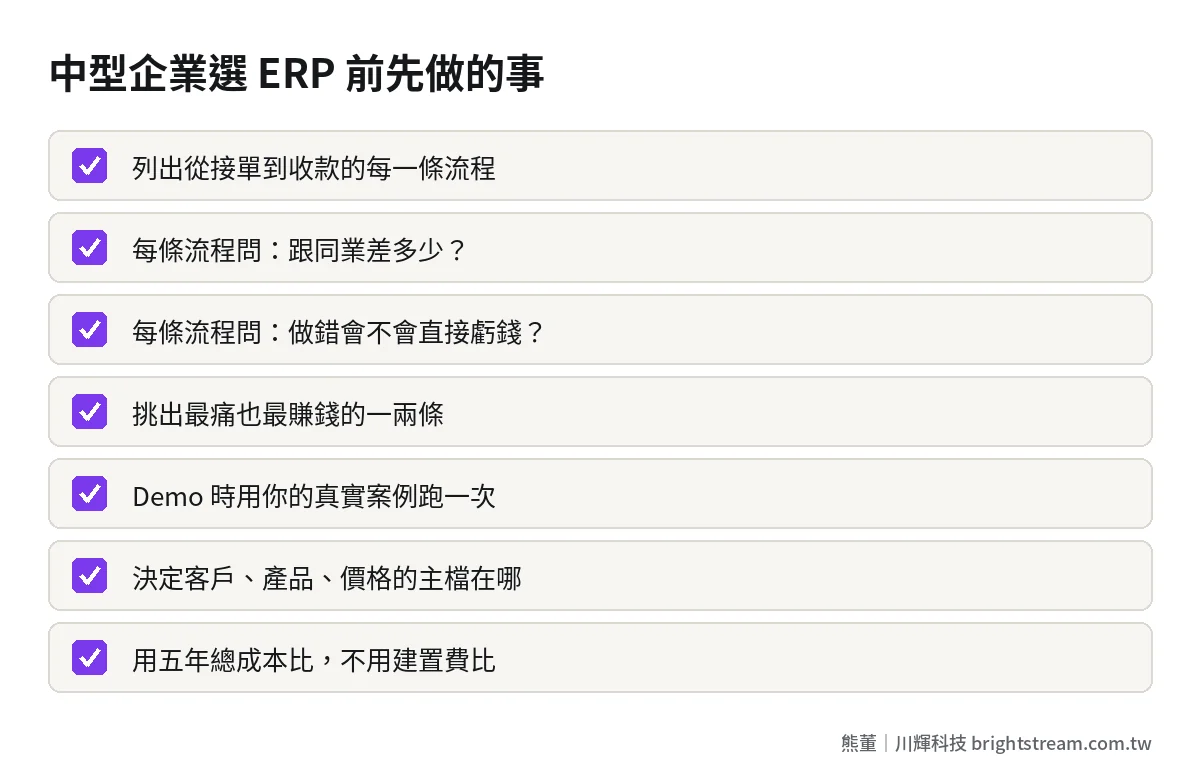
First, list your processes and run each one through the decision table. It doesn't need to look nice. One sheet of paper listing every stop from order to payment is enough.
Second, pick the one or two processes that hurt most and make the most money. These are usually what you'll custom-build, or what a packaged vendor has to prove it can handle. In the demo, have the vendor run this process with your real case, not their prepared sample.
Third, decide where the master record for each type of data lives. This step decides directly whether you need one system, or two or three systems plus integrations.
Fourth, compare five-year total cost, not build cost. Packaged, cloud and custom-built have completely different cost structures. Compare only year one and you will get it wrong. For how to calculate it, see How to calculate the five-year total cost of an ERP.
Frequently asked questions
Is cloud ERP enough for a 100-person company?
It depends on whether your core processes are standard. If your quotations, orders and production run roughly like your competitors', cloud ERP goes live fast and needs no servers to maintain. A good fit. If your core processes have a lot of your own rules, cloud leaves limited room to adjust. The more common approach is accounting on cloud, the core processes handled separately, connected by integration.
Does a mid-size company's ERP have to be custom-built?
No, and most processes don't need it. Accounting, payroll and general inventory are usually more stable following the standard than custom-built. What's worth custom-building is the one or two processes that set you apart from competitors and directly affect profit, like quotation rules or distributor pricing.
We already have a packaged ERP. Can we custom-build just one part?
Yes. That's what many mid-size companies actually do. The existing ERP keeps handling accounting and inventory. Quotation, ordering or field reporting on the front end is built separately, with data synced back. The key is agreeing up front which side is the source of truth for each type of data, so the two sides don't each edit their own.
We've used a packaged ERP for a few years and the processes don't fit. What now?
First figure out which process doesn't fit. If it's only one or two, you can add a custom piece outside the packaged system without replacing the whole thing. If most people are doing their work in Excel outside the system, you need to seriously consider whether you chose the wrong path in the first place. Either way, first find out where staff actually do their work, then decide what to change.
Drawing the right line matters more than choosing the right brand
In one sentence: for a 50–200 person company, choosing an ERP isn't choosing a brand. It's deciding which processes follow the standard and which run your way. Hand the standard ones to mature products. Only the few that make you money are worth building to fit. And each type of data lives in only one place.
If you've already listed your processes and still aren't sure where to draw the line, start with How ERP implementation works and think about how to cut the scope.