"We tried it on our own computer and the AI answered fast. Why, now that it's live for the whole company, does everyone say it's slow?"
We hear this a lot when we take over on-premise AI projects. When the owner tests it on their own computer, one person asks and one person waits, so of course it's fast. But at 9 a.m., when the whole company opens it and starts asking at the same time, it's a completely different situation.
I'm Johnny Yang, founder of Brightstream Technology in Taiwan. I've led my team through seven years of system implementation, more than 252 projects across 32+ industries. We've also built an AI customer service system that runs offline. The thing customer service systems fear most is a lot of people arriving at once.
My answer: on-premise AI speed has to be looked at two ways. When one person uses it, speed depends on the GPU's memory bandwidth. When many people use it at once, speed depends on the inference engine. When companies slow down after going live, the problem usually isn't that the GPU isn't good enough. It's that they're using a tool built for one person to serve the whole company.
Which two numbers matter for speed?
Let me define two terms first, or the rest won't make sense.
Tokens per second: a token is roughly the unit a model processes text in. One Chinese character is often one to two tokens. The more tokens per second, the faster the answer appears.
Time to first token: the time from hitting send to seeing the first character. This number often affects how the tool feels more than tokens per second does.
How fast is fast enough? According to Runpod, 43 tokens per second is already "faster than most people read," and a first token within 100 milliseconds feels like almost no wait in a chat interface. In other words, for a single user, most GPUs are already fast enough. The real problem is many people using it at once.
What determines speed for a single user?
First, let me acknowledge an intuition: everyone assumes a "stronger" GPU is faster. That's not wrong, but it's incomplete.
With a single user, every token the model generates requires reading the entire model from memory. So the speed ceiling depends on how fast the GPU's memory can deliver data, which is memory bandwidth. ComputingForGeeks' benchmarks state it directly: with only one request, speed is limited by memory bandwidth.
Below is single-user speed on different GPUs under the same test conditions (Ollama, 4-bit quantization, 4K context, in tokens per second), from ComputingForGeeks' June 2026 tests:
| GPU | 8B-parameter model | 32B-parameter model | 70B-parameter model |
|---|---|---|---|
| RTX 3090 (24 GB) | 119 | 37 | Doesn't fit |
| RTX 4090 (24 GB) | 148 | 43 | Doesn't fit |
| RTX 5090 (32 GB) | 250 | 71 | Doesn't fit |
| L40S (48 GB) | 113 | 33 | 16 |
The table shows two things. First, bigger models are slower. A 32B model runs at roughly a third the speed of an 8B model. Second, if memory isn't big enough, the model doesn't run at all. A 70B model doesn't fit on a 24 GB or 32 GB card.
Why fitting doesn't mean running fast
This is what a lot of people miss when buying hardware.
Some machines have plenty of memory, so large models fit, but their memory bandwidth is lower, so they run slowly. According to tests compiled by Presenc, the 20B-parameter gpt-oss model runs at about 205 tokens per second on an RTX 5090, and only about 49.7 on the DGX Spark, which has more memory.
Mac has a similar story. According to VDF citing MacStories' tests, a Mac Studio M5 Ultra runs Qwen3.8-27B at 48 tokens per second versus 59 on an RTX 5090. Not a big gap. But prompt reading speed is 1,701 versus 3,031, and the longer the document, the more obvious the gap.
So when choosing hardware, look at two things together: does the model fit in memory, and is the bandwidth fast enough.
With many users, the inference engine makes the difference
This is the most important section of the post.
The inference engine is the program that runs the model. Some engines are designed for one user: easy to install, quick to start, great for testing on your own computer. Others are designed for production services and can batch many people's requests together.
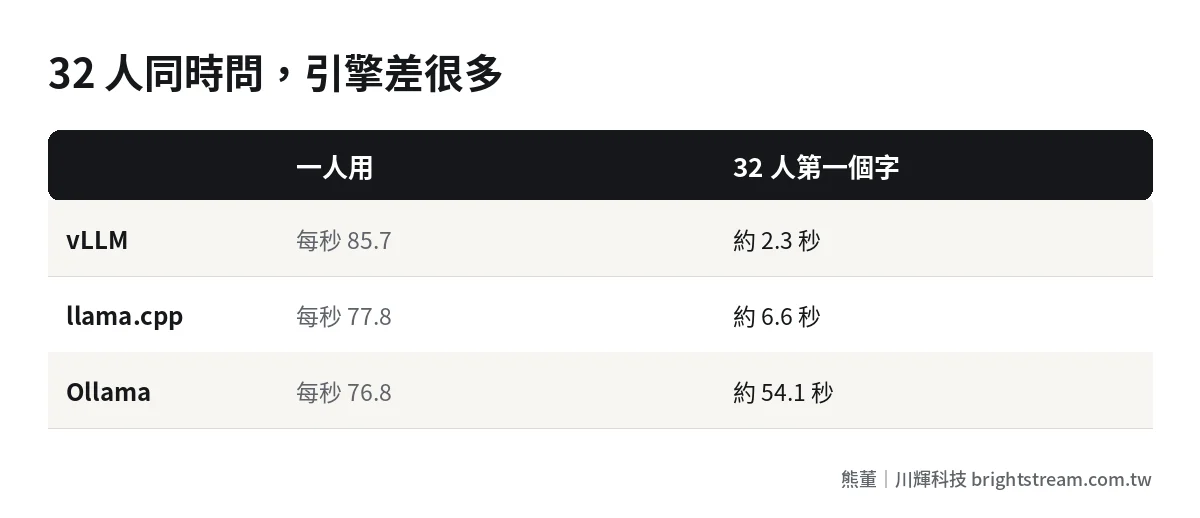
ComputingForGeeks' October 2026 benchmarks used the same 27B-parameter model on the same RTX 5090 to compare three engines with 32 requests coming in at once:
| Engine | Single user (tokens/s) | 32 users combined (tokens/s) | Time to first token at 32 users |
|---|---|---|---|
| vLLM | 85.7 | 936 | 2.3 s |
| llama.cpp | 77.8 | 369 | 6.6 s |
| Ollama | 76.8 | 74 | 54.1 s |
With one user, the three engines are about equally fast. But with 32 people asking at once, Ollama makes you wait nearly a minute for the first token. vLLM takes just over 2 seconds. The reason: in that test, Ollama processed only one request at a time for this model, and everyone else had to queue.
That's exactly what happened to the owner at the start of this post. Tested with Ollama on their own computer, it was fast. After going live on the same setup, the whole company used it at once and it jammed. For production use by many people, you must use an engine designed for multi-user serving, like vLLM or SGLang.
What else slows AI down?
Beyond the GPU and the engine, three more things noticeably affect speed.
Longer documents are slower. According to Presenc's compilation, the Qwen3 8B model on an RTX 5090 runs about 200 tokens per second at 4K context, drops to about 130 at 32K, and only about 59 at 128K. If you throw the entire long document at the AI every time, speed drops a lot. The better approach is to build a knowledge base first and give the AI only the relevant passages.
MoE models are faster. Some models have a large total parameter count but only use part of it each time. These are called MoE. At the same size, MoE models are usually two to four times faster. Worth considering when choosing a model.
Data center cards are much faster. According to Runpod's September 2026 benchmarks, with the same 7B-parameter model and the same engine, single-user speed is about 272 on B200, about 195 on H200, about 165 on H100, about 101 on RTX 5090, and about 61 on RTX 4090. If you need to serve many people, data center cards are worth considering.
The stress test you must run before going live
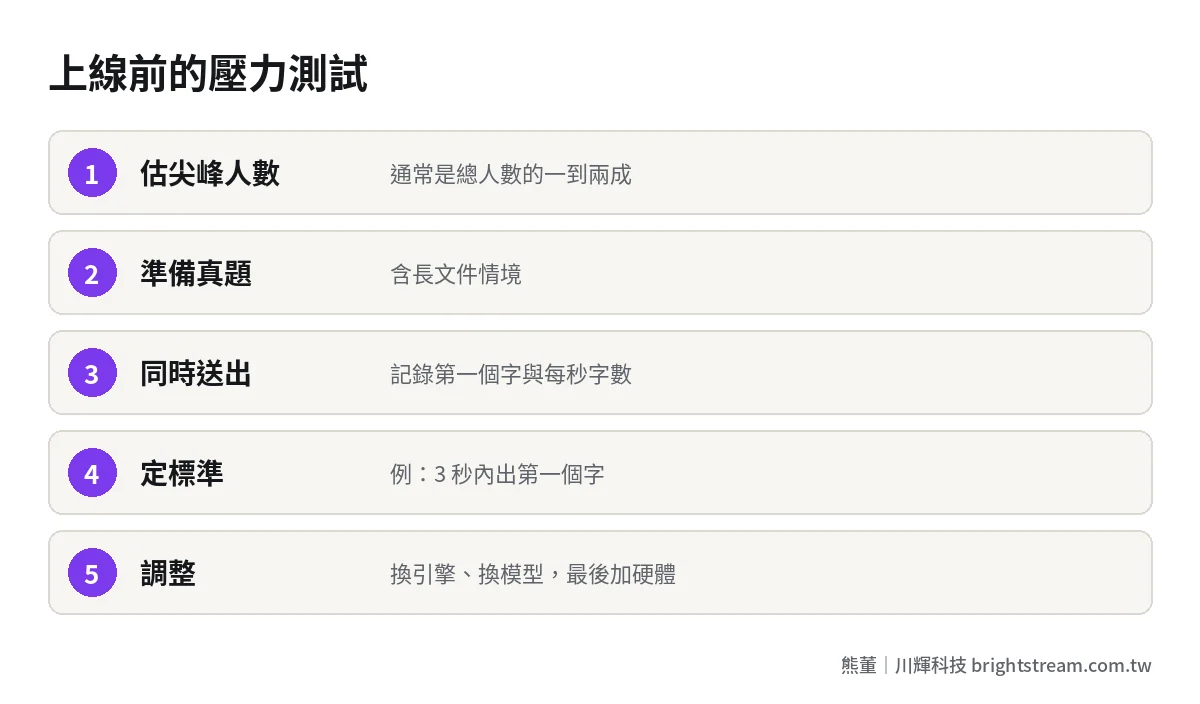
Speed problems are best found before you buy hardware. We always run a stress test before going live. The steps:
- Estimate concurrent users: not total headcount, but how many people are asking at the same time during peak hours. Usually 10–20% of total headcount.
- Prepare real questions: use questions employees will actually ask, including cases with long documents.
- Simulate simultaneous requests: use a tool to send that many requests at once, and record time to first token and how many characters per second each person gets.
- Set pass criteria: for example, first token within 3 seconds at peak, and at least 20 characters per second per person.
- If it fails, adjust: switch engines, use a smaller model, add caching. Adding hardware comes last.
This test doesn't cost much. You can rent GPUs to run it first. Once it's done, you know which tier of hardware to buy instead of buying on gut feeling. For how hardware tiers break down, see what hardware to buy for on-premise AI.
How to trade off speed and cost
One last question owners often ask: is faster always better?
Not necessarily. 43 tokens per second is already faster than people read. Going faster makes little difference to users. Rather than chasing maximum speed, spend the money on letting more people use it smoothly at once, and on making the AI answer more accurately. Most companies that fail to get AI working don't fail because it's slow. They fail because the answers are wrong and the data isn't organized. See why teaching employees to write prompts doesn't work and how to choose an on-premise AI model.
FAQ
How many tokens per second is enough for on-premise AI?
For a single user, around 40 tokens per second is faster than most people read. More important is time to first token, ideally within 1 to 3 seconds. For multiple users, look at each person's speed during peak hours, not single-user test numbers.
Why is it fast on my own computer but slow after going live?
Usually because you're using an inference engine designed for a single user, such as Ollama, and simultaneous requests have to queue. For production, switch to an engine that supports multi-user batching, like vLLM or SGLang, and run a stress test before going live.
How many concurrent users before I need to upgrade hardware?
There's no fixed number. It depends on model size, document length, and engine. Benchmarks show one RTX 5090 with vLLM delivers the first token in about 2 seconds with 32 simultaneous requests. Run a stress test with your own questions before deciding.
Is a Mac fast enough for on-premise AI?
Single-user speed is close to high-end GPUs, but it reads long documents more slowly, and there's no engine suited to many simultaneous users. Fine for individuals or small teams, not for company-wide use.
Conclusion: fast for one person doesn't mean fast for the whole company
On-premise AI speed depends on memory bandwidth for one user and on the inference engine for many users. Estimate peak users and run a stress test before going live, so you don't buy the wrong hardware or use the wrong tool.
If you're already testing on-premise AI but worried it won't hold up after launch, take a look at how we do AI system development, or just tell me roughly how many people you have at peak.