
“Johnny Yang, we want to implement AI too. Last month we went to a trade show, and the cameras on their line catch defects by themselves. Should we start there too?” The owner who says this usually has a factory of 50 or 60 people. The sales support staff key in orders all day, the plant manager spends the day chasing progress in LINE groups, and a quotation can't be worked out until one veteran craftsman has time.
I'm Johnny Yang, founder of Brightstream Technology in Taiwan. I've led teams building systems for seven years, handled more than 252 projects across more than 32 industries, and manufacturing is a large share of them. The sentence I say to owners most often is “don't build this.” Factory AI is no different: of ten things you want to do, the one you should do first is usually not on the production line.
My answer: the first three AI projects that pay off in a factory are not machines on the line. They are the places between the office and the shop floor where people carry information by hand. First, read the orders and RFQs customers send straight into the system, so nobody retypes them. Second, turn the estimating rules in the veteran craftsman's head into automatic quotations, so quotations no longer wait on one person. Third, let the shop floor report progress and problems in LINE with a photo or one sentence, and have AI turn it into a daily summary for managers. What the three have in common: you already have the data, you don't buy hardware, a mistake won't stop production, and they happen every day, so the time saved shows up fast. Defect detection, predictive maintenance, AI scheduling — talk about those once these three run smoothly and the data is clean.
Wanting to start on the line makes sense, but the order is wrong
First, I'm on your side. Almost all the factory AI you see at trade shows and in the news is on the line: cameras catching defects, sensors predicting when a machine will break, systems scheduling automatically. These things do work, and they look the most like a “smart factory.” It's normal for an owner to want to start there.
But these projects share three hurdles. First, hardware: cameras, sensors, industrial control equipment, plus installation and tuning. Second, a large amount of organized data: the AI has to see enough good parts and bad parts before it can tell them apart, and most small and mid-sized factories still keep defect records on paper or in Excel. Third, mistakes are expensive: miss one batch of defects and ship it, and the loss can be bigger than hiring another inspector.
Here is the real problem: in a mid-sized factory, a lot of the time and money doesn't leak at the machines. It leaks where information gets carried from person to person. Customer orders get carried from email into the ERP. Quotations get carried from the veteran's head onto the quote sheet. Shop-floor status gets carried from the LINE group to the manager's ears. Every carry takes a person, is another chance for an error, and adds another delay.
And the most mature things AI can do right now are reading documents, making rule-based judgments, and organizing text. That is exactly this carrying work. I wrote about how to pick a process in general in Which process should an SME pick first for AI. This post is only about factories, and only about the first three things to touch.
The three that pay off most: what does each one need?
I've ordered the three below by where most factories get stuck first. For each one: why it's a good first project, and what the owner needs to prepare.
First: customer orders and RFQs, read into the system automatically
In many factories, order intake looks like this: customers email a PDF, some still fax, some just drop a photo in LINE, and every customer's format is different. The sales support staff read them one by one, key the part number, quantity, and delivery date into the ERP, then go back to the customer to confirm nothing was mistyped.
This is the best first project for three reasons. The documents already exist, so there's no data to collect. The rule is clear: which of our part numbers does the item on this sheet match. And mistakes get caught, because the sales support staff go from being the people who type to being the people who check — glance at it, press confirm.
What the owner needs to watch is not the technology. It's two things. First, you need a mapping table between the customer's item names and your part numbers. If the customer calls a part A and you call it B and nobody has built that table, the AI can only guess. Second, the system has to show at a glance where the AI isn't sure — a blurry delivery date, a quantity far off from the last order. Those get flagged for a person to look at, not written straight in. For the details of document recognition, see Document recognition and automatic data entry.
There's another benefit people often miss: orders get into the system earlier. Before, they waited until an assistant had time to type them. Now an order is in the system as soon as it arrives, production control sees it the same day, and you can confirm delivery dates to customers faster. That is worth more than the typing time saved.
Second: the veteran's estimating rules, turned into automatic quotations
In many factories, quotations are stuck on one person. An RFQ comes in and waits for a senior salesperson or the plant manager, because only he knows how much waste to allow for this material, which machine this size goes on, and how much to add for a rush order. When he takes leave, quotations stop. When he quits, the quotation logic walks out with him.
Brightstream worked with a printing company where a quotation took 30 minutes by hand. We changed it to automatic estimating. Before that, the company had spent over NT$1,000,000 on two ERP systems that nobody ended up using. The third one was built around their own process, and staff adoption went from under 20% to over 90%. The point I want to make isn't the 30 minutes. It's that quotations stopped being tied to one person.
Whether this works depends on whether the rules can be spelled out. We usually sit down with the veteran and take his past quotations apart one by one: which parts are fixed formulas, which are adjusted by experience, which depend on the customer relationship. Fixed parts go into the system. Experience-based adjustments become options the salesperson ticks. Relationship calls stay with a person.
AI's role here is to help read the customer's request and pull up similar past quotations, so the salesperson starts from 80% done instead of a blank page. For the full process of getting a veteran's experience into a system, see Printing quotation automation. Other industries break it down in much the same way.
Third: shop-floor reports in LINE, turned into a daily AI summary
The third one is usually the one owners feel most, because it changes how the owner's day feels.
Right now, most of a factory's shop-floor information lives in LINE groups: a machine stopped, a batch of material arrived late, a work order is stuck waiting for a mold. Dozens of messages a day, mixed in with stickers and “got it.” Managers scroll up for a long time to find out what happened. Owners can only call people one by one and ask.
The approach: shop-floor staff keep their existing habits — take a photo in LINE, type a sentence, or send a voice message. The system files the content under the matching work order or machine, and before the end of the shift AI produces a summary: which work orders had problems today, why, who's handling them, how many are still open. Managers read the summary. No more scrolling the group.
The key is not giving the shop floor extra work. As I wrote in Why production reporting data is always fake, if you make the floor open a separate system to fill in forms, it always ends up as backfilling right before clocking out. Reporting in LINE lets them do what they already do, and the system does the organizing. This is what I keep saying: build the company system inside LINE, staff don't learn new software, and they can use it on day one.
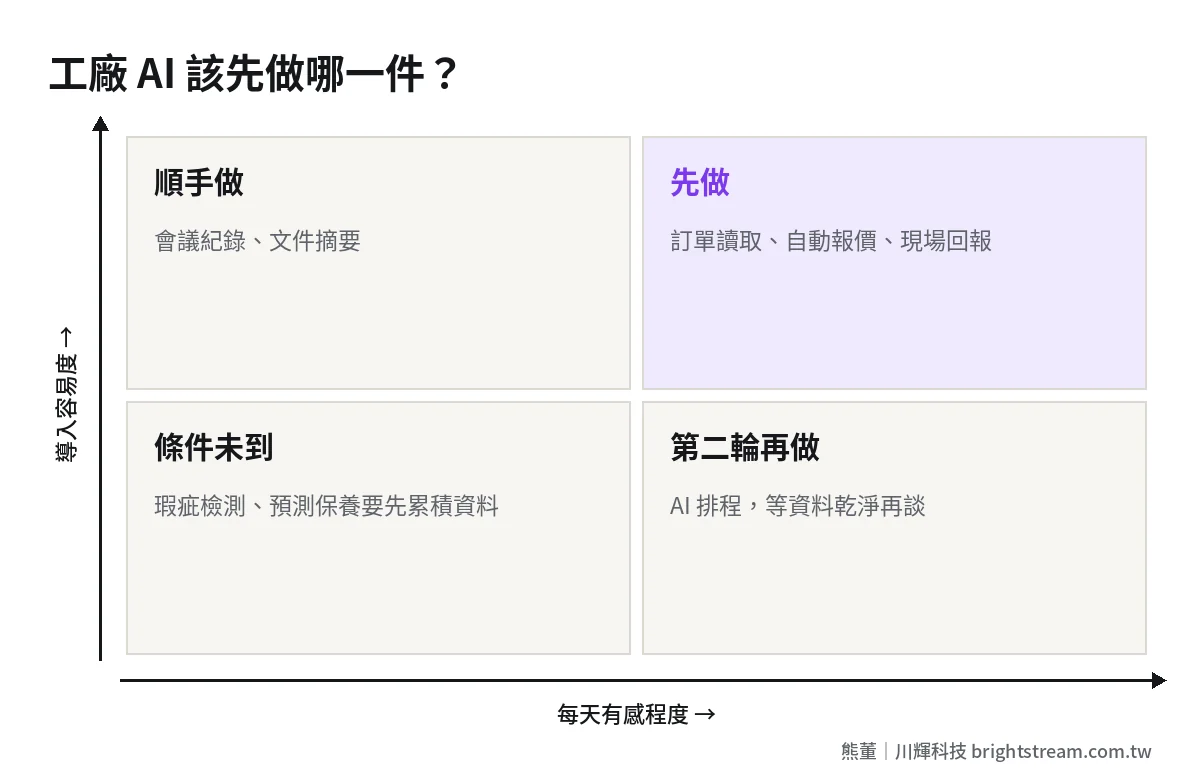
How do these three compare with typical AI proposals?
When you get an AI proposal, check it against the table below. It doesn't say the two on the right can't be done. It says they aren't good first projects.
| Comparison | Automatic order reading | Automatic quotation | Shop-floor report summary | AI defect detection | Predictive maintenance |
|---|---|---|---|---|---|
| Hardware needed? | No | No | No | Yes, cameras and control equipment | Yes, sensors |
| Where the data comes from | Customers' existing documents | Past quotations and the veteran | Messages the floor already sends | Organized images you must accumulate first | Machine run records you must accumulate first |
| Cost of a mistake | Low, a person confirms | Medium, sales checks again | Low, it's only a summary | High, defects may ship | Medium, false or missed alarms |
| How fast you feel it | Every day after launch | As soon as the rules are organized | Every day after launch | Only once enough data accumulates | Usually takes a while |
| Who feels it most | Sales support staff, production control | Sales, owner | Managers, owner | Quality assurance | Equipment maintenance |
Look at the table and you'll see the hurdle for the three on the left is organizing: organizing the part number mapping, the quotation rules, the work order numbers. Even if you never do AI in the end, that organizing is useful to the company. The hurdle for the two on the right is accumulating: you need enough data first, which takes time and someone recording it properly every day.
So the order is natural: do the three organizing projects first, and data starts flowing cleanly into one place. Once enough data has accumulated, AI on the line has something to learn from.
Which one first? Decide with three questions
You don't need to do all three at once. Pick one and get it running. Ask yourself three questions:
- Which one is blocking people most right now? If the sales support staff work overtime keying orders every day, do the first one. If every quotation waits on the same person, do the second. If you call several times a day to ask about progress, do the third.
- Which one has rules you can spell out? If you can spell out the rules, it can be built. If there's no part number mapping table yet, spend the time building it first. Don't rush to start.
- How will you know it worked? Write down today's numbers first: how many orders keyed per day, how long a quotation waits, how many times a day you ask about progress. Without a “before,” you can't state an “after.”
The math can be rough. Say an 80-person factory has two sales support staff who each spend 2 hours a day keying orders. At 22 working days a month, that's 88 hours. Even if you only save half after it's built, that frees 44 hours a month to chase delivery dates and look after customers. These are hypothetical numbers. Plug in your own company's.
There are also things I tell owners outright to leave alone for now: things that happen only twice a month, things where the rules change every time, and things nobody will maintain once they're built. Build any of those three with AI and they won't last.
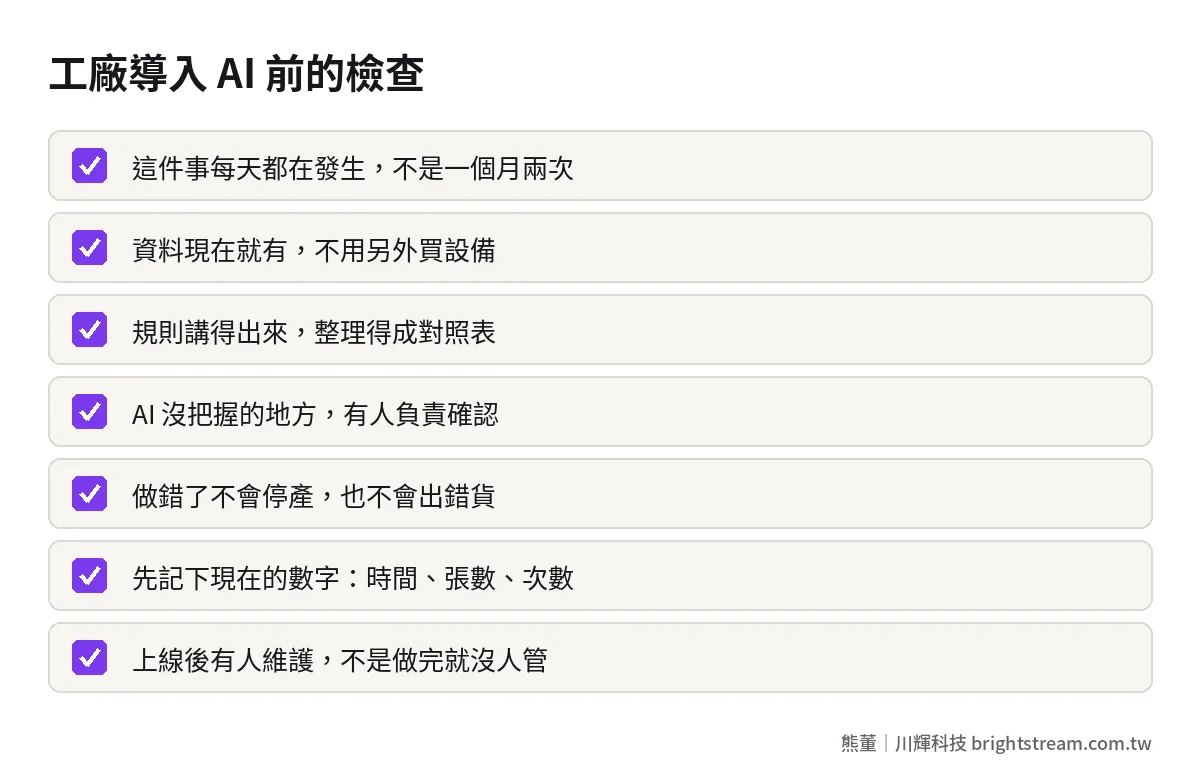
Three things the owner has to carry during implementation
AI projects rarely fail because the technology can't do it. Mostly they fail because nobody in the company takes ownership. When a mid-sized factory implements AI, the owner doesn't need to understand the technology, but there are three things he has to carry himself.
First, name one owner for the project. Not IT — someone who uses this process every day, such as the sales manager or the production control manager. They know where it hurts most, and they know whether the floor will actually use what gets built.
Second, decide the rules. How estimates get adjusted, how problems are ranked by severity, which orders always need human confirmation — these are business judgments, not something an engineer can decide for you. When the rules aren't clear, the only person who can make the final call is you.
Third, retire the old way. Once the new order intake goes live, close the old path. Leave both open and everyone picks the familiar one, and the new system quickly becomes an ornament nobody uses. If staff worry about being replaced, the owner has to say it clearly, in person: the time saved goes to chasing delivery dates and looking after customers, not to layoffs.
After it's built, what does it cost each month?
Owners always end up asking about money. Building these three is system development. Brightstream's system implementation and custom-built work starts at NT$300,000, quoted to your spec: we write the scope as a written feature list first, then quote a fixed price, billed in stages, with each payment due only after the agreed result is running. No signing first and raising the price later.
After launch, beyond system maintenance, AI itself has usage fees, and how much depends on how many documents and messages you process each month. I broke down how to estimate and control that in How much more a system costs each month once you add AI. Read it before you sign.
My advice is always the same: do one thing, measure it for a month, and decide on the second once the numbers are in. Getting one thing right does more to make the team believe in this than running three projects at once.
FAQ
Does a factory need an ERP before implementing AI?
Not necessarily. If you have an ERP, the AI just writes the orders it reads into it. If you don't, you can start with quotations or shop-floor reporting and get data into one place first. But if the same order data is scattered across email, Excel, and LINE, getting it into one place matters more than adding AI.
Is AI defect detection worth it for a small or mid-sized factory?
It depends on what it costs when defects get out, how much inspection labor you spend now, and whether you have enough defect records for the AI to learn from. For most small and mid-sized factories, the first step is digitizing defect records and accumulating them. Once there's enough data, evaluate whether to add cameras. Your judgment will be far more accurate.
Our shop-floor staff are older. Will they be able to use it?
That's exactly why reporting goes through LINE. Taking photos, typing, sending voice messages — most people do this every day, so there's no new system to teach. Just keep the report format simple. If it can be said in one sentence, don't make them fill in a form.
How long before a factory sees results from AI?
If the scope of these three is well controlled, you'll see changes every day after launch. What drags things out most is not development but the organizing work: part number mapping, quotation rules. So list what needs organizing before you start, and write down today's numbers, so the results can be measured.
Closing: start where the most people are carrying information
The AI that pays off most in a factory isn't the flashiest project. It's the one where the most people are retyping, waiting, and asking every day. Hand the information carrying to the system first. Once the data is clean, AI on the line has something to learn from.
If you want to know which of these three your team should do first, see how AI system development starts from a single process.